
What is AES Encryption and how is it used to protect documents?
What is AES Encryption & is it secure enough for documents?
What is AES encryption? Learn how it’s used, the different AES-256 modes, how it protects your documents, and where it falls short.
Key Takeaways ABOUT AES Encryption
- AES-256 itself has never been practically broken. The algorithm’s 2²⁵⁶ keyspace stays out of reach of any realistic hardware, cloud-scale included. The risk with encrypted documents almost never comes from the cipher itself.
- Most AES-256 encrypted files are only as strong as the password protecting them. A password-derived key shrinks the real search space enormously; a short or common password can fall in hours on rented cloud GPUs, even though the underlying algorithm is untouched.
- The encryption mode matters as much as the key size. PDF and Office both use AES-256 in CBC mode, which has no built-in way to detect tampering — a documented weakness in the implementation, not in AES.
- Not every document format handles AES the same way. PDF and Word both standardize on AES-256, but the OpenDocument format (LibreOffice, OpenOffice) has no unified standard — some versions default to AES, others to the older Blowfish cipher.
- AES protects a file only while it’s encrypted. The moment the correct password is entered, AES’s job is done. It has no way to stop that person copying, forwarding, or printing the content afterward.
- Document DRM (e.g., Locklizard Safeguard) closes that gap by pairing AES-256 with licensing controls: no exposed passwords, decryption only in memory, and the ability to revoke access remotely even after a file has been sent.
 What is AES encryption?
 What is AES encryption?
AES is a symmetric-key block cipher used to encrypt everything from internet traffic to hard drives and documents. It’s used by operating systems, companies, governments, and regular consumers, with over 90% of internet traffic now protected using the algorithm. As a symmetric cipher, AES uses the same key to encrypt and decrypt data, in 128-bit chunks (called blocks). It supports 128-bit, 192-bit, and 256-bit key lengths, but 128-bit and 256-bit are by far the most popular. We’ll cover everything you need to know about it in this guide, including:
- What is AES encryption?
- The history of AES
- AES-128 vs AES-192 vs AES-256: What’s the difference?
- How does AES encryption work?
- AES’s modes of operation: ECB, CBC, and GCM
- Where is AES used?
- How AES protects documents
- AES and the password problem
- Why AES encryption alone isn’t enough for document security
- AES and DRM: Full lifecycle protection
- Closing words on AES and document protection
- Frequently Asked Questions
The history of AES
 The history of AES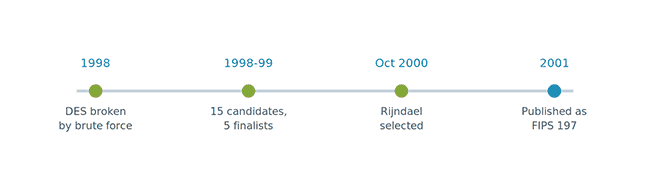
In the late 90s, the Electronic Frontier Foundation set out to prove a point. The widely used DES encryption algorithm was not secure enough to withstand the rigors of modern hardware. In 1998, it built a $250,000 machine called Deep Crack that it used to brute-force a DES-encrypted message in 56 hours.
“The news is not that a DES cracker can be built; we’ve known that for years,” said the President of Counterpane Systems, Bruce Schneier. “The news is that it can be built cheaply using off-the-shelf technology”.
Thankfully, the US’s National Institute of Standards and Technology (NIST) had seen this coming. In 1997, it had launched an international competition for a successor, with the Rijndael algorithm designed by Belgian cryptographers Joan Daemen and Vincent Rijmen selected as the winner after a multi-year evaluation. In 2001, NIST published it under a new name—the Advanced Encryption Standard (AES)—and it has been used ever since.
The important thing to understand about AES is that it was not selected because it was the most secure (that award would go to Serpent) or fastest (RC6). What made AES a cryptographic marvel was that it didn’t have a weak spot. It was elegant: very fast, with outstanding hardware efficiency, strong security, and great versatility. The ultimate generalist.
After 25 years of aggressive scrutiny by the world’s top cryptanalysts, there are no known practical attacks that can break a properly implemented AES. It’s even thought to be resistant well into the future, with its 256-bit key size likely making it uncrackable by future quantum computers or any technology currently known to physics.
AES-128 vs AES-192 vs AES-256: What’s the difference?
 AES-128 vs AES-192 vs AES-256: What’s the difference?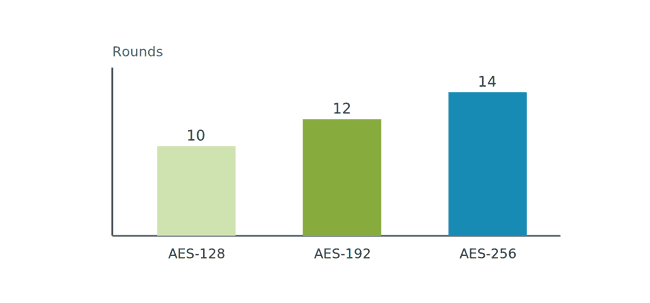
The number after AES is the bit length of the encryption’s key. Higher key sizes require more encryption rounds and therefore a higher degree of security against brute-force attacks. The trade-off is a slight hit to encryption speed and therefore performance.
| Key size | Rounds | Typical use |
|---|---|---|
| AES-128 | 10 | General-purpose apps, browsers, everyday consumer software |
| AES-192 | 12 | Less common as a standalone choice; occasionally used in specific enterprise or government systems |
| AES-256 | 14 | Document security, compliance-driven contexts (FIPS, HIPAA-adjacent requirements), long-term data protection |
It’s important to note that all of the above key sizes are considered secure against current hardware, though longer keys carry a larger safety margin against future advances — including quantum computers, which is one reason AES-256 is generally recommended for data that needs to stay protected for decades.
So why not just use AES-128 for everything? Mostly because, for tasks like document encryption, the performance cost is negligible. For a single 10-page document, you’re likely looking at less than a millisecond’s difference in encryption time between 128 and 256-bit. Not a difference that becomes important unless you’re performing very latency-sensitive tasks or encrypting terabytes of data. As a result, most document protection solutions opt for the stronger algorithm to err on the side of caution against future attacks, since some documents could be in circulation for decades.
For the full breakdown of how brute-forcing AES-256 actually works, and whether it can realistically be cracked, see 256-bit encryption explained.
How does AES encryption work?
 How does AES encryption work?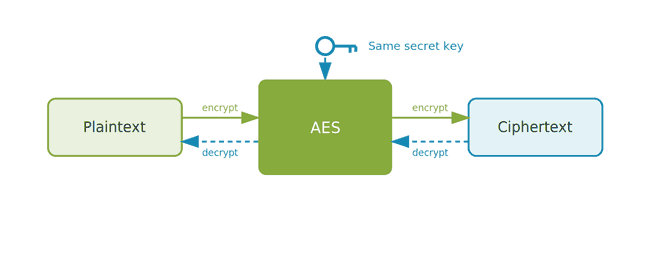
To simplify, AES works by taking a 128-bit block of data, arranging it into a 4×4 grid of bytes, and running that grid through a series of repeated “rounds”. Each round:
- Substitutes bytes for others using a fixed lookup table
- Shifts rows of the grid
- Mixes columns together
- Combines the results with a key made specifically for that round
After that repeats for the number of rounds listed above, the process is repeated for every other 128-bit block of data in the file until the whole thing is encrypted.
AES is a symmetric encryption algorithm, so decryption uses the exact same process, with the same key, but in reverse.
 AES’s modes of operation: ECB, CBC, and GCM
 AES’s modes of operation: ECB, CBC, and GCM
While most of us look at the “128-bit” or “256-bit” to determine the level of AES security, the encryption’s mode of operation is far more important. Encryption modes decide how each 128-bit block is scrambled, with the wrong mode able to undermine otherwise strong encryption.
The primary modes in AES are ECB, CBC, and GCM. Only the last two are really considered secure.
The problem with ECB
Electronic Codebook (ECB) encrypts each 128-bit block independently, using the same key. Because the same key is used, one paragraph with “hello world” will use the same jumble of numbers and letters as another with the same phrase. As a result, data encrypted with it can have several visible patterns.
This is important because it allows an attacker to reverse the encryption. The common example given is encrypting a bitmap image of a cartoon penguin with ECB. Large areas of flat color, such as the background or the outline around the character, are made of identical pixel blocks and therefore stay uniform after the encryption. You can still see the outline of the penguin despite it being encrypted.
But it’s relevant for documents, too. Imagine a document is locked with a permission tag: “view-only” or “edit”. With ECB, each of those tags always encrypts to the exact same scrambled text, every time. If an attacker ever sees the scrambled “edit” tag on someone else’s document, they can cut it out and paste it into their own “view-only” document in the same spot — swapping in a permission they were never granted. And this is just one simple example of how this shortcoming can be abused.
CBC: Vulnerable to tampering
CBC is a lot less flawed than ECB and has been the historical default for a lot of applications, including PDF password encryption. Its problem, however, is that it does not verify whether an attacker has tampered with encrypted data — a separate integrity check is required.
This opens the door to exfiltration and malleability attacks as outlined in how secure is Adobe PDF encryption. An attacker could, for example, add a submit form function to the document that sends the contents to the attacker. Or, if they know part of the plaintext information that was encrypted, they could change the contents of a cipher block to exfiltrate data or embed malicious content.
GCM: The modern default
GCM addresses the issues of CBC and ECB, hiding patterns and also adding an authentication tag that only matches if nothing in the ciphertext was changed. The system checks the tag before opening the file, and if it doesn’t match, rejects it instead of decrypting it.
As well as being more secure than CBC, GCM is faster on modern hardware, meaning there’s no real reason to avoid using it. For this reason, it’s becoming the new default, used in systems such as TLS 1.3.
Where is AES used?
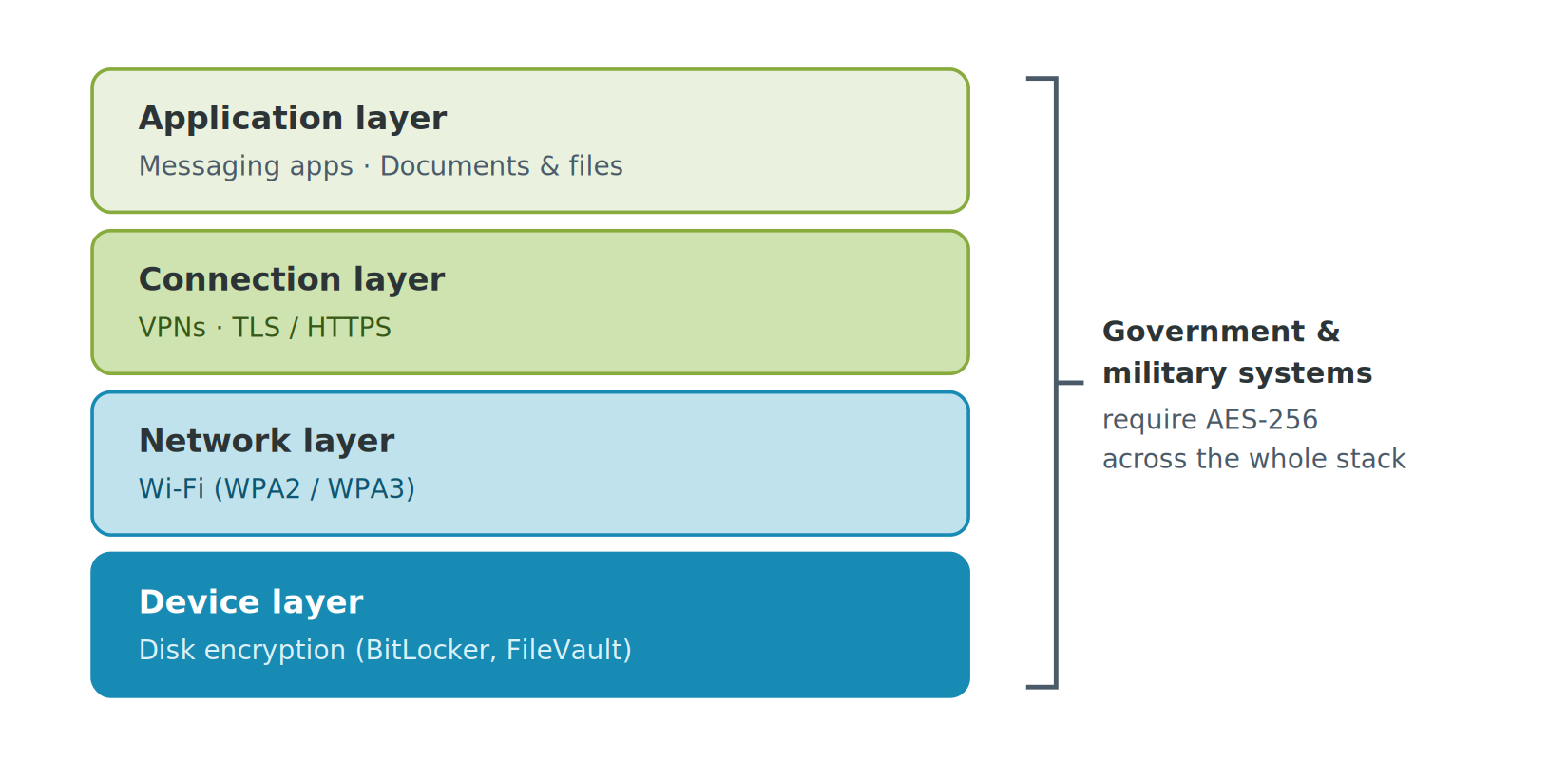
AES is the default cipher behind most encrypted connections and devices, with hundreds of real world use cases. Some of the most common include:
- HTTPS/TLS: TLS 1.3 secures the connection between your computer and almost every website you visit, preventing attackers from intercepting your traffic with AES-GCM.
- VPNs: AES is used in most VPN protocols to encrypt traffic between your PC and a VPN server.
- Wi-Fi: WPA2/WPA3 use AES to prevent eavesdropping on Wi-Fi networks.
- Disk Encryption: BitLocker uses AES to encrypt drives with 128-bit or 256-bit keys. FileVault on MacOS does similarly.
- Messaging apps: Encrypted messaging apps such as Signal, WhatsApp, iMessage, and Telegram rely on AES-256 at least in part, often combining it with an asymmetric encryption for end-to-end encryption.
- Government and military systems: AES-256 is the standard for sensitive and classified information in most governments and militaries, for documents, traffic, and more.
- Document protection: AES is used to encrypt everything from Word documents to ebooks, PDFs, and Excel files, with varying degrees of security depending on its implementation.
How AES protects documents
 How AES protects documents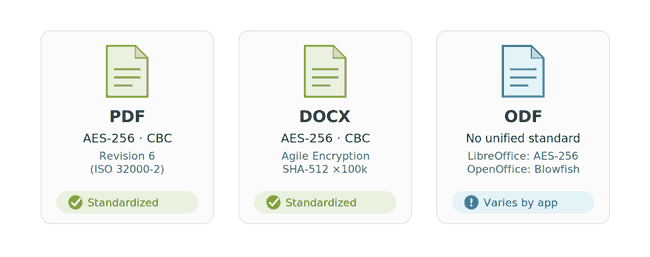
When you password protect a Word document, PDF, or Excel spreadsheet, AES-256 is almost always the algorithm used to scramble its contents to prevent opening and/or editing. The exact implementation typically depends on the document type and its standards:
- PDF: The PDF 2.0 specification (ISO 32000-2) uses AES-256 via what’s known as Revision 6 encryption. Data is encrypted in CBC mode, with the password run through a recursive hashing routine before it’s used to create the actual encryption key. Older PDF versions used RC4 or AES-128.
- Word (DOCX): Microsoft Word 2013 and later uses Microsoft’s Agile Encryption. It also uses AES-256 in CBC mode, with the password hashed through SHA-512 and 100,000 iterations before it’s used to derive the key. The large number of password hash iterations helps to slow down brute-force attacks.
- ODF: The OpenDocument Format, used by LibreOffice, OpenOffice, and other text processing tools, doesn’t have a unified standard. The ODF 1.2 spec itself only lists Blowfish in CFB mode, not AES. In practice, however, LibreOffice defaults to AES-256-CBC with PBKDF2-SHA1, while OpenOffice uses the Blowfish standard.
The important thing to note with all of these methods is that using a great algorithm such as AES doesn’t necessarily mean they’re secure. As well as the issues with CBC mentioned above, you’ll notice that the implementations use passwords, which comes with a new set of challenges.
AES and the password problem
 AES and the password problem
AES-256 may be unbreakable, but that doesn’t mean any security that uses it is unsurmountable. A poor implementation of AES is like fitting a vault door but leaving the window open. Such is the case with password protection.
The key thing to understand about encryption is that the key is only as strong as what generates it. When a document is protected with a password, that password is run through a key derivation function (KDF) to produce the AES key, usually with thousands of hashing iterations to slow down guessing. But no number of iterations fixes the fundamental issue: that instead of needing to guess a raw 256-bit key, an attacker only has to guess the password. If that password is short or easily guessable (“Password123”), that may not take long at all.
To put it into perspective with numbers, trying to crack a raw AES-256 key would take approximately 4.6 x 1055 years using a giant cluster of 8,000 H100 cloud GPUs. An eight-character password using lowercase letters and digits would take just 24 minutes.
| Attack target | Keyspace | Rate (same 8,000-H100 AWS cluster) | Time to crack |
|---|---|---|---|
| Weak/common password | ~10,000 | ~960M/sec | ~5 microseconds |
| 8-character password (lowercase + digits) | ~2.8 × 10¹² | ~960M/sec | ~24.5 minutes |
| 12-character random password (full character set) | ~4.75 × 10²³ | ~960M/sec | ~7.85 million years |
| Raw AES-256 key (no password) | ~1.16 × 1077 | ~40 trillion/sec | ~4.6 × 1055 years |
Of course, most attackers wouldn’t rent $100,000/h worth of GPUs to crack a single document — but they don’t need to. A single consumer GPU alone cracks an eight-character password in around 8 months, and a modest rental of just a handful of GPUs brings that down to days. The key point here is that passwords are orders of magnitude faster to crack than a raw AES key, even taking their KDF iterations into account.
Why AES encryption alone isn’t enough for document security
 Why AES encryption alone isn’t enough for document security
AES encryption, when implemented properly, provides a major boost to security in certain scenarios. However, it’s important to understand that it is not a complete document security solution and was never intended to be. AES encryption protects documents:
- From being intercepted and opened when they are travelling across the internet
- From being opened by an attacker that has compromised a server or device (provided the key or password is not accessible on that same device)
- From a shady cloud provider or insider trying to view your files
- From tampering before they are opened (assuming GCM mode is used)
Perhaps the most common overarching reason businesses use AES, however, is that it grants them a regulatory safe harbor. Often, under HIPAA and most breach notification laws, losing properly encrypted data in a breach means they don’t have to report it. The attacker is assumed to be unable to access it, and therefore users do not need to be notified.
The kicker with this protection, from both a regulatory and security standpoint, is that it ends the moment the document is decrypted. With almost all applications that utilize it (Word, Adobe Acrobat, LibreOffice), this occurs the moment the user enters the correct password to open the document. The decrypted file is saved to disk in the temp/recovery folder, as well as often in the hibernation file, print spooler, and so on. Attackers can recover these files relatively easily.
The bigger and more pervasive threat, however, comes from the recipient themselves. Once an AES-protected document is decrypted, they’re free to do what they wish with it, including editing it, printing it, uploading it to an unsanctioned AI or cloud service, or sharing it with others. In other words, AES alone does not prevent leaks and misuse. That requires a system that does not cache decrypted documents on the disk and enforces strong content controls while it is in use.
AES and DRM: Full lifecycle protection
 AES and DRM: Full lifecycle protection
AES is the right tool for two of three states a document exists in. DRM covers the third and most difficult: protecting the document while it’s in use. Rather than decrypting a file to disk and trusting the recipient with it, DRM systems like Locklizard Safeguard DRM decrypt content only in memory inside a secure viewer application that enforces controls for as long as the document exists. It ensures:
- There are no weak passwords. Locklizard uses raw AES keys that take longer than the age of the universe to crack. No human-made passwords that erode the usefulness of strong encryption.
- No plaintext files touch the disk. Contents are decrypted to volatile memory, where they’re almost impossible to recover.
- The user never sees the AES encryption keys. They can’t share them (unintentionally or otherwise) because they’re stored in an encrypted folder.
- Controls persist across the document lifecycle. This includes after opening, preventing printing, copying, screenshotting, saving, and editing.
- Access can be withdrawn at any point. Open and DRM controls are granted by a single-use license file which is checked against a license server on open. Revoke the license, and you revoke the user’s ability to view the file, regardless of where it’s located.
- Documents are locked to authorized devices. While users can share the file itself, it’s useless without a license installed to view it.
- There is a record of use. Logging shows who opened what, when, and how many times, creating a clear audit trail.
- Screen photographs aren’t consequence-free. Dynamic watermarks display the user’s name and company on the document and print, ensuring that photographing the screen with an external device and sharing that will lead back to the leaker.
Of course, no document protection is going to prevent a user from physically showing another user a document on their device. If you can limit document sharing to just that scenario, however, you’re in a pretty good place.
Closing words on AES and document protection
 Closing words on AES and document protection
AES is one of the most successful cryptographic standards ever built. After 25 years of scrutiny, there’s still no practical attack against a proper implementation. However, “proper implementation” is doing a lot of work in that sentence. Weak password-based enforcement, outdated modes of operation, or a viewer that dumps plaintext to disk will all undo your security in the hands of a determined attacker.
Ultimately, no amount of key length can address the fact that a document must be decrypted before a user can view it. If your threat model includes external partners or any user you don’t 100% trust, encryption alone was never going to be a solution. DRM solutions like Locklizard Safeguard bridge the gap that AES leaves by using a secure viewer application and transparent licensing to enforce persistent controls without exposing keys to users, or caching decrypted text to disk. You retain control over printing, copying, screenshots, expiry and revocation long after the document leaves your device.
Take a 10-day free trial of our PDF DRM software or book a demo to see whether it’s the right fit for your organization.
Frequently Asked Questions
 Frequently Asked Questions
Is AES-256 still secure?
Yes. When implemented properly, AES-256 cannot be cracked with current computing power and is not expected to be brute-forced with future hardware, including quantum computers.
Is it possible to crack AES-256-bit encryption?
No, not through brute force when implemented properly. However, AES is vulnerable when the key is derived from an insecure password, the ECB mode is used, or a software’s key generation is predictable.
Can I encrypt and decrypt documents using AES online?
Yes. Locklizard Safeguard Lite allows you to protect documents with AES and strong DRM controls in your browser.
Are my AES-encrypted files safe from my cloud storage host?
Not if they handled the encryption for you. Because the same key that encrypted the document can be used to decrypt it, any employee with the key could potentially decrypt and view your files.
What does AES stand for?
Advanced Encryption Standard.
Is AES symmetric or asymmetric?
Symmetric, since it uses the same encryption key to encrypt and decrypt content rather than a private and public key pairing.
