
What Is End-to-End Encryption, and Is It Enough for Documents?
How Does E2EE Work & Is It Suitable for Sensitive Documents?
Learn how end-to-end encryption works, what it actually protects, where it falls short for documents, and how to secure files after they’re opened.
You’ve almost certainly seen “end-to-end encryption” advertised on messaging apps, encrypted email, and cloud storage. The implication is that once E2EE is in place, security is no longer a concern. In reality, relying solely on E2EE leaves organizations wide open to leaks, insider threats, and compliance. To explain why, we’ll cover:
- What is end-to-end encryption?
- How does end-to-end encryption work?
- E2EE vs. encryption at rest vs. standard transport encryption
- What E2EE actually protects for documents
- Where E2EE falls short for documents
- What “enough” actually looks like for documents
- Where Locklizard fits
 What is end-to-end encryption?
 What is end-to-end encryption?
End-to-end encryption is a method of scrambling data so that only the intended sender and recipient can read it. The sender encrypts the data, and it stays encrypted until it reaches the recipient with the correct decryption key.
E2EE’s standout feature compared to other types of encryption is the “end-to-end” part. It protects data throughout its journey, including when it passes through a provider’s servers. This makes it excellent for privacy while reducing risk — since only the endpoints hold the keys, it’s nearly impossible for a rogue employee to leak your messages or for them to fall into an attacker’s hands.
How does end-to-end encryption work?
 How does end-to-end encryption work?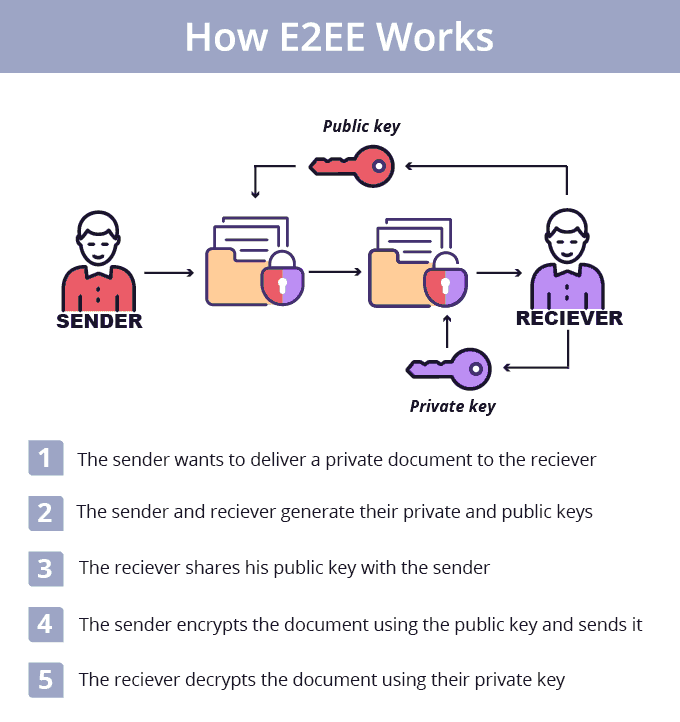
Under the hood, E2EE relies on a key-based process between the sender’s and recipient’s devices:
- The recipient’s device generates a pair of linked keys — one public, one private. The private key never leaves their device.
- The sender encrypts their message or file using the recipient’s public key.
- The encrypted data travels across the internet. Nobody in the middle can open it, since they don’t hold the decryption key.
- The recipient decrypts the data with their linked private key once it arrives, and can keep the decrypted file on their device permanently.
E2EE vs. encryption at rest vs. standard transport encryption
 E2EE vs. encryption at rest vs. standard transport encryption
The process above outlines E2EE specifically, but it’s easy to conflate it with other types of encryption that protect different parts of a document’s life cycle.
| Type | What it protects | What it doesn’t protect |
| End-to-End Encryption (E2EE) | Data while it travels between sender and recipient; protects against servers, providers, and network interception reading content in transit | Data after it’s decrypted on the recipient’s device — screenshots, copying, forwarding, printing, insider misuse, or leaks after access |
| Encryption at Rest (e.g. BitLocker) | Data stored on a device or server (disks, databases, cloud storage); protects against physical theft or server compromise | Data in transit; access by authenticated users or apps with valid permissions; misuse after login |
| Transport Encryption (e.g. TLS/HTTPS) | Data while it moves between your device and a server; protects against interception on networks (Wi-Fi snooping, ISP sniffing) | Data once it reaches the server (the server can read it); data at rest; recipient-side leaks |
What E2EE actually protects for documents
 What E2EE actually protects for documents
E2EE is an invaluable tool for organizations that are worried about documents being intercepted en-route to their destination. It protects against:
- Interception in transit: Files being intercepted when they’re sent, whether that’s on a public Wi-Fi network or during routing. An attacker will only see encrypted data and won’t be able to access the sensitive content.
- Service provider access: The platform carrying the file (messaging app, cloud storage, email) can’t read the document, since it doesn’t hold the decryption keys.
- Server breaches: If an attacker compromises the provider, they only get the encrypted documents with no way to decrypt them, provided the encryption algorithm is strong enough.
- Account compromise: When an employee’s Slack or cloud storage account is hacked, the attacker won’t be able to read E2EE encrypted documents.
- Network surveillance: your ISP or firewall monitoring traffic can’t view the document’s contents.
Once the recipient receives and decrypts the document, this protection stops. It becomes a normal, usable file again. And therein lies the problem.
Where E2EE falls short for documents
 Where E2EE falls short for documents
The gap in E2EE’s document security is what happens after the recipient receives the file. Once it’s opened, the decrypted version is saved to their device and behaves like any other file.
If the only goal was preventing interception, that’s fine. But for a business that also has to worry about compliance, insider threats, leaks from partners, and shadow AI, it isn’t enough. E2EE can’t control what the recipient does next — whether they forward, copy, print, or screenshot the document. It provides no audit trail, no revocation, and no protection against accidental leaks.
In other words, E2EE works when you have implicit trust in the person you’re sending the document to — not just that they won’t intentionally leak it, but that they’re well trained and keep their device free from malware. That doesn’t fit the zero-trust model most organizations operate under, and it can leave real compliance gaps for GDPR, HIPAA, and similar frameworks.
What “enough” actually looks like for documents
 What “enough” actually looks like for documents
Since E2EE only protects a document up until it’s opened, any real document security system has to pick up from there. Password protection, DLP, RBAC, and virtual data rooms are the most common attempts, but they share one or more of these problems:
- The security is easy to remove or bypass. Password restrictions on documents are famously trivial to strip, while browser-dependent solutions (data rooms, cloud viewers) can be bypassed using developer tools. None of them prevent screenshots.
- The security doesn’t travel with the document. DLP and RBAC break down as soon as a file is shared with partners or BYOD users. Once the document leaves your enterprise environment, you have no real ability to prevent unauthorized sharing, editing, or misuse.
Businesses that regularly share sensitive or confidential information need controls that work regardless of the network or device the document ends up on — and that go further than read/write permissions, to actually prevent screenshots, copying, printing, and unauthorized saving or editing. That means persistent protection beyond delivery: access expiry, dynamic watermarking, print/copy restriction, remote revocation, and view logging.
Where Locklizard fits
 Where Locklizard fits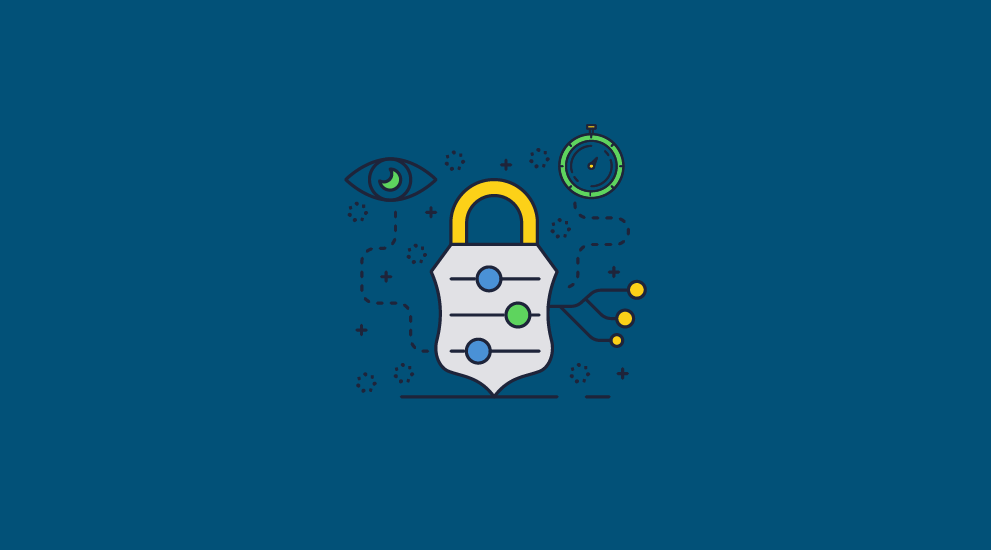
Unlike pure E2EE, Locklizard Safeguard DRM protects the file after it’s decrypted and opened on the recipient’s device. Locklizard uses AES encryption and secure viewer applications to enforce persistent controls that are embedded in the document and cannot be bypassed or removed. Your PDFs remain under your control regardless of where they are saved or who they are forwarded to.
To achieve a true zero-trust approach to document security, Locklizard provides:
- Copy and Screenshot Prevention: Locklizard blocks first and third-party screen grabbing software, as well as screen sharing.
- Print Controls: You can stop users from printing the document entirely, or restrict them to a specific maximum number of prints.
- Dynamic Watermarking: To deter users from taking photos of their screen with a smartphone, you can apply dynamic watermarks. These automatically stamp the recipient’s identifiable information (like their name, email address, and the date/time) across the viewed or printed document.
- Device and Location Locking: Files can be locked to authorized devices and specific geographic locations or IP addresses. Even if a user forwards the file to an unauthorized party, it will not open if it doesn’t meet the criteria.
- Automated Expiry and Revocation: Set documents to automatically expire on a certain date, after a specific number of days, or after a maximum number of views or prints. Or, instantly revoke access to any document for any user at any time, regardless of where it’s stored.
- Activity Tracking: Locklizard can log when documents are viewed or printed, and track who did so and from which device.
By enforcing persistent controls over both who can open a document and what they can do with it, Locklizard enables businesses to safely distribute sensitive information, protect intellectual property, and ensure regulatory compliance without relying on implicit trust.
Start a 10-day free trial of Locklizard Safeguard DRM to test these features yourself, or book a demo to discuss how we can help secure your organization’s specific workflow and compliance needs.

