
How to publish an ebook securely

How to publish an ebook and protect it from piracy
Publishing an ebook is straightforward, but doing it well isn’t. This guide walks you through the decisions you’ll need to make as an indie author, from the text itself to the, format, platform, pricing, marketing, and piracy prevention.
The ebook format revolutionized self-publishing. It has never been easier to write, publish, and distribute a book — whether it’s sharing a unique fictional world or turning your knowledge into income. But while simpler from a logistical point of view, going from first draft to published manuscript can be extremely intimidating for first-time authors. There’s still an incredible amount of knowledge required to publish your book, from how to write, to ebook formats, type setting, marketing, and piracy protection. We can’t impart everything you need to know in one short blog, but this guide will give you an idea of the basic elements you need to be aware of and some tips on how to deal with them.
- How to publish an ebook step-by-step
- Designing your ebook cover
- Choosing the right ebook format
- Where to publish your ebook
- How to price your ebook
- Marketing your ebook
- Protecting your ebook from piracy
- How Locklizard DRM stops ebook piracy
- Closing words on secure ebook publishing
- FAQs
 How to publish an ebook step-by-step
 How to publish an ebook step-by-step
It’s a given that writing and editing your ebook will be the most difficult and time-consuming part of the process, but also the most important part to get right. There are no shortcuts here — you will have to write, rewrite, send to beta readers/editors, revise, and so on. There is no generic advice we can give within the scope of this article that will guarantee your first book is a good one.
What we can do, however, is give you an idea of what the typical process of writing a book is like so that you know what to expect and what to look for.
 1 – Idea generation
 1 – Idea generation
A lot of beginner writers never pass the “what should I write” phase or think that they are not creative enough, or their ideas aren’t original enough to sell. Creativity, however, can be trained like any skill, and often lies in the execution of an idea rather than in its originality. Gone Girl, at its core, is a standard mystery novel about a missing woman, but the structure, unreliable narrators, and twists make it great.
If you don’t even know where to start, that’s fine too. Read more and read often, give yourself time for introspection, and start by writing short stories based on writing prompts. Eventually, the ideas will come.
2 – Outlining
 2 – Outlining
Outlining is not a mandatory part of writing a book, especially in the fiction world, but it’s helpful for most people to have at least a few notes about the structure of their ebook. If you’re writing fiction, you’ll probably want to note down at least the major plot events so that you know the direction you’re heading. Non-fiction writers will likely want to write down the information they want to cover and a logical order to convey it in — this will help to inform the research required.
Of course, if you find in-depth outlining useful, do so. Some writers, often referred to as architects, outline every single scene or section down to minute details. Others don’t outline at all and allow the writing process to inform where they go next. There’s no right or wrong, just what you find most helpful for your individual process.
3 – Research or world-building
 3 – Research or world-building
Whether you’re writing a fiction or non-fiction ebook, doing some level of research before you start your first draft is likely to save you time in the long run. You don’t want to be 20,000 words into your 1980s novel only to realize your characters’ smartphones don’t exist yet, or have to rewrite a chapter of your military history book because you bought the myth that Polish cavalry charged at German tanks. We recommend using your outline to inform your research and vice versa. You’ll find that research gives you new ideas and takes your book in new directions.
Keep in mind that even if you’re writing a novel in an entirely made-up fantasy world, research is going to be helpful in fleshing out that world (world-building). You can’t invent every single plant, creature, and law of physics — doing so will leave your reader fatigued or unable to suspend disbelief. So, allow the real world to inform your creation and add your own spice where it makes sense.
4 – First draft
The most important thing about writing a book is actually writing the thing. It sounds like common sense, but in reality, it’s incredibly easy to get caught up in planning and research, or on finding the perfect first sentence.
The first draft is all about just getting words on paper, no matter how awful they are. No rewrites, no editing, no asking your friends for feedback. As Stephen King puts it, “Write with the door closed. Rewrite with the door open”. Many writers will find that they share their idea with a friend, then shortly after, lose motivation to continue. The human brain can easily trick itself into thinking that talking about an idea is as good as executing it.
The first draft of your first book is almost always going to be the hardest thing you’ve ever written. It requires dedication, consistency, overcoming self-doubt, and figuring out your writing process as you go. As long as you are managing to put one word on the page after another, you’re doing a good job.
5 – Second draft
 5 – Second draft
The phrase “can’t see the forest for the trees” applies heavily to writing. When you write your first draft, you’ll get stuck in the details and miss a lot of “big picture” elements. Some things to look out for on your second draft include:
- Timeline/structure: Does the order of your book actually make sense? Do different events add up in a sensical way without continuity errors, and are you maintaining an order that will deliver the best understanding and/or impact for the reader?
- Themes: What are you conveying with your book, and is what you intended? Does your book feel like it has a clear “point”, adequately explore the themes you wanted to, and so on.
- Length: You’ve almost certainly waffled, included subplots or chapters that don’t add much to your book, or been unnecessarily wordy. As a general rule, look to cut your book by around 10%. Yes, it’s going to be painful. Yes, you’ll think it’s impossible at first. And yes, it will be worth it in the end.
- Pacing: For both fiction and non-fiction, you’ll want to make sure that your book retains interest and doesn’t feel too “slow” or “fast” as a whole. It’s okay, and even encouraged, to have lulls and crescendos, but make sure they’re utilized at the right points to maintain interest.
- Plot holes and major errors: In fiction, you’ll want to look out for subplots that you’ve forgotten about, logical inconsistencies, and events that are impossible or improbable in the world you’ve created. Fiction writers might find themselves contradicting an earlier statement, making factual errors, or leaving out crucial information that’s necessary for understanding.
- Transitions: A good book flows gracefully from one chapter or section to another rather than feeling like a collection of disparate parts. A lot of this comes down to transitions: repeat sentences, spatial markers, hinting at the next step before you begin it, etc. Check for switches that feel jarring; you might need to use the techniques above or move them to a different section entirely.
Try not to get too bogged down in sentence-level edits during your second draft. At this point, you still want your book to be malleable; spending too much time perfecting the language will make you reluctant to make major changes and will waste time if you decide to cut a section. You might go through several rounds of editing before you’re happy with the overall structure.
6 – Third draft
 6 – Third draft
This is where you can start making sentence-level edits, and usually, when writers start to send pieces out to friends and beta readers. A good place to start is with the four Cs:
- Clarity: The reader should never have to re-read a sentence to understand which character is talking or to gather what you mean when explaining a technical term. When in doubt, simplify: make sure your wording is precise rather than pretentious.
- Concision: As Dr. Seuss once said, “So the writer who breeds more words than he needs, is making a chore for the reader who reads”. If there’s a way to convey the same sentiment in fewer words, do it. Eliminate filler words and repetition, combine sentences, and generally interrogate every word, sentence, and paragraph to ensure it’s necessary.
- Consistency: Make sure you have a consistent voice, character appearances, timeline, formatting, names, character dialogue styles, point of view, tense, and so on. But also look for internal consistency: are you chopping and changing the messaging you’re putting out, the rules of your world, or the aspects of a topic you’ve stated you’ll cover?
- Correctness: Does your manuscript adhere to the established standards of grammar, spelling, punctuation, usage, and factual accuracy? Look for run-on sentences, misspellings, subject-verb agreement, comma splices, and more.
At this point, you should either be pretty happy with your book or realising that it’s a lost cause. Most people’s first or second books fall into the latter category. This can be incredibly demoralizing, but try to see it as a good thing. The fact that you can identify that your book is bad means you’ve grown as a writer. But if you’re happy with your book and you’ve had good feedback from beta readers, it’s time to put some money on the table if you haven’t already.
7 – Hiring an agent or editor
 7 – Hiring an agent or editor
While many people try to avoid this step, it’s not optional if you want your ebook to be the best it can be. There’s just no substitute for having a professional look over your work in detail and refine it. If you’re looking to go the traditional publisher route, you’ll want to pitch your book to an agent first. They’ll agree to edit your work, suggest revisions, and pitch your work to their publishing contacts. Almost always, this is in return for a 15% commission on your future advances or royalties. If your work gets picked up by a publisher, they’ll assign you their own editor with their own opinion on your work. You’ll likely go through several more rounds of revisions to meet their standards.
If you’re self-publishing, you can skip the agent and hire a freelance editor. You’ll have to pay them per word or per hour — no commissions here. You’ll generally want to pay for a round of developmental edits, followed by line edits. Keep in mind that each round of edits could cost over $1,000 if you have a long book. If you have to skip one, you might be able to get away with quality beta readers for developmental advice
Designing your ebook cover
 Designing your ebook cover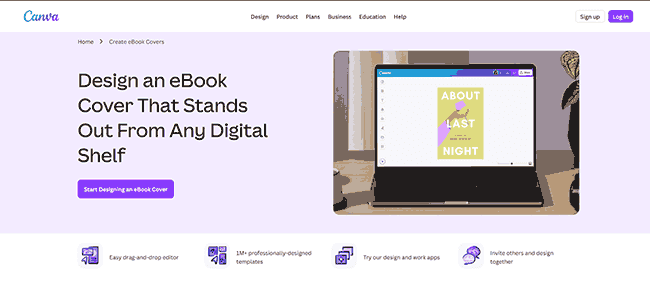
Our advice on ebook covers is always to hire a professional if you can. While the classic wisdom is “don’t judge a book by its cover”, the truth is that a cover implies something about the quality of your book, whether accurate or not.
If you have to wait a few months to save for a good cover artist, it might be worth it, since the most sales usually happen on a book’s launch. A case study by Reedsy found that self-published authors experienced a 24%–164% improvement in clicks after having their covers professionally redesigned. That’s potentially thousands of sales left on the table across an ebook’s lifetime.
For context, a cover designer for an indie book typically costs $150–$650 depending on experience and skillset. You’ll want to review the portfolios of designers and make sure they really fit your genre and target audience. Hiring the wrong designer can be just as damaging as going it alone, so take the time to do your research and chat with them about your needs.
5 tips for designing a professional ebook cover
 5 tips for designing a professional ebook cover
If you have no choice but to go it alone, or sales aren’t your focus, here are some general tips for designing your own cover.
- Use a platform like Canva or Adobe Express to help you out. Yes, your cover may end up looking more generic, but if you don’t have design or art skills, it’s going to end up better than trying to make everything from scratch.
- Create a moodboard of covers from your subgenre. One of the key roles of a cover is to visually inform the reader what kind of book they can expect. While it’s okay to buck the trend, you’ll likely want to do it selectively. You don’t want users clicking on your book and immediately bouncing because they got mystery vibes when actually you’re publishing historical fiction.
- Design for the thumbnail. Users’ first impression of your book is likely going to be the tiny one-inch thumbnail on a storefront or Google, not the full resolution image. Zoom out of your canvas until your cover is the size of a postage stamp and ask yourself if you can identify the title and central image and whether it’s still engaging.
- Don’t neglect typography. This is one of the most common mistakes we see in amateur cover designers: standard Arial font slapped over an image with little thought. Pay attention to things like hierarchy, legibility, contrast, and general while ensuring the text fits in with the rest of your design. Here are some great tips from cover artist Geoffrey Bunting.
- Don’t over-complicate it. Too many competing themes will confuse the user’s eye on digital storefronts and make your cover feel unfocused and messy. Try to focus on one strong central image or motif.
At the end of the day, your cover’s primary purpose is to communicate exactly what kind of journey the reader is about to go on. Keep it simple, respect your genre’s conventions, and focus on catching their eye so the quality of your writing can do the rest.
Choosing the right ebook format
 Choosing the right ebook format
Many self-published authors let their sale platform inform their ebook format rather than the other way around. The file format of your ebook is going to affect everything from how it is displayed to which devices it can be used on and what anti-piracy measures are available to you. While this isn’t always more important than the retail platform, it certainly can be.
Here are the most popular formats and their advantages/disadvantages:
- PDF: A fixed-layout format that essentially acts like a static, digital photograph or a printed page. Ideal if you want to ensure your exact font formatting, and high-resolution images remain identical to how you designed them and don’t move around. An undisputed best choice for graphic-heavy content, children’s books, technical manuals, and so on, or for users who need the strong piracy protection that only PDF DRM can provide.
- Epub: A widely used open-source format with nearly universal compatibility and text that reflows based on screen size. It works across Apple Books, Google Play, Kobo, Book, and newer Kindle devices. Well-suited for primarily text-based content, provider the publisher doesn’t care about piracy. Epub DRM can be removed in seconds with free tools.
- AZW3 and KFX: These are Amazon’s proprietary ebook formats designed specifically for its readers. The primary advantage over Epub is its ability to tap into Kindle-specific features such as X-Ray and WhisperSync. Unfortunately, its DRM is not much better than EPUB. While Amazon has taken some steps to improve it, it’s still relatively simple to remove and better serves to lock genuine customers into the Amazon ecosystem.
- MOBI: An old format that has no real value compared to EPUB and KFX. There’s really no reason to use it since it’s more restrictive on typesetting custom fonts, high-res images, and so on.
Keep in mind that uploading an ebook to Amazon Kindle will convert it to its KFX format and allow you to choose whether or not to apply Amazon’s DRM. You won’t be able to upload a DRM-protected PDF to Amazon.
Where to publish your ebook
 Where to publish your ebook
There are two primary approaches to publishing an ebook online: through third-party marketplaces (Amazon, Nook), and directly from your own website. Some authors use a combination of both. It’s worth breaking down the different major platforms, their royalty rates, and how they compare to your own website.
| Platform | Royalty Rate | DRM Options | Control Over Pricing | Direct Customer Relationship |
|---|---|---|---|---|
| Amazon KDP | 35% or 70% (exclusivity-dependent) | Optional Amazon DRM | Limited (must follow pricing rules) | No (Amazon owns customer data) |
| Apple Books | 70% | Apple FairPlay DRM | Moderate | No |
| Barnes & Noble (Nook Press) | 55–65% (price-dependent) | Optional B&N DRM | Limited | No |
| Kobo Writing Life | 70% (45% under $2.99) | Optional Kobo DRM | Moderate | No |
| Google Play Books | 52% | Optional Google DRM | Moderate | No |
| Smashwords / Draft2Digital | ~60% (after retailer cut) | Varies by retailer | Moderate (distributed to multiple stores) | Partial (some reader data shared) |
| Gumroad | 90% minus $0.10 per transaction | No built-in DRM | Full | Yes |
| Payhip | 95% minus transaction fees | No built-in DRM | Full | Yes |
| Your own website | ~95–97% (minus payment processor fees) | Full control (e.g. Locklizard, Adobe DRM, or none) | Full | Yes |
Ultimately, publishing via your own website is the only choice if you want to maximize profits by eliminating both fees and piracy while having full control over your pricing and marketing methods. That said, other platforms aren’t without their benefits. Platforms like Amazon, Kobo, or Barnes & Noble can be beneficial if you don’t have the ability to create your own website or need to rely on organic methods of discovery.
How to Price Your Ebook
 How to Price Your Ebook
Pricing your ebook is a delicate balancing act that’s often made more difficult by platform restrictions. On the most basic level, pricing an ebook is no different from any other product. You need to assess perceived value, market expectations, and how much of each sale you get to keep. While the “right” price will therefore depend on your genre, audience, and distribution method, but there are some reliable guidelines worth following.
Understand the market benchmark
There are usually upper and lower bounds for ebooks pricing within their categories. If you look through the prices at major retailers for new ebook releases, you’ll see pricing along these lines:
- Fiction: $2.99 – $9.99 (indie titles typically on the $5-7)
- Non-fiction: $9.99 – $29.99
- Professional and B2B: $49-$199
Don’t decide on a price yet – but keep these guidelines in mind as you consider other factors.
Factor in platform royalties
This is where many self-publishers get caught out. Amazon KDP only delivers the 70% royalty rate if you keep it priced between $2.99 and $9.99 and sell it in participating territories. Other platforms have similar thresholds. Always calculate your actual per-sale earnings, not just the sticker price.
As the table above illustrates, selling from your own website at ~95–97% take-home means a $9.99 ebook nets you roughly $9.50, compared to around $7.00 on Amazon and as little as $5.20 on Google Play.
As well as royalties, keep in mind any digital delivery fees. These are around $0.15/MB per book. This can quickly add up if you have a book with a lot of images.
Don’t underprice at launch
The most common mistake by debut authors is undervaluing their work. Many are not confident in the quality of their ebook and therefore price it at $1-2 or even release it for free. We strongly recommend avoiding this unless it’s a small launch discount or loss leader tactic. Beyond the financial aspect, pricing your ebook low at launch has several disadvantages. For starters, you attract a wider range of readers who may not necessarily be that interested, which may affect your initial review score. Meanwhile, it signals low quality to interested readers and leaves you with almost no room to discount later.
Consider tiered pricing
Selling ebooks on your own website gives you new options for pricing that you might not get at a major retailer. Tiered pricing, for example, could allow you to charge a lower price for time-limited access. Alternatively, charge per device, offer bundle discounts, and so on.
Account for piracy
If you’re going to sell your ebook on a platform with poor or no DRM, you’ll need to consider piracy in your overall pricing strategy. Once a pirate copy of your ebook is out there, your sales are likely to fall. You might need to think about lowering the prices once pirate copies become commonplace in order to convince users that it’s not worth risking dodgy sites for the sake of a couple of bucks.
Selling on your own website with strong DRM allows you to avoid these, but you’ll still want to consider the cost of that DRM and how it affects your profit margins. For example, if you’re paying $5k a year for a DRM solution and expect to sell 10,000 books in that time, adding $0.50 to your ebook price will cover that cost. Alternatively, if accounting for the DRM would be more than $1-2, you might decide it’s better to just take the hit.
Marketing your ebook
 Marketing your ebook
Even the best ebook in the world won’t sell itself. As much as most of us loathe self-promotion, it’s extremely important to consider as early as possible, especially if you’re self-publishing. Generally, you can group your marketing efforts into three stages.
- Phase 1 – Before launch
Start building an audience as soon as you start writing your book. Nowadays, it’s essential that indie authors are active on social media and build a following there. When it’s ready, consider offering a free chapter as a lead magnet, linked to a mailing list. Consider starting a blog and talking about the topic your ebook covers to build a following. Try to network with other authors in your niche and help them out where you can. - Phase 2 – During launch
Now is the time to create urgency with a big marketing push. Use tactics such as bonus resources for early buyers or a small, limited-time sale to get readers on board. Reach out to the contacts you made earlier and ask them to review your book, while contacting relevant blogs for paid and unpaid promotion. Consider paying for ads on social platforms, too, if it makes sense for your niche. Remember, the better you set up phase one the more options and success you’ll have at launch. - Phase 3 – Post launch
Many authors make the mistake or ceasing marketing after launch, especially if it didn’t go as well as they expected. In reality, the best tactic is usually to try to build on any momentum you created. Collect and showcase reader reviews, interact with comments, and monitor which marketing channels drive the most sales so that you can double down on them. Finally, update your ebook periodically if it’s a non-fiction work and schedule marketing pushes to coincide with the updates. This way, you give yourself (and publications) more to talk about than just “buy my book”.
For a more detailed marketing breakdown, see the marketing section of our guide to selling ebooks online.
How to Protect Your Ebook from Piracy
 How to Protect Your Ebook from Piracy
Publishing piracy is growing. According to the MUSO 2024 Piracy Trends Report, publishing was the only major media sector where piracy increased in 2024, rising 4.3% to 66.4 billion visits to piracy websites. Between 2020 and 2024, publishing piracy exceeded 261 billion total visits.
Most ebook retailers offer some form of DRM, but the protection they provide is superficial. Amazon’s Kindle DRM can be stripped in seconds using free tools like Calibre’s DeDRM plugin. Adobe’s ADEPT DRM, used by Google Play and Kobo, is equally vulnerable. Apple’s FairPlay DRM is harder to bypass, but it locks you into the Apple ecosystem.
Other common protection methods are similarly weak:
- PDF password protection is trivial to remove. Open passwords can be shared, and permissions passwords (which restrict editing and printing) can be stripped instantly using free online tools. See our full breakdown of PDF password protection weaknesses.
- Social DRM and watermarking embeds identifying information into each copy of your ebook. The idea is that readers won’t share copies with their name attached. In practice, watermarks in most formats can be located and deleted using a PDF editor.
- Cloud-based and flipbook solutions force readers to view ebooks in a browser and use JavaScript to disable printing and copying. These controls are easily bypassed through the browser’s developer mode.
- PDF DRM: The strongest available DRM from ebooks is in the PDF format. Unlike ebook DRMs, the right PDF DRM can prevent unauthorized sharing, screenshots, copying and so on while enforcing expiry and applying dynamic watermarks.
For a detailed comparison of each protection method and how they can be bypassed, see our guide on how to protect ebooks from sharing and copying.
Does copyright registration prevent piracy?
 Does copyright registration prevent piracy?
Unfortunately, while copyright registration is a good thing to have, it doesn’t materially prevent piracy. Pirates have long figured out that if they hide their identity and host files with sketchy providers, they’re practically immune to DMCA. The international copyright framework requires hosts and/or pirates that are identifiable and compliant. Since several countries are not signatories to the Berne Convention, there are easy and obvious loopholes. Copyright can have a small impact by getting the results removed from search, but it’s primarily useful for stopping copycats rather than piracy.
How Locklizard DRM stops ebook piracy
 How Locklizard DRM stops ebook piracy
Most ebook DRM systems fail for the same reason: they rely on passwords, plugins, or formats like EPUB, MOBI, and AZW that are trivially stripped with freely available tools. Type “EPUB DRM” into Google, and the top results are removal guides. At best, it poses a minor inconvenience to pirates.
Locklizard Safeguard takes a different approach. Ebooks are published as PDFs, encrypted with AES 256-bit encryption, and only ever decrypted in memory inside our Secure Viewer. There are no passwords to share, no keys exposed to the user interface, and no Adobe Security Handler to bypass. Decryption keys are transparently transferred via public key technology and stored in an encrypted keystore locked to each authorized device.
This architecture shuts down the common piracy routes:
- Sharing the file: ebooks are locked to authorized devices, so forwarding the PDF to someone else is useless without a valid license.
- Printing to unprotected PDF: blocked at the viewer level, along with “Save as” and conversion back to standard PDF.
- Screen capture: screenshot tools and the Windows Print Screen key are blocked, including over remote connections.
- Copy-paste and editing: disabled by default, preventing content extraction and watermark tampering.
- Analog photo leaks: dynamic watermarks stamp each view and print with the user’s name, email, date, and other identifying data, making any leaked copy traceable back to its source.
What happens after distribution is just as important. Locklizard gives publishers the ability to revoke access instantly, regardless of their location. Ebooks can also be set to expire on a specific date or after a set number of views or days, and use can be restricted to particular locations or IP ranges. As a result, if an account is compromised or a subscription ends, the ebook stops working. Since Safeguard disables copying, you don’t need to worry about hunting down copies that have had the DRM stripped before revocation.
Closing words on secure ebook publishing
 Closing words on secure ebook publishing
Whether you’re looking to protect a novel, instruction manual, non-fiction piece, or training content, the message of this guide should be clear. The most widely used ebook DRM systems just don’t work, and neither does Adobe Acrobat. It’s so easy to remove their sharing and editing restrictions that you may as well not bother. They’re no better than politely asking customers not to share. Watermarks with these solutions are no better – they can be easily removed with the very same tools used to create them.
Using Locklizard to protect your ebooks from piracy is far more effective. It gives you more control and flexibility while implementing strong copy protection and anti-sharing controls that pirates cannot easily bypass. With additional benefits such as the ability to watermark ebooks for distribution, remotely revoke ebooks, track use, control printing, and change PDF security settings after distribution, it’s a no-brainer for ebook publication. If you want the most secure and easiest way to sell digital ebooks from your website or any other platform then Locklizard is the most effective solution.
To stop ebook piracy and protect your ebooks from sharing, take a free 10 day trial of our PDF copy protection software.
FAQs
 FAQs
FAQsDo I need an ISBN?
No. Platforms such as Amazon KDP have their own unique identifiers (ASINs), and you don’t need one to sell on your own website. That said, we highly recommend buying an ISBN if you want to distribute your ebook to libraries or on multiple platforms, as it helps to manage the title.
How much does it cost to publish an ebook?
As much as it sounds like a cop-out, the answer is “it depends.” Generally, you’re looking at anywhere between $0 and $3000, depending on the editor you hire, whether you pay for a cover design, how much you put into marketing and promotion, and so on.
How much money can you make from publishing an ebook?
Income from ebook publishing is dependent on dozens of factors, from the quality of your ebook to its genre, the platform you sell it on, piracy, marketing, and so-on. You could make anywhere between $1000 and $100,000 per year. The average self-published author, according to surveys, makes around $12,749, with income rising year-on-year.
Is it possible to stop people from sharing my ebook?
Yes, but you need to choose the right digital rights management software. Most ebook DRM can be removed in seconds with freely available tools. Locklizard Safegaurd DRM ensures only devices with a valid license can read your book.
Does ebook piracy affect sales?
Of course. According to some estimates, ebook piracy costs the U.S. publishing industry over $315 million per year. Self-published authors also report major issues with piracy once their series got popular.
Does Amazon KDP protect against piracy?
No. Amazon’s Kindle DRM is easy to remove and books frequently end up on torrent sites the same day they’re released.

