
256-bit Encryption Explained: What It Means for Your Documents
How 256-bit encryption works & the best way to use it for document security
You’ve seen “256-bit encryption” on banking sites, VPNs, and document security tools. But what does 256-bit encryption actually mean, can be cracked, and what it does it take to use it effectively for document security?
You’ve almost certainly seen “256-bit encryption” mentioned on numerous products, from banking sites to messaging apps, VPNs, and document security tools. The implication is always that it makes your data safe, but what does that number (256) actually mean? Is it really “uncrackable”, and is it enough to keep your document safe?
This guide will answer all of that, covering:
- What is 256-bit encryption?
- How does AES 256-bit encryption work?
- Symmetric vs asymmetric encryption: How 256-bit AES, RSA, and ECC differ
- Can AES 256-bit be cracked?
- Is 256-bit encryption effective for document security?
- AES 256-bit encrypting documents with Locklizard Safeguard
 What is 256-bit encryption?
 What is 256-bit encryption?
256-bit encryption is a very powerful method of scrambling data to prevent unauthorized parties from reading it while it’s in transit or at rest. Its 256-bit encryption key results in 2²⁵⁶ possible key combinations, making brute-forcing it to break the encryption practically impossible with current hardware.
There are different standards (algorithms) used to encode data with a 256-bit key, but the most common are AES, RSA, and ECC. We’ll focus primarily on AES 256-bit in this article, since it’s by far the most used at 256-bit.
How does AES 256-bit encryption work?
 How does AES 256-bit encryption work?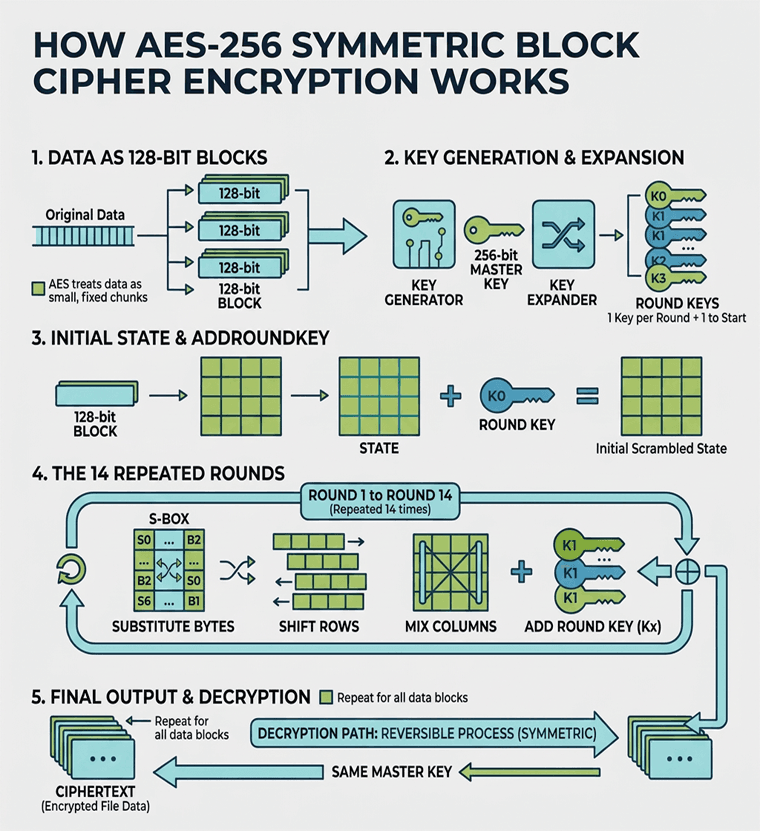
AES is a block cipher, meaning it encrypts data in fixed-size chunks rather than all at once. It breaks the data into 128-bit blocks and scrambles each one through a series of repeated rounds — 14 in total at 256-bit.
- The encryption software generates a random string of 256 1’s and 0’s that comprises the encryption key. That key is then expanded into a set of “round” keys: one key for each encryption round, plus one to start.
- The cipher takes a 128-bit block of data and arranges it into a 4×4 grid of bytes called a state. The first round key is combined with this block.
- Each of the 14 rounds runs the state through the same set of operations: substituting each byte using a fixed lookup table, then shifting the rows, mixing the columns, and combining the result with that round’s key. Each round scrambles the data further until it’s incomprehensible and random.
- The block is output as ciphertext, and the process is repeated for all of the other blocks until the data is fully encrypted.
- Because AES is asymmetric encryption the key holder can repeat the same operations in reverse to decrypt the file.
Symmetric vs asymmetric encryption: How 256-bit AES, RSA, and ECC differ
 Symmetric vs asymmetric encryption: How 256-bit AES, RSA, and ECC differ
The process above outlines the general idea, but the standard you use changes what those 256 bits are actually doing. Every 256-bit standard falls into one of two categories that can have a fundamental impact on what the encryption process looks like and how much security it imparts at a 256-bit key size.
 Symmetric encryption
 Symmetric encryption
Symmetric encryption standards like AES use the same 256-bit key to encrypt and decrypt data, with the key scrambling the data directly. As a result, security comes purely from the size of the keyspace. Since there are no mathematical shortcuts to find the key, the attacker is forced to brute force all 2²⁵⁶ possibilities.
Asymmetric encryption
 Asymmetric encryption
Asymmetric encryption, such as RSA and ECC, uses separate private and public keys to encrypt and decrypt. Instead of directly scrambling the contents with the key, the encryption is tied to a difficult maths problem. With RSA that’s factoring large numbers, while ECC is based on elliptic curve calculations. Since both problems have mathematical shortcuts, an attacker doesn’t need to try every combination, and the asymmetric keys need to be longer to compensate. At a 256-bit key size, RSA is very easy to break, while ECC offers roughly half the security of AES at the same size.
Is symmetric or asymmetric encryption more secure?
 Is symmetric or asymmetric encryption more secure?
Neither symmetric or asymmetric encryption is inherently more secure — it’s all about what you’re trying to achieve and whether you’re using the right key length for your encryption standard. For security equivalent to AES, ECC and RSA need larger key sizes, as illustrated below.
| Algorithm type | key size for ~128-bit | key size for ~256-bit |
| AES | 128-bit | 256-bit |
| ECC | 256-bit | 512-bit |
| RSA | 3072-bit | 15360-bit |
AES is faster and simpler, and each bit provides a larger brute-force margin. However, because both parties need the secret key, the difficulty lies in how you distribute the keys securely so that they aren’t intercepted. RSA/ECC solve the key distribution concern by pairing secret private keys with public keys that can be safely shared. However, it’s slower, larger, and leans on math problems that do have known shortcuts.
For these reasons, AES is best used for tasks where the same party will be encrypting and decrypting the data. Use cases like bulk data encryption where speed is important, as well as encrypting data at rest (i.e. disks, files). It can also be useful for encrypting data in transit once a secure session is already established via TLS.
Asymmetric encryption is most useful when you’re sharing data with someone else, particularly when you don’t know what their security posture is like or you have limited trust. They can also be helpful for verifying identity via digital signatures (since you can embed the public key), and other authentication tasks. Of course, because RSA and ECC encryption is slower, it’s better used for sharing small amounts of information infrequently rather than encrypting an entire drive.
Ultimately, symmetric and asymmetric encryption are not competitors. In fact, they’re frequently used together. For example, in HTTPS, RSA is used to authenticate the site you’re connecting to and establish a connection, at which point both sides can securely share AES secrets for more performant encryption.
Can AES 256-bit be cracked?
 Can AES 256-bit be cracked?
AES 256-bit is the most secure encryption algorithm currently available. Experts current assume that it’s virtually impossible to brute force with current technology. Give every person on Earth their own copy of the world’s fastest supercomputer, and it would still take longer than the age of the universe to crack a single AES-256 key. Without a change to our understanding of physics, its unlikely hardware will ever be powerful enough to bruteforce a 256-bit AES key.
Non-brute-force methods that rely on a mathematical break in AES (cryptanalysis) haven’t gotten much further. After 20+ years of intense scrutiny, we’re at the point where the best-known attacks could maybe shave a small margin off the full key strength in theory.
Ultimately, it’s far easier and cheaper to find an exploit in a piece of software’s AES implementation or a weakness in humans. Why spend trillions trying to build a supercomputer to crack AES when you can pay a person a fraction of that to purchase the data you’re trying to obtain?
Will AES-256 be crackable with future technology?
 Will AES-256 be crackable with future technology?
We don’t have a magic eight-ball, but symmetric encryption algorithms like AES aren’t as vulnerable to quantum as asymmetric. It has been suggested that Grover’s algorithm would give a future quantum computer a quadratic speed-up, in effect halving AES-256 to ~128-bit security. Fortunately, brute forcing 2¹²⁸ options is still unfeasible.
Whether there will be a future mathematical break, perhaps discovered with the help of AI, is much more difficult to predict. There’s nothing currently on the horizon, but that doesn’t mean a whole lot. Even so, the most likely threat to AES is attacks on anything but the cipher, including weak password protection or key derivation, poor random number generation, side-channel leaks, implementation bugs, or straight-up stealing the key.
Is 256-bit encryption effective for document security?
 Is 256-bit encryption effective for document security?
We’ve established that AES 256-bit is essentially impossible to brute force and is unlikely to be in the future. Does that mean from a document security perspective? Well, no, not exactly. While you’ll see dozens of document security products with “AES 256-bit secured” or use “US Government-grade” encryption, it’s largely marketing hype. The important part is not whether AES-256 is used, but how it’s used. It’s key to understand that:
- AES encryption is symmetric — the same key is used to encrypt and decrypt it
- It’s designed to protect data in transit and at rest, not while it is being used
This can become a major issue as soon as documents are shared. If a provider doesn’t implement a bulletproof way of sharing keys without exposing them to users or the internet, the security falls apart.
Even then, however, you need to consider what happens when the recipient receives the document. To open a document, users need to decrypt it. If there aren’t strong controls enforced by the application that opens it, or the decrypted document is saved/cached to disk, recipients can do what they wish with it.
To summarize, making AES 256-bit work for document security requires:
- A secure key transfer system where keys are not exposed to users and cannot be shared with others
- Decryption of the document only in memory (RAM) to prevent easy recovery of the text via cache or disk
- A viewer application with well-implemented view, print, copy, save, and screenshot controls
- A way for admins to manage and revoke encryption keys remotely
As you can imagine, there are very few document security solutions that have implemented this, and even fewer that have done so well.
AES 256-bit encrypting documents with Locklizard Safeguard
 AES 256-bit encrypting documents with Locklizard Safeguard
Locklizard Safeguard is one of the few document security solutions built around how AES-256 actually behaves rather than the marketing around it. It uses AES 256-bit encryption as the foundation, then wraps it in the licensing, key management, and viewer controls that the cipher itself can’t provide. In practice, that means it addresses each of the four requirements above.
- Keys are never exposed to users. Safeguard combines AES 256-bit encryption with public key technology and a real-time licensing server. Encryption keys are relayed transparently from the server to the recipient’s device and stored in an encrypted keystore that they can’t open, modify, or pass on. There are no passwords for users to type, forget, or share, so the weakest link in most “AES 256-bit” products is removed entirely.
- Documents are only decrypted in memory. Protected files are decrypted in RAM and displayed through the Safeguard Secure Viewer. The decrypted content is never written to disk or cached, so a recipient can’t simply pull the plaintext out of a temporary file. Even if the protected file is intercepted or forwarded, it stays unreadable without a valid license activated on an authorized device.
- The viewer enforces real controls. Because documents open in a dedicated viewer rather than a standard PDF reader, Safeguard can enforce what happens after decryption. You can stop printing or limit it to a set number of prints, block copying and editing, and deter screen capture with dynamic watermarks that display user and system information directly on the page. Files can also be locked to specific devices, countries, or IP ranges.
- Admins keep control after sending. Access is granted and removed through the Safeguard Admin system. You can expire documents on a fixed date, after a number of views or prints, or revoke access instantly at any time, even for files already sitting on someone else’s machine. Key management happens automatically in the background, so there’s no certificate handling or manual key exchange to get wrong.
The result is a system where AES-256 does the job it’s good at, encrypting data at rest and in transit, while licensing and DRM controls handle the part raw encryption can’t: stopping authorized recipients from doing whatever they like once a document is open. If you want to see how it works on your own files, you can take a free 10-day trial of Safeguard PDF Security.

