
Introducing Safeguard Lite
Safeguard Lite: In-browser PDF protection for smaller businesses and individual departments within a larger business
Protect PDFs without the complexity of full-scale DRM. See how Safeguard Lite delivers the core protections small publishers actually need — encryption, revocation, watermarks, expiry — through a simple web-based interface.
Today, we’re delighted to announce a new entry to the Locklizard DRM lineup: Safeguard Lite. Designed specifically for businesses seeking robust, easy-to-use DRM protection, it provides a secure web-based platform that prevents PDF documents from being shared or misused.
If you’ve looked at Safeguard Standard in the past and decided it didn’t fit your use case because you protect a modest number of documents or can’t use our Windows DRM Writer, Safeguard Lite is built for you. It delivers the core security features organizations need to protect sensitive documents and IP with a lower complexity level and price point.
 Why we built Safeguard Lite
 Why we built Safeguard Lite
Two things kept coming up in conversations with publishers using Safeguard Standard and Safeguard Enterprise.
The first was complexity. DRM platforms tend to scale upwards, with more controls, integration, and configuration to ensure enterprises can protect thousands of documents across various use cases. But what if you’re a consultant publishing a handful of client reports, or a training provider distributing a few hundred PDFs to students? You still need effective protection, but don’t necessarily need the full surface area (and associated cost) of Safeguard Standard or Enterprise.
The second point of feedback was the platform. The existing Safeguard Writer application is Windows-only. This hasn’t been a problem for most of our customer base, but it was a barrier for macOS or Linux businesses, who needed to use Parallels or Wine to protect their documents.
“With Safeguard Lite, we’ve responded to the growing demand from businesses that require reliable DRM document protection but do not want to navigate the maze of extras and integrations. Based on client feedback and the need to support all businesses and publishers with a cost-effective system, our new platform delivers exactly what is needed – core DRM functionality that is easy to set up and manage, allowing organizations to focus on their operations rather than security complications.”
– Mark Langton, Locklizard CEO
Safeguard Lite provides a cost-effective system that maintains the core functionality of Safeguard DRM while being easy to set up and manage. Protection is moved to the browser — no installation required, and therefore no requirement to use a specific OS or hypervisors.
How to use the Safeguard Lite Web Writer
 How to use the Safeguard Lite Web Writer
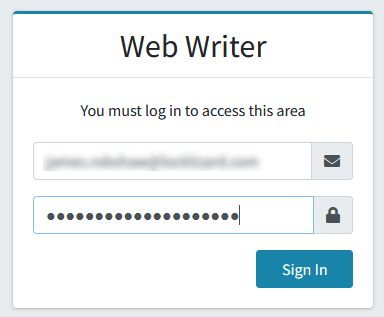
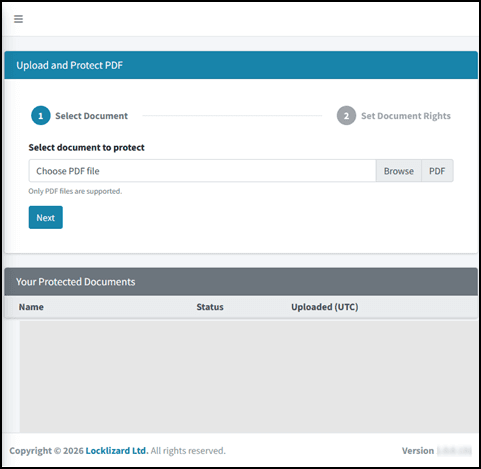
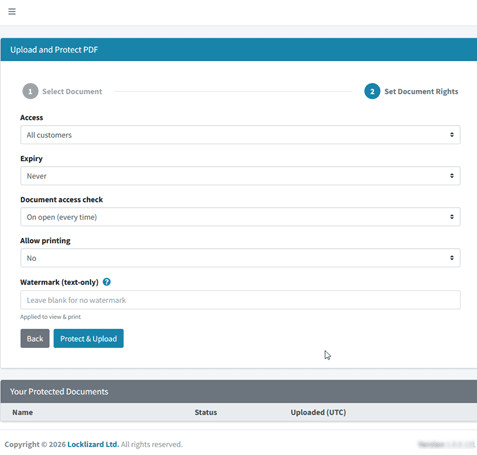
Safeguard Lite uses a web-based writer rather than a desktop application to apply Locklizard DRM to PDF documents. The full process to protect a document with Safeguard Lite looks like this:
- You log in to the Web Writer portal using the supplied details.

- You press “Protect Documents” in the sidebar, click “Browse” to upload your PDF, and press “Next”.

- You select your document rights, including which customers can view the PDF, when it expires, when to check validity, whether printing is allowed, and any watermark text.

- You press “Protect & Upload”. Once the protection process finishes, you can press the green download icon to download your secured .PDC document.

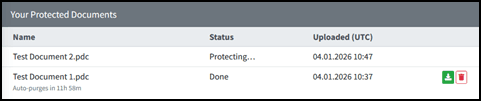
Crucially, documents are encrypted locally by your web browser using AES-256-GCM before being transmitted by HTTPS. On arrival, the server decrypts the payload in volatile memory only, applies Locklizard’s DRM protection, and immediately discards the decrypted data.
The only file ever written to disk is the final, anonymously named, and protected PDC output (AES 256). Your original PDF is never stored, logged, cached, or recoverable on the server. Protected documents can be distributed just like any other files – by email, CD, SharePoint etc., or made available for download from your website. Since the files are encrypted, it does not matter who gets hold of them. They cannot view them without having first been authorized by you, as the publisher.
What’s included in Safeguard Lite?
 What’s included in Safeguard Lite?
Safeguard Lite retains the core security and administrative features of Safeguard Standard. Our aim is to provide the tools that most small publishers need day-to-day without adding unnecessary complexity:
- AES-256 encryption with public-key technology (no passwords for end users to manage, forget, or share)
- Stop copying, modifying, sharing, and saving by default
- Block screen grabbers and print-screen
- Dynamic text watermarks on viewing and printing — user name, company, email, date/time — applied at view/print time
- Document expiry by fixed date (or never)
- Instant revocation of users or documents in real time
- Offline and online access management
- Device-locking so licenses can’t be copied between machines
- Fully hosted administration system — no servers for you to run
- Free Viewer software for your customers
*Preventing print screen or third-party screen grabber utilities is not possible on iOS client devices.
There’s no per-user licensing on the reader side: recipients install the free Viewer, and they’re done.
 What Lite doesn’t include
 What Lite doesn’t include
If you need the following, Locklizard Lite isn’t for you:
- Advanced audit reports
- Batch editing across users and documents
image watermarks - View/print count limits
- IP or country restrictions
- e-commerce API integration
- Publication grouping
- More than 300 active documents or 1250 documents
You’ll instead want Safeguard Standard or Safeguard Enterprise. For a full side-by-side, see our feature comparison chart.
Locklizard Lite pricing packs
 Locklizard Lite pricing packs
Safeguard Lite is available with six tiers, called packs, each based on how many documents you’re protecting and how many customers you’re distributing the documents to. Upgrades are available from one tier to another, in either a single step, (Pack 1 to Pack 2), or multiple steps (Pack 1 to Pack 4) allowing for growth and expansion as your requirements change.
| Pack | Documents | Customers |
| Safeguard Lite Pack 1 | 50 | 200 |
| Safeguard Lite Pack 2 | 100 | 400 |
| Safeguard Lite Pack 3 | 150 | 600 |
| Safeguard Lite Pack 4 | 200 | 800 |
| Safeguard Lite Pack 5 | 250 | 1000 |
| Safeguard Lite Pack 6 | 300 | 1250 |
Further expansion and growth is available beyond Safeguard Lite, via an upgrade to either Safeguard Standard or Safeguard Enterprise, with options of unlimited documents and customers, add on applications and additional licensing models. You won’t need to re-protect or migrate anything; it’s the same product family, just with a larger allowance and a wider admin toolkit.
Reach out to the Locklizard sales team for exact pricing information.
Available now
 Available now
Safeguard Lite is available from today, 20 April 2026. You can view the product page, request a demo, or contact our sales team at sales@locklizard.com.
Don’t hesitate to reach out if you need help determining which tier best matches your use case. Alternatively, if you’re an existing Safeguard customer and want to understand how Lite compares to what you have, reach out to your Locklizard contact for assistance.

