
Manga and Comic Book Piracy

Manga Piracy: How to Protect Manga and Comic Books from unauthorized use
Protect digital manga from rampant piracy. Understand how pirates copy content, why existing DRM falls short, and how strong desktop-based protection can secure comics and prevent illegal distribution.
 The reality of manga piracy

In 2019, the arrest of Mangamura’s operators brought to light the staggering scale of Manga piracy. At its peak, an estimated 100 million users per month visited the site to read manga for free. According to court documents, its mastermind made $565,000 from advertisements and crypto miners while causing an estimated $2.9 billion damages to rights holders.
Yet while some assume this to be a major blow to manga piracy, president Hiroo Unoura of internet service provider NTT said these prophetic words:
“Just because a site has been shut down does not mean that illegal activity has been settled.”
Within months, a handful of websites had risen to fill the void. By October 2021, it was estimated that monthly visits across the three top manga piracy sites reached 326 million, and damages to rights holders totaled over $5 billion between January and October of that same year. In 2024, MUSO estimates that users visited manga piracy sites 46.5 billion times.
The data points to one, unavoidable fact — manga publishers have lost the cat-and-mouse game against piracy sites. The legislative framework cannot keep up with the rapid creation of mirror and alternative sites. As with every other form of piracy, active measures are the only way to truly combat unauthorized sharing.
Here, we’ll cover everything you need to know about preventing manga and comic book piracy, covering:
- The current digital manga publishing landscape
- Why do people pirate manga
- How manga piracy happens
- Current manga piracy measures and why they aren’t working
- Case studies: How pirates rip Manga from online viewers
- Can PDF protection prevent manga piracy?
- How to prevent manga piracy with Locklizard PDF DRM
- Why Locklizard for manga security
The current digital manga publishing landscape
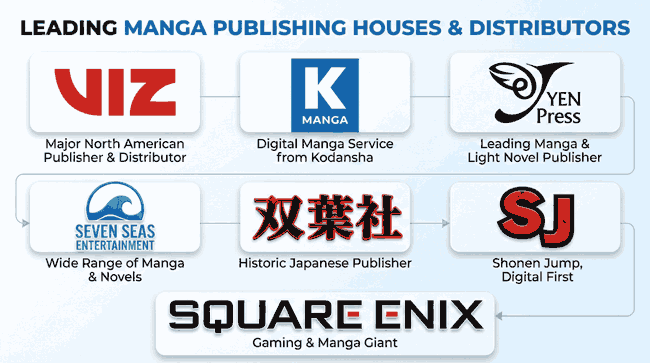
The first step in understanding why manga piracy is so prevalent is to consider the general landscape and the distribution methods currently used. Unlike with regular fiction, digital manga is commonly purchased directly from a publisher’s website. Some of the most common places to purchase English-language manga include:
- Amazon
- Viz (Shueisha)
- K Manga (Kodansha)
- Yen Press
- Seven Seas Entertainment
- Futabasha
- SJ
- Square Enix
Digital manga is often delivered via web viewers and/or mobile applications, either as a one-off purchase or via a subscription service. While this is perhaps a bid to mirror the convenience of pirate media, it creates further challenges when it comes to limiting the distribution of unauthorized copies. Some manga is also distributed in the PDF format, occasionally with rudimentary password protection.
 Why do people pirate manga?
 Why do people pirate manga?
There are no scientific studies on why people pirate manga specifically, but we can glean the following reasons from online discussions:
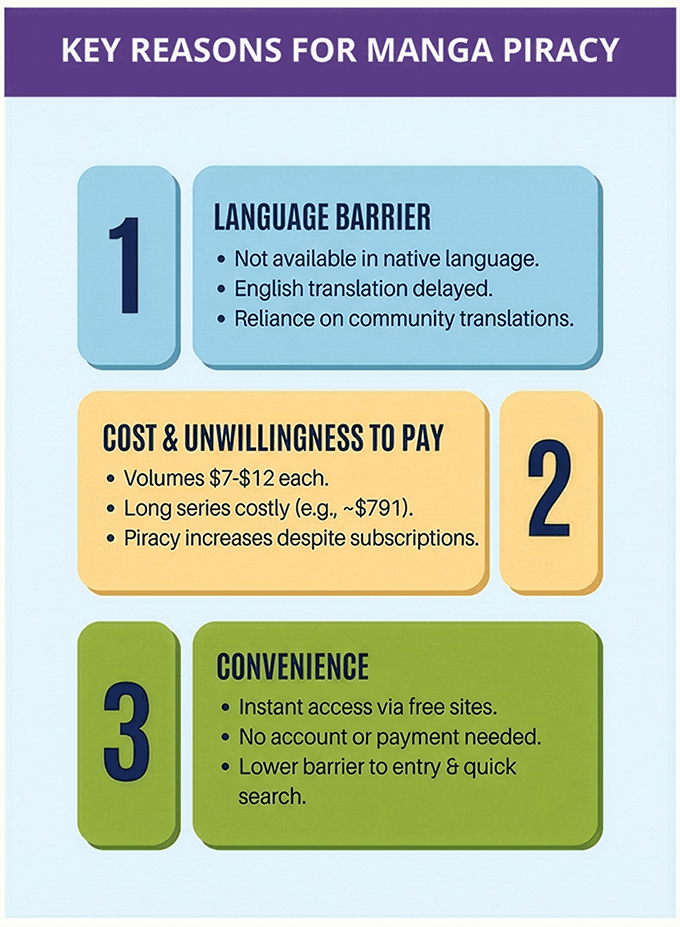
- The manga is not available in their native language: This is perhaps the reason that is easiest to sympathize with. In situations where a manga is only available in Japanese or the English translation comes later, some manga fans pirate community translations to get their fix.
- They can’t (or don’t want to) pay: Manga volumes tend to cost between $7 and $12 each and take between thirty minutes and two hours to read, depending on the text density. Publishers will know that this cost is necessary to pay artists, writers, editors, marketing, and more. Online, however, many avid manga readers complain that the cost of reading a long series with many volumes is too high. One Piece, for example, with 113 volumes at the time of writing, would cost around $791 to read at a price of $7 per volume. To address this, some publishers offer a subscription service: pay x amount per month and read as many volumes of the manga as you like. Despite this, piracy has only increased, suggesting that it’s less a case of “can’t pay” or more “don’t want to pay”.
- Convenience: Free manga downloaders and websites let pirates type the name of any volume and instantly read a copy without creating an account, entering credit card details, etc. While this is unlikely to be a major contributor, pirating manga typically has a slightly lower barrier to entry than buying it. Pirated manga can also be made available offline and can be converted to any format.
The truth is that while publishers have taken strides to increase convenience and lower prices, they cannot compete with piracy in this regard. It doesn’t get any cheaper than free, and legitimate customers will always need to deal with the inconvenience of entering payment information or creating an account. The only way to truly prevent digital manga piracy is to limit the ability to create pirate copies in the first place. To do so, you need to understand how pirates rip and distribute manga and why current anti-piracy measures aren’t working.
How manga piracy happens
 How manga piracy happens
Manga piracy is that it’s a little different from other ebook piracy in that there are two common ways to create unauthorized copies:
- Ripping digital manga from English or Japanese publisher sites and distributing it elsewhere
- Scanning the manga in its physical form, often translating it from Japanese to English manually or with OCR tools
Naturally, option one is far easier; it’s faster, requires less effort, and typically creates a higher-quality result. Regardless of the methods used, however, the goal is simple: to create an uncontrolled digital copy that can be uploaded to the plethora of pirate manga sites we mentioned earlier. No publisher wants to launch into a market that already has bootleg copies, so disrupting the operation of these sites feels like the natural solution. One of the major reasons for this isn’t working, however, is the clever way that pirates distribute manga and comics.
 Free manga downloaders: How pirates distribute manga
 Free manga downloaders: How pirates distribute manga
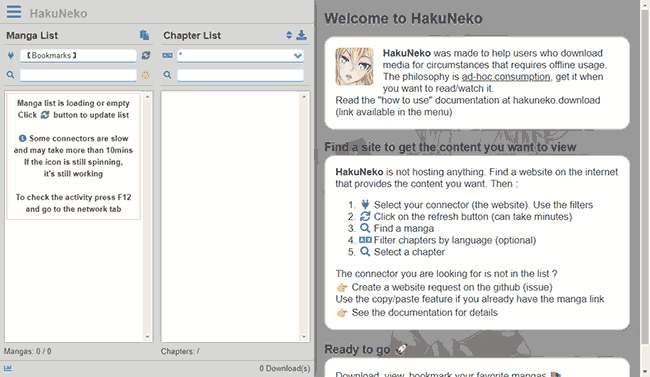
Free manga downloaders enable pirates to easily distribute, read, and download manga. Some of the most popular free manga downloaders include:
- Free Manga Downloader 2
- HakuNeko
- Kotatsu
- Tachidesk
Publishing companies must recognize that these tools make their attempts to disrupt manga piracy sites via legal action almost pointless. Free manga downloaders are crafted to make it as frictionless as possible to obtain pirate copies:
- They ship with a continually updated list of manga piracy sites. This effectively democratizes the discovery of new pirate sites; a few people closely associated with the piracy community can regularly add newly created sites for thousands to access.
- They act as a search engine for various manga volumes. Entering a title automatically queries hundreds of pirate manga sites for one that has it. Advanced search tools allow for filtering by publisher, genre, author, language, etc. to make it as easy as possible for pirates to find what they’re looking for.
- They make it simple for pirates to manage and maintain an extensive, searchable library of manga/comics. Pirates can download hundreds of manga and comics at a time or stream them, and automatically download their favorite manga. They get personalized suggestions for new releases to download and, using metadata tools, ensure copies have official covers, titles, descriptions, and more. All of this is presented in a slick, Netflix-like interface.
- They have built-in viewers for convenient reading. These readers are just as good or better than official tools, offering the ability to change layouts, switch between landscape and portrait mode and dark/light mode, add color correction, scroll automatically, bookmark, and more.
- They enable easy conversion to popular e-reader formats. Pirates can convert manga to CBZ, PDF, EPUB, etc. in one click to ensure volumes are compatible with their e-reader or other platform.
While a few (mostly mangawu) publishers have recognized the key role free manga downloaders play and started to apply legal pressure, this is unlikely to be effective for two main reasons. Firstly, manga downloaders are open-source. If one gets taken down, it’s a simple matter for someone to just fork it and release a new version. Second, manga downloaders have started to distance themselves from the piracy source lists to avoid legal repercussions. There’s no real legal basis to shut down a tool that doesn’t have direct links to illegal manga — pirates can just paste a URL list in from somewhere else. While you can try to target sites hosting those lists, you’ll find it very difficult to prevent the distribution of something as portable as a text file.
All of this brings us to a harsh truth: the only way to prevent manga and comic piracy is to stop unauthorized copies from being made in the first place. All of the manga that’s already out there is likely going to stay out there – you can’t close Pandora’s box. So, what are publishers currently trying to do to prevent the creation of unauthorized copies, and why isn’t it working?
Current manga piracy measures and why they aren’t working
 Current manga piracy measures and why they aren’t working
There are three common methods manga publishers use to protect their works:
- Web-based viewer security: This is the most common form of security. Customers must log into their account and the publisher then uses JavaScript and obfuscation techniques to make it harder for users to download manga or retrieve high-quality images.
- Mobile app security: Most publishers also offer manga through a mobile app, since a phone or a tablet is the most convenient device to read on.
- Ebook DRM: E-Readers such as Kindle, Kobo, etc. have their own digital rights management software that tries to prevent unauthorized copying and sharing.
If you look at the current manga piracy landscape, it’s clear that all three of these are ineffective. However, it’s worth looking at each in detail to examine the pitfalls that publishers need to avoid.
Why web-viewer security doesn’t work
The browser-based security most publishers use is, and will always be, ineffective. Web app developers typically have only a few tools in their arsenal to stop users from making unauthorized copies:
- Obfuscation: Manga is almost always delivered to users as a series of images. To prevent customers from downloading those images, some publishers hide the true path to the image. While it’s not possible to fully obfuscate a URL, techniques such as base64 encoding it can make it more difficult for non-technical users.
- JavaScript controls: JavaScript can be used to try to restrict some functions within the browser, such as the right-click menu, printing, and copying.
- Account management: User accounts and passwords are used to restrict content access to those with a valid subscription or purchase.
- Watermarks: Visible/invisible watermarks are used to identify the user viewing the manga and therefore deter sharing.
Clearly, these controls have not been successful in preventing manga piracy. Let’s look at each in more detail:
Obfuscation
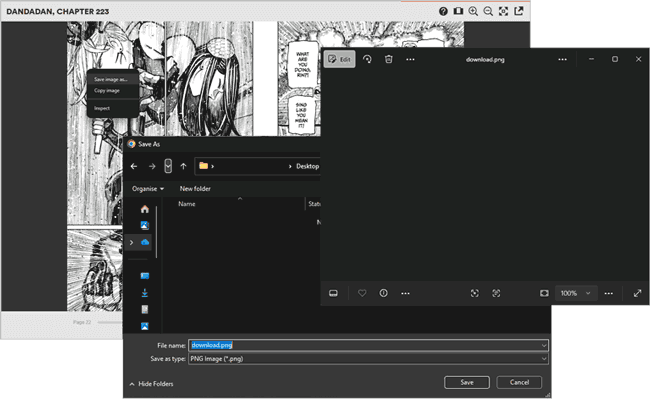
Obfuscation leads to all saved images becoming the same blank “download.png”
The image URLs for each page are the main thing publishers need to hide when delivering manga online. Serving the images normally makes it trivial for a user to download them — they just have to right-click> Save as or check the sources panel in their browser’s developer mode. However, there’s only so much a developer can do to hide the path to an image or other resource. Eventually, it must be delivered to the user, which means their browser must be able to decode whatever trickery you’re using. To explain further, most of the manga viewers we analyzed had a process that looks something like this:
- They direct users to a viewer application which is inside an iframe for security reasons. This is essentially like having another tab inside the browser tab, with the main page not able to see the reader and vice versa.
- The reader loads a few pages at a time rather than loading them all at once. This both makes it slightly more effort to download them, and improves performance.
- The images are hosted on a content delivery network (CDN). The JavaScript code in the viewer requests each image when it runs (usually triggered by a page turn).
- Typically, the images use session tokens that expire or have base64 encoded or encrypted URLs to make it harder to grab the image from the URL.
As we explained before, though, the customer’s computer needs to display the image somehow. At some point, it must send that request to fetch the image. A technical user (or increasingly, AI tool) can spy on this process and create their own script that runs inside the iframe. This fetches the raw image from the server, converts it into a file that the browser can work with, and then creates a special, invisible link to the image that the browser can use to download it. This can then be distributed as a Tampermonkey script that anybody can run with a single click.
JavaScript controls
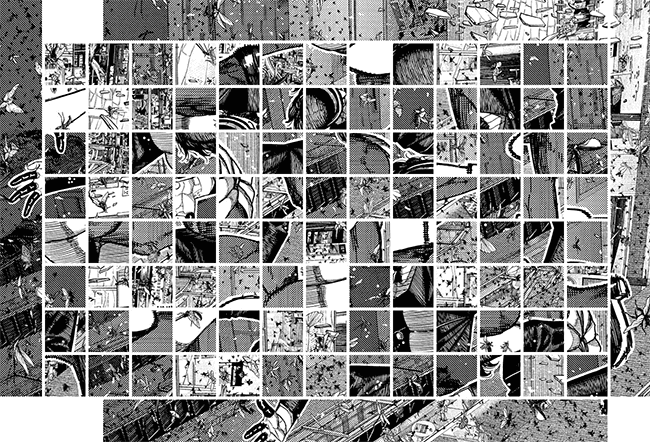
A manga scrambled into tiles which can be reassembled with JavaScript.
JavaScript DRM controls are the mechanism through which developers attempt to control what a user can do with their content. Though we haven’t seen them used as widely in manga viewers as in other flipbooks, some examples include:
- Disabling the right-click menu to prevent the copying of text and images
- Breaking File>Print functionality by sending a blank page to the printer
- Preventing users from selecting text
- Splitting pages into various images (tiles) and scrambling them using an algorithm, with client-side JavaScript downloading and reassembling them in the correct order.
- Browser fingerprinting
Most or all of these can be bypassed by someone with technical knowledge or access to an AI tool. The problem with these kinds of controls is twofold:
- The browser is designed to be a closed ecosystem to prevent malware. Modern browsers are sandboxed from the rest of the device and cannot control system functions such as the ability to screenshot. This leaves a simple alternative for users to make copies of image- and text-based content.
- JavaScript executes partially on the client side. As a result, users can interfere with its running via their browsers’ developer mode or extensions. There are several scripts for popular websites that circumvent controls to download images of each Manga page in a single click.
Enforcing controls effectively requires strong encryption and desktop-level security. You must be able to not just prevent saving and copying, but also screenshots. Unfortunately, no online manga reader we examined was able to do this. For most, we found TamperMonkey scripts that can download high-quality images of every page with a single click.
Watermarks
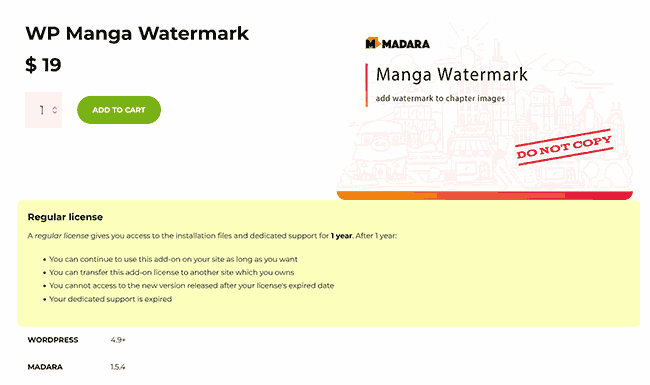
Watermarks (at least visible watermarks) don’t appear to be used frequently by manga publishers. In fact, you’ll see them more often on the web viewers of manga piracy sites.
This may be because implementing watermarks that identify the reader can be challenging at scale on the web. You have two options:
- You overlay a dynamic watermark on the manga using HTML/CSS/JavaScript. In this case, users can usually just select the watermark element in their browser’s developer mode and delete it.
- You add a watermark to the manga image itself. However, in order to identify the reader, you need to create and deliver a different version of every manga page to every user. This is extremely resource and storage-intensive and just not practical.
While publishers can add static watermarks to their manga with their logo or text, such as do not distribute, this does very little to stop piracy. The best way to utilize watermarks is in a tightly controlled desktop or mobile PDF viewer, where the user cannot do so using browser developer tools.
Account management
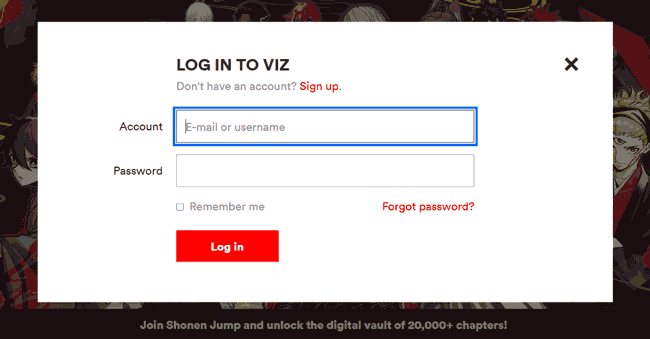
Username and password authentication is the standard way to give customers access to the content they purchased while ensuring it’s not available to anybody who browses to the correct webpage. That said, as everybody who has had a streaming subscription knows, that does very little to prevent sharing. Customers freely and happily share those credentials with friends and family so that they don’t need to purchase their own copies.
While publishers can implement more stringent sharing controls through a combination of IP address, device ID, Wi-Fi network, and other analytics, most choose not to. As we have seen with Netflix’s attempt to stop sharing, it helps somewhat. However, the change also did significant harm to its public image, so such controls are best implemented from the beginning.
Ultimately, though, account sharing is a minor issue for publishers compared to piracy. According to MUSO’s piracy report, visits to pirated TV increased by 4.2% the year Netflix’s restrictions were introduced. Several of the top ten pirated shows and movies in the year Netflix started cracking down on sharing were its first-party titles. There’s really little point in preventing account sharing if you don’t have strong copy protection in place to stop pirates from ripping media.
Does ebook DRM stop manga piracy?
 Does ebook DRM stop manga piracy?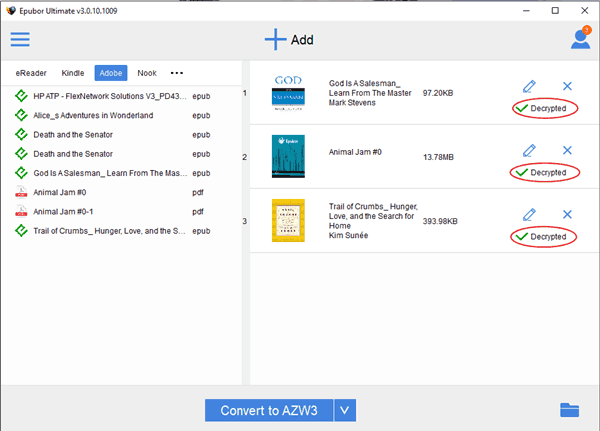
Amazon and Kobo allow users on e-reader and mobile devices as well as in the browser. These are purpose-built devices that use desktop apps and have purpose-built hardware, so enforcing copy controls should be easy, right? Unfortunately not. Controls still need to be researched, updated regularly, and implemented perfectly with no workarounds. None of that is possible without sinking significant amounts of money into copyright protection, which Kobo and Amazon just have not done.
All major ebook DRMs are crackable thanks to community-made apps and Calibre plugins, which masquerade as “converters”. In reality, they are used almost exclusively by pirates looking to strip DRM so that they can redistribute copyrighted content for free. These purpose-built tools can remove manga DRM in a single click and re-enable sharing, editing, and copying. Even without this, however, the DRMs do not stop screenshots, leaving pirates with an easy route to create high-quality copies.
Case studies: How pirates rip Manga from online viewers
 Case studies: How pirates rip Manga from online viewers
It’s worth demonstrating exactly how easy it is for pirates to rip manga from publisher sites with a few high-profile examples.
Example: Using Tampermonkey to download manga PDFs in one click
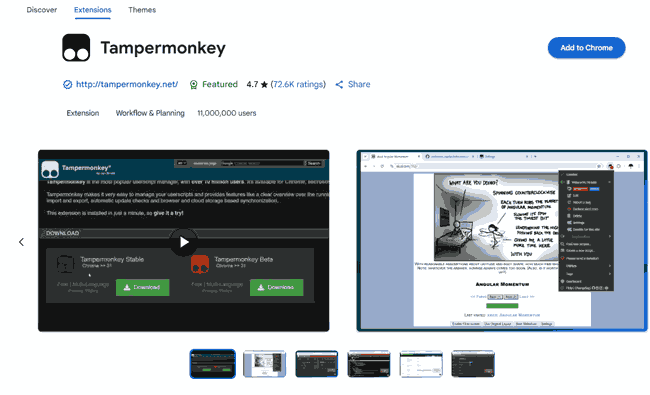
Unfortunately, creating illegal copies of manga isn’t limited to technical users. Extensions like TamperMonkey allow users to install user-created scripts to bypass browser DRM controls and download every page in a single click. We’ll use an unnamed, popular manga publisher to show you what the process of downloading manga looks like:
- The pirate downloads the Tampermonkey extension from the Chrome or Firefox store.

- They then go to GreasyFork and search for their Manga website of choice.

- They press “Install”.

- They visit the site they want to rip from and press the download button.

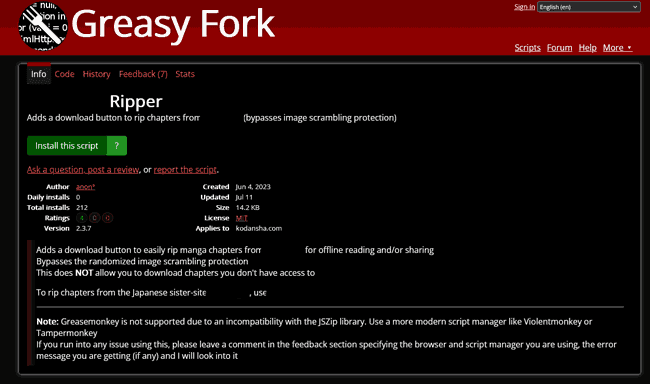
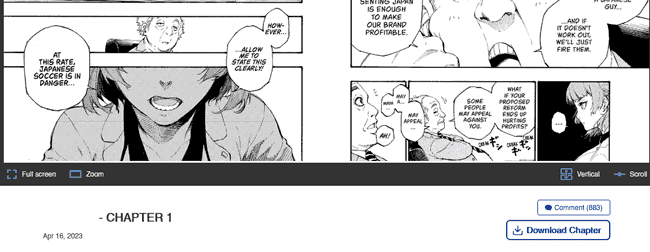
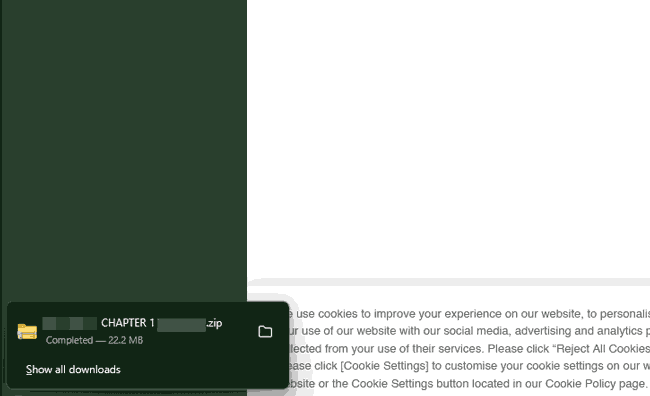
That’s literally it. Their browser will download a zip file with an image of each page, which pirates can then put into a manga PDF for easy reading. The whole process takes less than a minute because somebody else has already written the script. In the future, all they’ll need to do is press the download button on any manga they have available.
Example: Amazon Kindle DRM
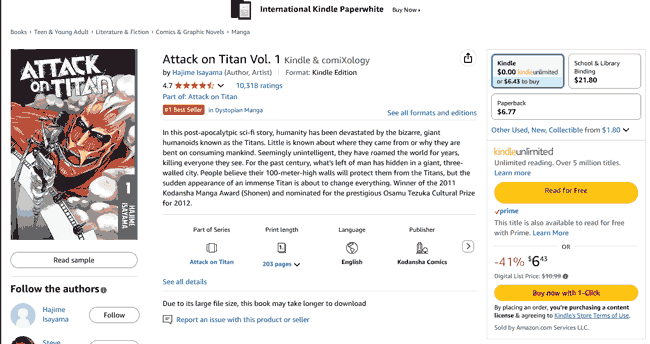
Many would assume that a company with a market cap of 2.5 trillion has the resources to prevent manga piracy. Unfortunately, Amazon has put a lot more effort into trying to lock people into its ecosystem than into preventing piracy. The millions of digital manga volumes published on Amazon are vulnerable to the same types of attack as publisher sites as its viewer is web-based. There are numerous ways to download and share manga published on Amazon Kindle:
- Screenshot the pages. Anybody can do this with no technical knowledge. Most volumes of manga/comics are a couple of hundred pages at most, so this is a bit repetitive, but probably achievable in 15 minutes or less.
- Use Tampermonkey or other scripts. There are scripts specifically for Amazon Manga/Comics that download high-resolution images of every page in a single click.
- Account sharing. As Amazon has no account sharing detection, users can just provide their login details to as many friends and family members as they like and split costs.
In other words, pirates have numerous ways to share Kindle manga, despite Amazon’s lukewarm efforts to prevent people from extracting images. The only way to prevent screenshots and other browser extraction methods is to use a desktop/mobile DRM.
Example: Ebook DRM
Ebook DRM is perhaps the easiest to remove of them all. As we covered in ebook DRM protection, it’s a two-step process for pirates:
- Open the ebook DRM removal tool and select the manga.
%22%20transform%3D%22translate(1.2%201.2)%20scale(2.35156)%22%20fill-opacity%3D%22.5%22%3E%3Cellipse%20fill%3D%22%23cacaca%22%20cx%3D%22124%22%20cy%3D%22138%22%20rx%3D%2257%22%20ry%3D%2237%22%2F%3E%3Cellipse%20fill%3D%22%23c9c9c9%22%20cx%3D%2216%22%20cy%3D%2210%22%20rx%3D%2231%22%20ry%3D%2231%22%2F%3E%3Cellipse%20fill%3D%22%23cacaca%22%20rx%3D%221%22%20ry%3D%221%22%20transform%3D%22matrix(3.2985%2020.52384%20-41.14418%206.6125%20247%20137.2)%22%2F%3E%3C%2Fg%3E%3C%2Fsvg%3E)
- Press “Convert” and wait a couple of seconds for the unprotected file to be output.
%22%20transform%3D%22translate(1.2%201.2)%20scale(2.35156)%22%20fill-opacity%3D%22.5%22%3E%3Cellipse%20fill%3D%22%23c7c7c7%22%20cx%3D%22115%22%20cy%3D%22145%22%20rx%3D%2249%22%20ry%3D%2233%22%2F%3E%3Cellipse%20fill%3D%22%23c8c8c8%22%20rx%3D%221%22%20ry%3D%221%22%20transform%3D%22matrix(20.82384%2010.51888%20-17.33297%2034.31344%2010.2%2016)%22%2F%3E%3Cellipse%20fill%3D%22%23cbcbcb%22%20rx%3D%221%22%20ry%3D%221%22%20transform%3D%22matrix(-4.48265%2017.69779%20-25.68549%20-6.50584%20248.8%200)%22%2F%3E%3C%2Fg%3E%3C%2Fsvg%3E)
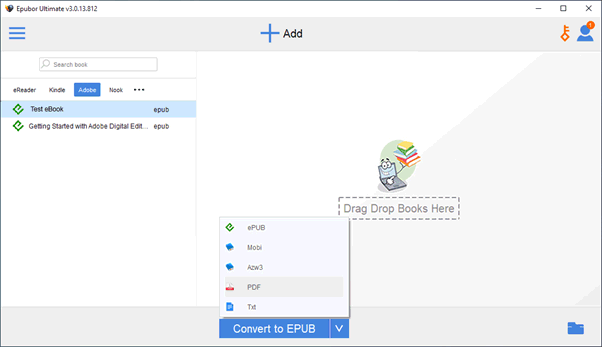
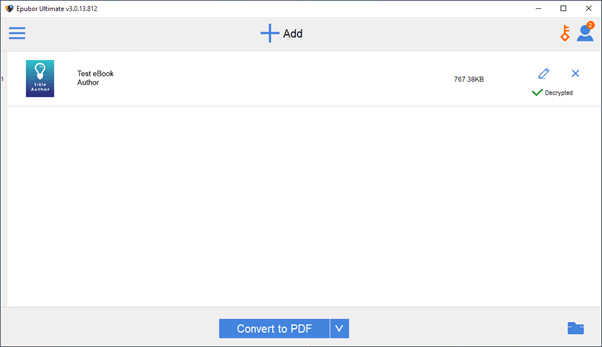
That’s it. No need for any commands, scripts, or complicated configuration.
Can PDF protection prevent manga piracy?
 Can PDF protection prevent manga piracy?
As we have covered in great detail, one of the main reasons manga piracy is so widespread is the weakness of web-based controls. It stands to reason, then, that using a format designed for the desktop could lead to better results. While there are various ebook formats suitable for manga and comics, one stands out: PDF. The PDF file format is ideal for manga for three key reasons:
- It’s a static format. Text and other elements do not reflow based on the device’s screen size, which ensures the artist’s original vision and panel layout are maintained.
- PDF has a mature DRM ecosystem. Due to its age, there are several different rights controls for PDF software, some of which are highly effective.
- Most viewer applications are desktop-based. This allows them to exert greater control over customers’ computers and enforce a wider range of copy controls.
That said, it’s not quite as simple as applying whatever built-in security your PDF editor has. Applications such as Adobe, Foxit, SmallPDF etc. all use the same basic password security for PDF files. Unfortunately, if your goal is to prevent unauthorized sharing, this type of protection is essentially useless. To explain more, we need to cover the different types of PDF password and their failings.
The open password
When a manga PDF files are protected with an open password, users must enter it before they can view the document. In the latest Acrobat versions, the open password is backed by strong encryption. The decryption key is tied to the password, leaving the document a jumble of numbers and letters until the user enters the correct phrase.
If the password is strong, open passwords are an effective way of preventing an attacker from accessing an intercepted document. This includes when it is in transit over the internet or sitting on a device unused.
However, open passwords are not really an anti-piracy measure. Adobe’s system is designed in such a way that anybody who has the open password is allowed to remove it. A pirate can therefore buy a legitimate copy, unlock it, remove the password, and distribute it as normal. Not ideal.
The permissions password
The Adobe Acrobat permissions password is supposed to address what a user can do with a document once they have opened it. When it’s enabled, publishers can disable printing, editing, copying, and saving. Or at least that’s the theory.
In practice, the permissions password only partially encrypts a document. This makes it trivial to bypass — search for “PDF password remover” and you’ll see dozens of online tools that can remove this password in seconds, even if the customer doesn’t know it.
The bottom line
The complete ease with which Adobe permissions can be removed makes them worthless for preventing piracy. Open passwords, meanwhile, are designed primarily to prevent malicious parties who have intercepted a document from gaining access, not authorized users from sharing with unauthorized ones. The problem with Adobe’s approach is that it built its viewer application first, then tried to tack security on top. Successfully preventing piracy requires an application to be designed from the ground up with that purpose in mind.
How to prevent manga piracy with Locklizard PDF DRM
 How to prevent manga piracy with Locklizard PDF DRM
While there are several DRM solutions suitable for manga, most of them fall into familiar traps. A lot of DRM solutions now are cloud-based, which means similar browser-based security with similar flaws. Another common pitfall is buying a DRM plugin for Adobe Acrobat. The issue with this approach is that plugins are not a stable way of improving a program. Updates often break them, other plugins can conflict with them, and a knowledgeable attacker could even build a plugin to circumvent yours.
To truly prevent manga piracy, then, you need a desktop DRM system that:
- Stops users from screenshotting manga, both with first-party and third-party screenshot tools
- Uses strong, non-password-based security
- Locks manga to authorized devices so that users can’t share with others
- Locks manga to specific regions to respect distribution rights
- Prevents users from printing, editing, saving, or otherwise copying manga.
- Stop printing to prevent scanlation of digital copies
- Optionally, allows publishers to add a dynamic watermark to digital and printed copies that identifies the customer
- Allows you to expire access to manga after a certain date or number of views, enabling subscription payment models and free trials
- Gives you the ability to manually revoke access to manga at any point, regardless of the device it is stored on
Locklizard Safeguard DRM does all of the above and more. It works by pairing AES 256-bit encryption with a transparent licensing system and a secure, desktop viewer application. The publisher encrypts the file on their local computer and selects the controls they want to enforce. Customers are then sent a license file that they can register to a single device (by default). When the customer registers their license and opens the file, decryption keys are securely transmitted from the licensing server to an encrypted keystore on their device, which they cannot access or share. The document content is then decrypted in memory so that it cannot be extracted, while the desktop viewer application prevents any printing, screenshots, editing, etc. We’ll show you how it works step-by-step below.
How to protect manga from piracy with Locklizard Safeguard
Here’s how you make manga in PDF format unshareable with Safeguard:
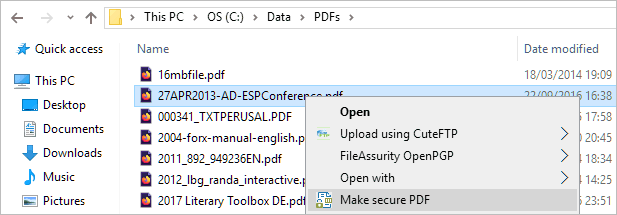
- Right-click the manga PDF in File Explorer and select “Make secure PDF”.
%22%20transform%3D%22translate(1.2%201.2)%20scale(2.41016)%22%20fill%3D%22%23fff%22%20fill-opacity%3D%22.5%22%3E%3Cellipse%20rx%3D%221%22%20ry%3D%221%22%20transform%3D%22matrix(-.5809%2027.73216%20-106.81608%20-2.23748%20197.3%200)%22%2F%3E%3Cellipse%20rx%3D%2246%22%20ry%3D%2230%22%2F%3E%3Cellipse%20rx%3D%221%22%20ry%3D%221%22%20transform%3D%22matrix(84.31433%2010.80091%20-3.55798%2027.77434%20176%200)%22%2F%3E%3C%2Fg%3E%3C%2Fsvg%3E)
- Protect the PDF from copying by ticking the relevant controls. We recommend that you add a watermark to discourage sharing. Safeguard creates permanent dynamic watermarks that identify users.
%22%20transform%3D%22translate(1.3%201.3)%20scale(2.57031)%22%20fill-opacity%3D%22.5%22%3E%3Cellipse%20fill%3D%22%234b8fc5%22%20cx%3D%22103%22%20cy%3D%228%22%20rx%3D%22213%22%20ry%3D%2214%22%2F%3E%3Cellipse%20fill%3D%22%23fff%22%20cx%3D%22101%22%20cy%3D%22131%22%20rx%3D%22180%22%20ry%3D%2292%22%2F%3E%3Cellipse%20fill%3D%22%23d6d3d0%22%20rx%3D%221%22%20ry%3D%221%22%20transform%3D%22matrix(-23.25743%20-43.01462%2024.53354%20-13.26496%2034%2054.5)%22%2F%3E%3C%2Fg%3E%3C%2Fsvg%3E)
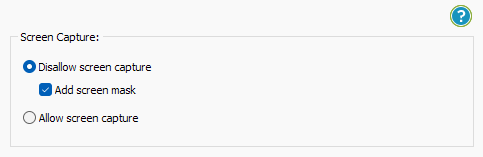
- Locklizard PDF will automatically protect a PDF from copying text and images, but you will want to take additional steps to protect your manga from screen capture. Without screen capture protection, a user can screengrab each page and create a pirate copy for others to use. To prevent this, open the “Environment Controls” tab and tick “Disallow screen capture” and optionally “Add screen mask” which covers the viewer window with an image if focus is moved away from it.
%22%20transform%3D%22translate(1%201)%20scale(1.88672)%22%20fill-opacity%3D%22.5%22%3E%3Cellipse%20fill%3D%22%23cacaca%22%20rx%3D%221%22%20ry%3D%221%22%20transform%3D%22rotate(76.5%20-20%2045)%20scale(59.50181%2038.8711)%22%2F%3E%3Cellipse%20fill%3D%22%23fff%22%20cx%3D%22161%22%20cy%3D%2259%22%20rx%3D%2295%22%20ry%3D%2295%22%2F%3E%3Cellipse%20fill%3D%22%23fff%22%20cx%3D%22157%22%20cy%3D%2246%22%20rx%3D%2290%22%20ry%3D%2290%22%2F%3E%3C%2Fg%3E%3C%2Fsvg%3E)
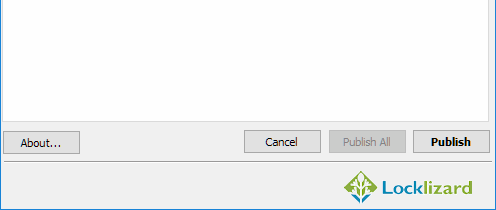
- Press the “Publish” button at the bottom of the window.
%27%20fill-opacity%3D%27.5%27%3E%3Cellipse%20fill%3D%22%23d1d1d1%22%20fill-opacity%3D%22.5%22%20rx%3D%221%22%20ry%3D%221%22%20transform%3D%22rotate(168.9%20164.5%20104.6)%20scale(494.0625%2062.51262)%22%2F%3E%3Cellipse%20fill%3D%22%23fff%22%20fill-opacity%3D%22.5%22%20rx%3D%221%22%20ry%3D%221%22%20transform%3D%22matrix(393.1765%20-23.13948%204.63058%2078.68087%20199.7%2040)%22%2F%3E%3Cellipse%20fill%3D%22%23d5d5d5%22%20fill-opacity%3D%22.5%22%20rx%3D%221%22%20ry%3D%221%22%20transform%3D%22matrix(-82.79938%20-45.81606%2023.04825%20-41.6531%2025.1%20159.3)%22%2F%3E%3C%2Fg%3E%3C%2Fsvg%3E)
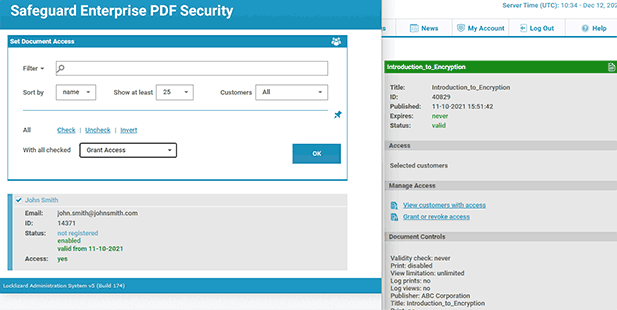
Locklizard will automatically prevent anybody from editing or saving your manga. This restriction cannot be bypassed, and as the user cannot make a copy of the document, they won’t be able to clone it and edit that, instead. On publication, your document will output to its source folder in the .pdc file format, and you can safely share it knowing that nobody can access it without a valid license. - Add a user account and send them their license via the Safeguard admin portal. They’ll receive an email with their license and a link to download the viewer application. After registering the license to their device and installing the viewer, they’ll be able to read the manga under the restrictions you set. Though they can share the encrypted .PDC file with others, users won’t be able to open it without a valid license file, and licenses cannot be shared.
%22%20transform%3D%22translate(1.2%201.2)%20scale(2.41016)%22%20fill-opacity%3D%22.5%22%3E%3Cellipse%20fill%3D%22%2357cae7%22%20rx%3D%221%22%20ry%3D%221%22%20transform%3D%22matrix(90.48772%20.46606%20-.09282%2018.0206%2065.8%207.7)%22%2F%3E%3Cellipse%20fill%3D%22%23eae2e1%22%20cx%3D%22125%22%20cy%3D%2281%22%20rx%3D%22255%22%20ry%3D%2253%22%2F%3E%3Cellipse%20fill%3D%22%239df1bc%22%20cx%3D%2252%22%20cy%3D%2221%22%20rx%3D%2292%22%20ry%3D%226%22%2F%3E%3C%2Fg%3E%3C%2Fsvg%3E)

Using Locklizard Web Viewer for Manga
While the Locklizard Secure PDF Web Viewer does not offer as strong protection as its desktop counterpart, it’s still better than most publisher viewers. Publishers can make protected PDFs available on the web viewer via their administration system.
The secure PDF web viewer:
- Fetches data in small chunks and decrypts content a page at a time in memory to make it harder for users to extract content.
- Ensures only one computer can be logged into an account at a time (by default).
- Does not require you to upload unprotected PDFs. You protect your manga locally and publish the protected .pdc file to the web view.
The Secure PDF Web Viewer is a good option for scenarios where customers cannot install a dedicated mobile or desktop application. Like any web viewer, however, it cannot reliably prevent screenshots. We therefore advise manga and comic publishers to use the desktop viewer where possible.
Why Locklizard for manga security
 Why Locklizard for manga security
Locklizard PDF DRM gives manga publishers real, enforceable control over their digital distribution. Instead of relying on easily bypassed online readers or ineffective ebook DRM, it uses hardened device-level copy protection that stops screenshots, locks manga to devices, and prevents copying. Crucially, it does so without adding significant friction to readers or internal teams. After a user installs their license file and the secure viewer, volumes open in just two clicks – download, then open. There are no passwords to leak, accounts to share, or browser controls to bypass.
Behind the scenes, publishers maintain control from a centralized administration portal where they can:
- Monitor opens, prints, and access comics and graphic novels
- Revoke individual users, user groups, or volume groups instantly
- Adjust expiry controls (such as date, number of prints, number of opens)
- Apply and adjust location and IP locks per document and globally
- Enforce viewer updates
- Bulk manage customers and volume validity, expiry, registration emails, and more.
While there’s nothing Locklizard can to prevent retail copies from being scanned and distributed, limiting piracy to physical copying is highly-beneficial. It means pirates will have to expend more effort, more time, and more money if they want to infringe your copyright. This gives publishers a critical head start in which they can produce first-party translations or convert impatient pirates to paying customers.
But don’t just take our word for it — try a free trial of our PDF DRM software today.
FAQs
 FAQs
FAQs
Is pirating manga legal?
Yes. Pirating manga is considered copyright infringement in the vast majority of jurisdictions.
Is it legal to use free manga downloaders?
While installing a free manga downloader isn’t illegal in itself, using it to download copyrighted material is. As practically no manga is in the public domain, downloading anything from the provided sites is likely to constitute copyright infringement.
Can you recommend safe websites to download manga for free?
There is no such thing as a safe website to download manga. Downloading manga from any piracy site could get you in trouble with the law and could lead to your PC being infected with malware. Many pirate manga sites accept user submissions and aren’t regularly checked for quality.
How do you use HakuNeko to download manga?
After waiting for its source lists to update, pirates can download manga with HakuNeko by simply searching for the volumes they want and hitting “download”.
Do you need an internet connection to read manga with Locklizard?
No, publishers can choose how frequently their manga “phones home” to the licensing server — on each open, only when an internet connection is available, every x days, after x days and never again, or never.
What is the most pirated manga?
There have been no robust studies on the most pirated manga, since the network of pirates is distributed across various websites that aren’t transparent with their numbers. That said, if we check piracy sites, titles such as Solo Leveling, Beserk, and One Punch Man often have the most follows.
