
How to protect ebooks from sharing, copying & piracy with DRM
Protect IP

Protect ebooks without useless passwords:
- Stop unauthorized access
- Stop sharing, distribution, theft & piracy
- Strong US Gov strength encryption, DRM and licensing controls
Restrict Use

Set Expiry

Revoke Access

Watermark

Log Use

Benefits

 Free Trial & Demo
Trusted by:

How to protect ebooks from sharing & copying with Safeguard PDF security
To protect a PDF ebook from being copied
In Safeguard Secure PDF Writer, choose the ebook protection options:
- Stop printing, allow printing, or limit the number of prints.
- Add dynamic watermarks that are permanent, to viewed and or printed pages. Dynamic variables replace actual user and system data when the document is viewed/printed so you only have to protect the document once for all users. By using watermarks you can discourage users from photocopying and distributing printed copies.
- Decide whether you want to make it expire on a specific date, after a number of views, after a number of prints, or after a number of days from opening. You might want to make an ebook expire if you want to provide a sample for a limited period of time.
- Block screen shots and prevent screen grabbing.
- Allow or deny offline use. In most circumstances you probably want to allow users to view ebooks without having to be connected to the Internet. You can however enforce a connection after a certain number of days and then never again so that if a chargeback is made you can instantly revoke access.
Safeguard’s default ebook protection
- Stops users sharing ebooks, editing, and ebook copying or pasting content
- Locks ebooks to machines or devices so they cannot be shared
- There are no passwords for users to enter, manage, or remove
- Revoke ebooks at any time regardless of their location

 | Ebook Protection and DRM security |

Use an ebook DRM solution to protect ebooks from sharing & theft
With the media focus on TV, film, video games, and software piracy, you’d be forgiven for thinking that digital publishing dodges the lion’s share of copyright infringement. The statistics, however, tell a different story. According to analyses of piracy traffic, published material is the second most pirated medium globally; it’s pirated more than film, software, and music combined.
The impact on the publishing industry is significant. The Authors Guild estimates that the US book publishing industry lost $300 million to piracy in 2019, while in the UK, it may be even worse. A 2024 survey by the UK Intellectual Property Office found that 22.4% of respondents had accessed ebooks illegally in the past three months. Worse, the respondents were not customers who wouldn’t have been converted anyway. 84.8% of respondents said that they would access books through a legal source if pirated copies were not available.
The bottom line is that publishing an ebook without sufficient protection could cost you tens or even hundreds of thousands in opportunity cost. Revenue that could be going towards authors’ royalties or commissioning innovative new content.
 What is e-book protection & ebook copy protection?
 What is e-book protection & ebook copy protection?
Ebook protection – i.e., to copyright protect your ebook – is the application of security controls to an ebook to produce a result consistent with the needs of the ebook publisher. This could be who is entitled to use the ebook, whether they can transform it, copy it, obtain printed copies, etc.
Ebook security lets publishers protect e-books against unauthorized distribution and use (stop sharing & copying) and prevent revenue loss while still enabling authorized use.

“Our E-Books on Demand project at Symantec has grown to wondrous proportions, thanks to your Locklizard PDF DRM products.”

Items to consider when choosing e-book protection software
 Items to consider when choosing e-book protection software
There are many issues to consider (see below) when protecting ebooks. digital rights management is an essential addition for ebook security.
- Copying & distribution. If someone purchases an ebook, they feel it should be theirs to keep and do what they like with. A physical copy is quite different from a digital one because an identical copy can be easily produced and quickly distributed. There is no need for the photocopier and the use of the postal system when you are dealing with digital e-books – a simple file copy and email distribution or upload to a website will do. E-book publishers want to protect their IPR and prevent loss of revenue by stopping ebook sharing (unauthorized distribution) and copying, however attractive they are to the purchaser.
- Licensing authorized devices. You need to address how many devices an e-book should be allowed to be installed on. An e-book publisher might argue that one is enough – just the same as if a person had purchased a single copy of a physical book. A user would argue they need to use it on several devices. Good e-book protection systems use digital rights management to allow you to specify the number of devices the e-book can be used on.
- Offline use. When a person purchases an e-book, they don’t want to have to be connected to the Internet to view it (just like a physical book). It is important that the e-book protection system is capable of allowing permanent offline use. More sophisticated DRM based e-book protection systems should let e-book publishers specify a one-time connection after x days of use so they have the ability to revoke access if a chargeback is made. Also, they should have the option to connect to the internet for licensing if it is available.
- Printing. Just because someone has purchased an e-book, that does not mean they have the right to produce a hard copy of it as well. If printing is to be allowed, then you might want to consider the use of dynamic watermarks (user information is added at the time of printing). This is to provide another layer of e-book protection – most people don’t want to have their names associated with copies that have been unlawfully distributed.
- Portability & Security. The ebook format you decide upon is equally important – what file format do you have to convert to, and do you get the same results on different devices? While both Amazon (Kindle, .azw) and Adobe (epub) have their own popular proprietary e-book formats they have both been broken – type in Kindle .azw crack or epub crack into Google and you will find quite a few websites dedicated to this task. So, as an ebook publisher, you might want to wonder what e-book protection you are actually getting. Locklizard works with PDF files since they provide consistent rendering across a variety of platforms and devices. Our bespoke viewer applications mean we don’t have to rely on the Adobe security handler (security through obscurity) for the protection of e-books.
- Tracking and enforcement. Many ebook DRMs can tell you how many times your ebook has been downloaded or read. However, consider one that can provide you with in-depth information such as the number of times your ebook has been opened, who by, and where from. This can not only give valuable market insights but also help to identify unauthorized sharing. Of course, to be truly useful, publishers need to have the ability to revoke access to ebooks when unauthorized sharing is identified, regardless of where they’re stored. This is only possible if the DRM “phones home” every now and then to check that the license is still valid.
- Fixed locations. This is a more sophisticated DRM control that only allows the e-book to be used from a specific location (IP address or range) which might be a library, a school, or a country, and so on. This allows a publisher to manage access to e-books much more flexibly.
- Dynamic watermarks. There are many ebook digital rights management systems that claim to watermark ebooks dynamically with user information. However, often these are just standard PDF watermarks that can be easily removed using any PDF editor. If you want to add watermarks to a PDF ebook, then you need to make sure they cannot be easily removed.
- Managing expectations. A digital ebook does not cost the same to produce or distribute (in both time and physical shipping costs) as a physical copy (paper or hardback). E-book publishers can charge less and manage customer expectations of use (what limitations there are on copying, printing, use on additional devices, etc.) to justify lower prices than physical copies.
DRM provides an essential series of licensing measures in ebook protection which extend the ability of the publisher to publish safely when distributing ebooks in the digital marketplace.
 Other ways to protect ebooks
 Other ways to protect ebooks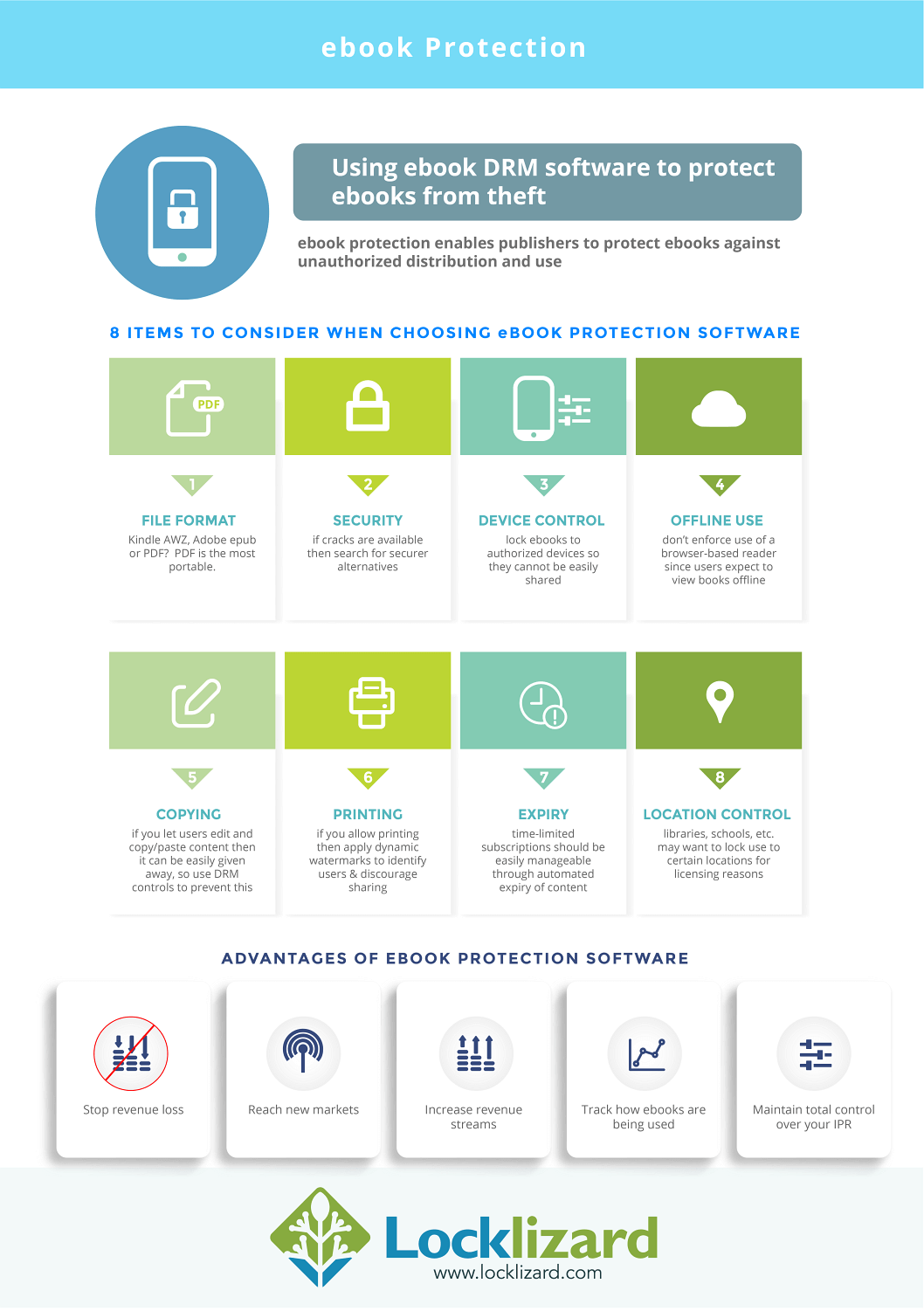
Ebook DRM
 Ebook DRM
If you’ve sold, bought, or borrowed an ebook previously, there’s a good chance you’ve already run into other ebook digital rights management solutions (ebook DRM). The most popular offerings are from Adobe and Amazon, with offerings from Nook, Kobo, Google Play etc. building off of one or the other.
The important thing to understand is that these DRM solutions were never well implemented and are easy to remove. Due to flaws in implementation and obfuscation, users can remove the copy protection from ebooks by pressing a single button in a free cracking program. They can then share the ebook with anybody who wants it. The worst part is that because these tools market themselves as “conversion” tools, they’re freely available with no legal repercussions.
Social DRM (Watermarking)
 Social DRM (Watermarking)
Social DRM refers to the practice of embedding visible or invisible watermarks in an ebook that typically contains identifying information. The idea is that users will not share the file with others knowing that it can be traced back to them. Or, failing that, the copyright holder will be able to track down the source of the leak and pursue legal action.
The problem is that social DRM does not prevent the customer from editing the document. As a result, a pirate just needs to purchase a legitimate copy, find the watermarks in the documents code, and remove them. Once they share it, whether they catch every watermark or not, the ebook is already out there and next to impossible to take down.
Ebook password protection
 Ebook password protection
Another route some self-published authors take is password protection. This can be achieved by encrypting a file and only allowing decryption with the right password.
The problem with this method is that passwords only protect a document when it is in transit (being sent via email etc.) or at rest (sitting on the users’ computers). They don’t protect against unauthorized ebook sharing because the customer can just share the password with whomever they like.
Cloud ebook protection/flipbooks
 Cloud ebook protection/flipbooks
Web ebook protection, whether it’s via a cloud document service or a flipbook, is more feasible than it’s ever been from a usability perspective. Many customers now have access to a stable internet connection wherever they go, including on flights, trains, and buses. Big companies such as Amazon have even leaned into this with the addition of a web-based Kindle viewer.
Unfortunately, while such a solution is convenient, it has major flaws when it comes to ebook protection:
- Account sharing: It’s trivial for users to share access to their account to deliver ebooks to friends and family free of charge.
- Download prevention: Web developers have limited tools to prevent legitimate customers from downloading their ebooks and sharing them with others. They’re restricted to using tools like JavaScript to try to prevent downloads via the source code, copy-paste, and printing. However, web browser cannot exercise control over users’ system functions. Allowing such access would make it trivial for malicious parties to deploy malware and ransomware. As a result, there’s little developers can do to prevent users from screenshotting webpages or modifying the JavaScript that executes on their screen to bypass other controls. See flipbook protection for in-depth examples of this.
- Reduced quality: While the quality and speed of mobile internet has improved significantly over the past decade, anybody who has tried to stream live content will tell you it’s still far from perfect. Online ebooks are often converted to images and then compressed so that they don’t eat into data caps and don’t take seconds to load on slow connections. This leads to a degraded experience for the end user, with elements such as low quality text even potentially causing headaches.
Copyright Registration
 Copyright Registration
Does copyright registration/ copyright law protect your ebook from copying?
Authors and other content creators are often encouraged to register their copyright as soon as they consider publishing their work. Though you are entitled to a degree of inherent copyright protection the moment you create your work, official copyright registration will give you more options should you need to pursue legal action against ebook piracy.
However, copyright registration alone does nothing to protect an ebook from copying. Pirates are usually very aware that what they are doing is illegal. Knowing a work is copyright registered does not act as much of a deterrent, nor does it impose any physical restrictions. Unfortunately, copyright registration is also of limited use when it comes to getting pirated content removed. Most pirate sites refuse to comply with a takedown notice and go to great lengths to protect the identity of their owners, uploaders, and server locations.
Really, then, enforcing your copyright through the legal system should be your last resort. However, this is both time-consuming and expensive. It’s much better if you can stop your ebook from being distributed without your permission in the first place.
Ebook watermarks: Should you use them?
Watermarks are the final line of defense for ebooks. While a robust DRM system can prevent most copying methods, none can prevent a user from photographing their screen with a smartphone. What you can do, however, is increase the personal risk of doing so. User-identifying watermarks, when backed up by strong editing controls, ensure that customers can’t share images of their ebooks publicly without exposing themselves to potential legal action.
Watermarks aren’t for everyone, of course. They can make a text more difficult to read, particularly if there are limited customization options. You have to ask yourself how likely your particular publication is to be shared in this way and whether the trade-off is worth it. Typically, watermarks make more sense for ebooks that contain desirable information. Owners of recipe books, for example, might be tempted to snap a picture to share with others. The same could apply to books with a lot of maps or charts, reference sheets, membership association content, etc.
There are three types of watermark that are relevant to ebooks: static, dynamic, and hidden.
Static watermarks
You will have seen static watermarks thousands of times. Stock photos, photographers, designers, law firms, and even banks use them extensively for three primary purposes:
- To make it clear who the owner of a document is and authenticate it as official
- To remind users of their obligations (e.g. do not share or copy)
- To promote brand recognition
These are more or less their use cases in ebooks, too. Static watermarks aren’t particularly effective at preventing piracy or unauthorized use because they don’t convey any consequences to the user. It’s not feasible at scale to manually change a static watermark to include a customer’s name. That’s where dynamic watermarks come in.
Dynamic watermarks
Dynamic watermarks allow ebook publishers to insert information into a text watermark on open or print. This can include information such as the customer’s name, the date, the publisher, a unique ID, etc. These are an upgrade over static watermarks because suddenly the user can be identified if they share the ebook outside of authorized channels. They also ensure that information such as the date, time, company, etc. stays up to date.
That said, even a dynamic watermark is only as strong as its editing controls. Ebooks are essentially XML files. Without strong copy protection, a user can easily edit the underlying code to remove any watermarks.
Hidden watermarks (social DRM)
Social DRM or stenography refers to the practice of embedding visible or invisible watermarks in an ebook that typically contains identifying information. The idea is that users will not share the file with others knowing that it can be traced back to them. Or, failing that, the copyright holder will be able to track down the source of the leak and pursue legal action.
The problem is that social DRM does not prevent the customer from editing the document. As a result, a pirate just needs to purchase a legitimate copy, find the watermarks in the documents code, and remove them. Once they share it, whether they catch every watermark or not, the ebook is already out there.
5 steps to protect your ebook before you publish
Once you release your ebook to the internet, there’s no going back. It only takes one person downloading a version with insufficient copy protection for it to be out there for free, forever. As a result, we strongly recommend you take these five steps to protect your ebook before you publish it:
- Apply an effective DRM. Popular ebook DRMs such as Kindle, Kobo, ADEPT, etc. aren’t going to do a whole lot to prevent customers from sharing pirate copies of your ebook. You need a DRM with strong encryption that can lock ebooks to devices and ensure users cannot save, edit, or copy them.
- Enable screenshot protection. OCR and AI tools make it trivial for anybody to convert a screenshot of an ebook back into text. If you want to stop unauthorized sharing, you need to be able to stop first and third-party screenshot tools across a number of environments.
- Limit the number of devices that can read it. Having the above systems in place allows you to grant customers the license to read the ebook on a set number of devices. This prevents users from providing the license to view your ebook to anybody they like.
- Expire based on time or usage. Naturally, you want to make sure that customers who join your subscription service, get a free trial, or check your ebook out of the library don’t gain perpetual access. As you can’t legally access every user’s device to delete their files, the best way to enforce ebook expiry is to revoke the decryption key they use to open their document.
- Apply digital and print watermarks.While readers can find watermarks intrusive, they’re a good idea if you’re really serious about protecting your ebook from sharing. In particular, dynamic watermarks that identify the customer dissuade them from taking a picture of an ebook with their phone or sharing a printed copy. The ability to customize print and digital watermarks individually is important, though — both to ensure their effectiveness and to minimize disruption for the end user.
FAQs
 FAQs
FAQsAre all ebooks DRM protected?
No. ebooks are not DRM protected by default, but many publishers decide to add DRM to help prevent illegal downloads. DRM is particularly common on platforms such as Amazon Kindle and Kobo, who make it as simple as ticking a box before listing.
What is the best way to add DRM to an ebook?
The best way to add digital rights management to an ebook is to convert it to a PDF and protect it with a PDF DRM solution. Unlike popular ebook protection methods, Safeguard PDF DRM cannot be easily bypassed or removed.
Should I have DRM on my ebook?
If you’re planning to make money, it’s a good idea to protect your ebook with DRM. Without it, you risk losing a large chunk of your revenue to ebook piracy.
However, it’s critically important that whatever digital rights management solution you use actually works. Sadly this just isn’t the case for .epub, .azw, or .mobi DRMs. Instead, you should convert your ebook to PDF and protect it with a tool like Safeguard DRM ebook security.
Where can I sell protected PDF ebooks?
Anywhere that will let you list them for sale. While Amazon likely won’t let you list protected PDF files, other retailers will. You can also sell them on your own website and make use of the e-commerce add-on for automation.
Where can customers read a Safeguard-protected ebook?
On a Windows, Mac OS, iOS, or Android device – so long as they’re authorized to do so.
Download e-book protection software – protect ebooks from sharing
 Download e-book protection software – protect ebooks from sharing
Copy Protect e-books with Locklizard ebook PDF DRM software – sell ebooks securely, stop ebook piracy & theft
Download ebook protection software to copy protect ebooks published in PDF format and protect them from sharing by stopping unauthorised distribution.
Locklizard uses US Government strength encryption (AES) and digital rights management controls to prevent unauthorised access, sharing and misuse of your ebooks. With Locklizard ebook DRM software you can control who can view your ebooks, what they can do with them (copy, print, etc.) and when they can no longer be viewed (expire).
Locklizard uses encryption, DRM and licensing controls for complete copy protection of your ebooks. Our protection software stops unauthorized distribution of your ebooks and lets you revoke access to them if you feel they are being misused.
Read our customer testimonials and case studies to see why thousands of organizations use Locklizard PDF security to securely sell ebooks, protect your ebooks from sharing, and stop ebook piracy & theft.
Customer Testimonials















