
PDF encryption software: Encrypt PDF files without Acrobat or passwords
Protect IP

PDF encryption for business without useless passwords:
- Stop unauthorized access
- Stop sharing and distribution
- Strong US Gov strength encryption, DRM and licensing controls
Restrict Use

Set Expiry

Revoke Access

Watermark

Log Use

Comply Law

Benefits

 Free Trial & Demo
Trusted by:

Safeguard PDF encryption software: Encrypt PDF files securely without Acrobat or passwords
How to encrypt a PDF without Passwords
Encrypting a PDF or multiple PDF files is simple and secure with Safeguard PDF Security.
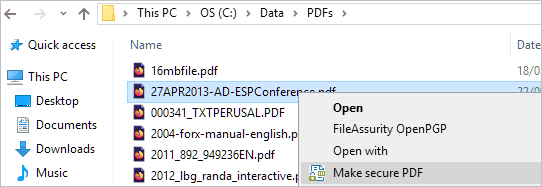
To encrypt PDF files, right-click on them in Windows File Explorer and select the menu option ‘Make Secure PDF’.
Strong PDF Encryption with DRM controls
Safeguard PDF security takes PDF encryption to the next security level. It encrypts PDFs with US Gov strength AES encryption to prevent unauthorized access, and applies DRM to control what authorized users can do with your PDF files:
- stop sharing
- stop copying
- stop editing and modifying
- stop or limit printing
- stop screen shots
- control expiry (how long your PDFs can be used for)
- revoke access at any stage
- add dynamic watermarks to identify users
- lock PDFs to country and IP locations
- track document use
Safeguard provides strong PDF encryption with total document control:
- PDFs are locked to individual devices
- content is only ever decrypted in memory
- there are no passwords to enter or manage, or for users to share or forget

 Is Adobe PDF encryption secure?
 Is Adobe PDF encryption secure?
Why should NOT use passwords to encrypt PDF files
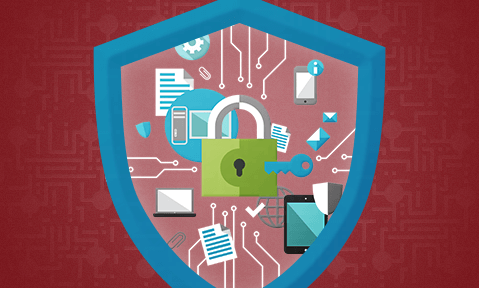
- users can share passwords and thus ‘protected’ PDFs with others
- passwords are easily removed with password recovery software
- Adobe PDF permissions (stop copy, print, editing) can be easily bypassed or removed
- once the user has the password they can decrypt the PDF and do what they like with it
“I just wanted to let you know how impressed I am by your PDF security product.
I was looking for a way to protect my GCSE revision books (which I write and sell online) and prevent unauthorised distribution.
The whole system works flawlessly, my customers love it and appreciate the fact that I can alter their order (for example authorising more prints) from my end.
So thanks again for providing such a great PDF encryption product that does exactly what it promises.”

 Protect your IPR
 Protect your IPR
See why thousands of companies use Locklizard to safeguard their documents and increase revenue streams.
“By using Safeguard PDF DRM we are immediately cutting the costs of distributing by printing and mailing. In that sense the software pays for itself quickly.”

PDF Encryption Articles
Learn more about PDF encryption:
 How to encrypt a PDF
PDF Security and Encryption
Encryption is not enough for DRM
 | Encrypting PDF files |
What is encryption and PDF encryption?
Encryption is the use of a mathematical system (algorithm) to make information secret from anyone not authorized to use it. Encryption uses a secret key to scramble information in files so that only those with the correct key can view them. PDF encryption is therefore the encryption of PDF files, the result of which is an encrypted PDF file.
Encryption keys are sometimes taken from passwords, but passwords are a poor choice for encryption keys – see PDF password protection. It does not matter what the strength of the encryption algorithm is if the implementation is not secure.
Why encrypt PDF files & documents for business?
There are many reasons why you would want to encrypt PDF files in a business scenario.
The information in the PDF document is confidential, and only a restricted number of people should be able to see it. This could include training courses, price lists, bid documents, takeover plans, healthcare records, and so on. The information is valuable – you sell it – perhaps a newsletter, an analyst’s report, a consulting report, a periodical, or a book. You obviously don’t want to give it away!
If you don’t encrypt the PDF file, anybody can read it, and the value of your information is lost. However, if you do plan to encrypt PDF files, you need to use PDF encryption software that utilizes a reliable encryption method.

Passwords vs encryption
What is the difference between PDF Password Protection & Encryption?
They are usually one and the same, but since there is more than one way to encrypt a PDF, PDF password protection clarifies the protection method used. You can encrypt a PDF with either a password or a certificate so PDF password protection refers to encrypting a PDF with a password rather than using a certificate. For PDF password protection, the password you enter is used as the encryption key, and for PDF certificate encryption your public key is used to encrypt the PDF.
PDF encryption, uses a key to scramble the contents of the document. From the perspective of somebody without the key, its contents are just a jumble or random numbers or letters. They cannot view, modify, or convert the document without first cracking its encryption.
So when you protect a PDF with a password, the software application encrypts the PDF using that password as your encryption key. This is how solutions such as Adobe Acrobat function. However, as we’ll cover in the “Passwords vs Certificates” tab, password protecting a PDF in this way isn’t much better than forgoing encryption entirely.
Is PDF encryption secure?
Is free PDF encryption secure?
Encryption algorithms
Passwords vs Certificates
 Password encryption
 Certificate encryption
Encrypted PDFs
 How to send encrypted PDF files
Password protect PDF
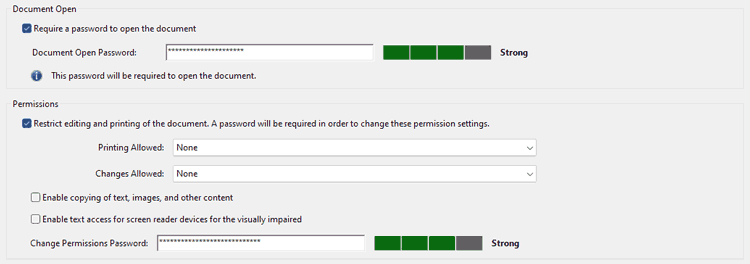
 How to password protect a PDF with Adobe Acrobat

Unlock Adobe PDF
 How to remove a permissions password from a PDF
 Removing a permission password with an online tool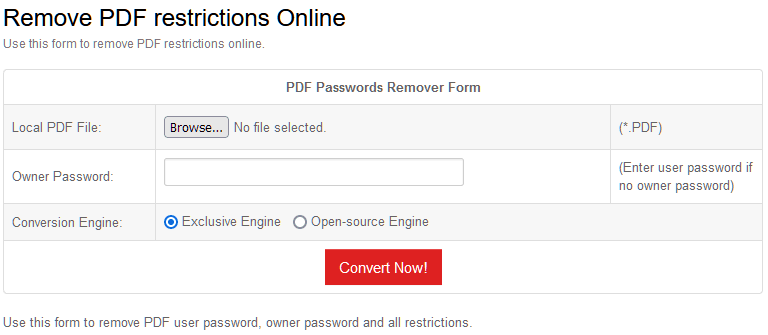
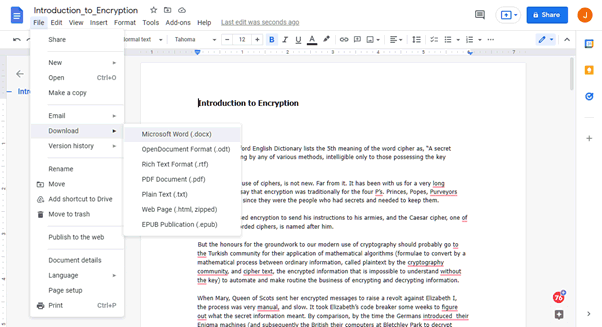
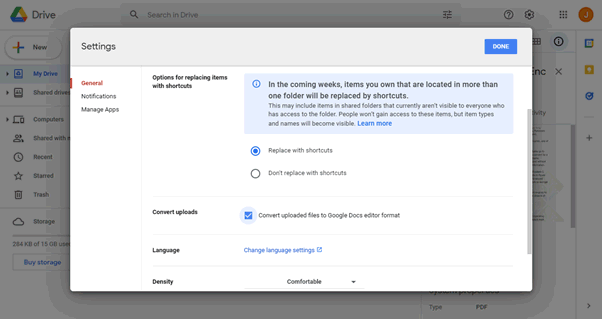
 Removing a permission password with the Microsoft Word PDF convert tool
 How to Unlock a PDF protected with an owner password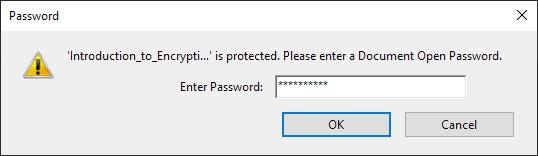
PDF encryption for business needs
 | Locklizard – the best PDF encryption software to encrypt PDF files securely |
Encrypt PDF files without passwords or Acrobat: control access and use
Locklizard provides the best PDF encryption software, protecting your PDF files from unauthorized access and use with US Gov strength PDF encryption, licensing and DRM controls.
- Our DRM PDF Security products enable you to share documents securely without insecure passwords or plug-ins, and enforce access, location, expiry, and usage controls.
- Batch encrypt PDF files, automate protection, and add DRM controls using our command line PDF encryption.
- Unlike Adobe Permissions which can be easily removed, our DRM controls persistently protect your PDF files and enable you to revoke PDFs at any time regardless of where they are.
- We don’t password protect PDFs because they are not a secure method of protecting PDF files. Instead we use transparent and secure key management to transfer and store keys.
- Our DRM technology ensures your encrypted PDF files remain safe regardless of where your documents are located. No keys are exposed to users or interfaces and documents are only ever decrypted in memory.
- Our easy to use administration system provides simple user and document management, and unlike passwords, keys are securely and transparently managed for you.
See our customer testimonials and case studies to see why thousands of organizations use Locklizard PDF security to securely share PDF documents and sell PDF files securely.
Customer Testimonials















