

Product Add-ons for our Document Security products
Safeguard PDF Security product add-ons
Our DRM products can be enhanced with add-ons to create more comprehensive solutions.
Multiple add-ons can be used together to create a completely automated document protection system – for example: using command line to automatically protect documents (ebooks, reports, training courses, etc.) placed in one or more folders, then using ecommerce to automatically add and assign access rights to new users, and finally giving Web Viewer access.
- Internally this could be used by an administrator say to distribute board papers automatically with the right protection applied to them, or externally for distributing manuals to franchises.
- Publishers selling information can setup generic protection profiles for their different products and integrate Safeguard with their ecommerce systems for 24×7 fulfilment.
 Free 10 Day Trial
Protect PDF files – stop misuse
- Stop unauthorized access and sharing
- Control use – stop printing, copying, editing, etc.
- Lock use to devices, countries, locations
- Control expiry, revoke files anytime, anywhere
Trusted by:

 | Safeguard Web Publisher |  |
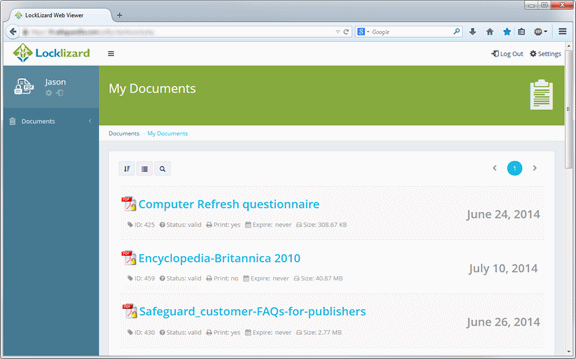
Publish protected PDF files to the Web and view them in your Browser
Where Publishers want to make protected PDF documents available to users without having to install a Viewer, they can use Safeguard Web Publisher to prepare them for web use. Users use the free browser based Secure PDF Viewer to view them on any Operating System.
 | Safeguard PDF Portable | |
Publish protected PDF files to USB sticks and view them offline
Safeguard PDF Portable is a portable, no installation Viewer and secure PDF document solution for USB sticks (Windows only). It enables publishers to distribute secure Viewers, documents, and keystores on USB sticks, and users to use secure documents from any computer without having to install or register the secure Viewer software.
Safeguard PDF Portable can work in both offline (no Internet connection for the user is required), and online mode where USB sticks can be updated on-the-fly with new documents, keys, and access rights. The licensing control is that whoever has the USB device has use of the license(s) granted.

One use of the USB system is the bulk issuing of conference documentation where all the materials can be published on one USB stick and circulated with the conference welcome pack. You can also publish collections of documents onto USB but only license parts of them at a time to customers – thus saving replication costs.
 | E-commerce API – Automate user account creation & access rights | |
Automate user account creation and document access
Ecommerce integration allows for full automation between your web sales process (payment system) and the issuing of licenses and document access.
It can also be used within an organization to enable administrators to easily add user access without having to use the Safeguard administration system (i.e. a full administrator of the system).
Instead of having to manually enter user details into the administration system (user name, email address, protected files they are entitled to view, etc.), the ecommerce module allows these details to be sent automatically from your ecommerce system to the Locklizard administration system, so no manual input is required. Users therefore do not experience any unnecessary delay in receiving their license codes, and can view your protected files as soon as they have paid. This is suitable for organizations processing more than 20 sales a day.
You or your web developer integrate with the Locklizard ecommerce module from your ecommerce system of choice, or you can separately purchase ecommerce plug-ins for common shopping cart systems (e.g. Magento, XCart, opencart, Woocommerce, WordPress) from Proexe who also provide integration services, and concrete5 plugins from Mesuva.
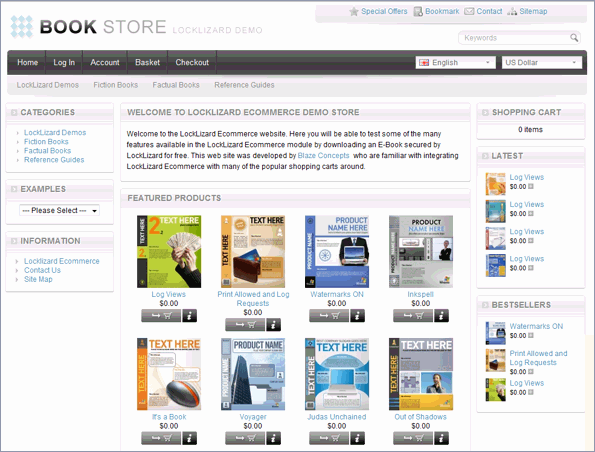
Shopping Cart System Demo
- Shopping cart system demo using Locklizard ecommerce integration.
- Purchase process and flowchart
What can you use the Ecommerce API for?
There are several reasons why you would wish to automate administration system processes:
- Connection to one or more sales web sites
This is probably the commonest use for any publisher, in order to automate online order fulfilment – granting access to secured PDF documents. Commands are available to add a customer and grant them access to documents, or to connect them to subscription services using the Locklizard publications concept. Publishers may also grant existing customers access to additional documents that they acquire (or are allocated) through the web site or as a result of external administrative processes. Licenses may be emailed to customers or fulfilled directly over the web link established with the customer during ordering. - Managing dynamically created documents
A number of major publishers allow their customers to design the document they wish to see dynamically. It is created out of many database content sources, and is often a unique production. The DMS is used to marshal document text as part of the assembly function before using the Command Line option to protect it as a new secured document. When it has the new Document ID it can be passed forwards to eCommerce to automatically link the new protected document to the customer. - Automating adding new documents to existing customers
There can be times when for marketing reasons a publisher can wish to distribute a ‘sample’ of an upcoming title, allowing existing customers a ‘sneak-peek’ perhaps for a number of reads or days. The eCommerce integration API allows a publisher to batch allocate access rights to a document(s) protected for this purpose, and, if needed, cancel access after a fixed period of time. - Devolving user/customer administration
In larger administration environments it is not good practice to allow too many people to be systems administrators, because that role is very powerful and difficult to supervise. But by creating applications that interact with the eCommerce API, you can create tiers of lower level administrators who may be programmed to be able to add users, modify some of their attributes, but perhaps not be able to delete users, publications or documents. Such powers would simply not be exposed to them by the application, and the actual commands being issued would be effectively hidden. Rules built into the commands issued to the eCommerce API could be used to limit the role of these administrators, control access to the applications, and create activity logging entirely according to internal control requirements. - Automatically logging users in to the Web Viewer
Users can be logged in automatically (SSO) to the Web Viewer. By clicking on a one-time link, users are logged directly into the Web Viewer (without them having to enter any login credentials), and optionally a document can be automatically opened. This simplifies the user experience and enables you to offer a seamless interface with other systems that users are already logged in to.
 | PDF Command Line Encryption – Automate batch protection | |
Automate PDF protection
Safeguard PDF Security Command Line Encryption Utility allows the automation of actions that would otherwise have had to be carried out manually whilst protecting documents through the Writer GUI. PDF files can be encrypted and DRM controls applied without the need for manual input or user intervention. Commands can be run from the DOS prompt or a batch file.
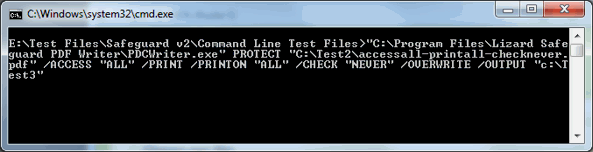
This also provides quick and simple integration into your existing web based applications and .NET code (where PDF encryption is required on-the-fly) without the need to use an API. It also simplifies integration with Document Management Systems. Using command line, documents can be consistently protected with the same DRM controls just by dropping them into the appropriate folders where a preset batch file is run.
All the protection options available through the Safeguard Secure PDF Writer GUI can be accessed through the command line utility.
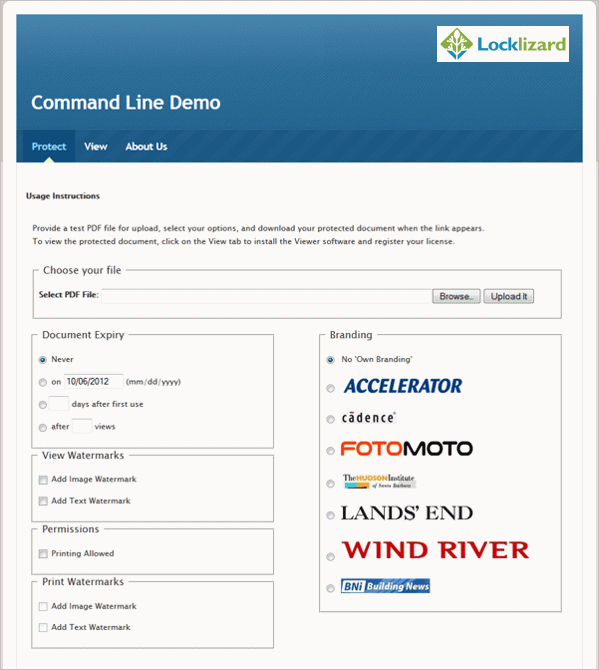
Command Line Encryption Demo
- Document Protection demo using command line encryption.
This demo uses a GUI to run command line commands. Organizations internally can use this to rapidly protect documents for secure distribution and to control what DRM protection features are made available.
Why Automated Document Protection?
The manually operated Writer app used to protect documents can be automated using the Command Line option. This allows an administrator to preset specific commands and have them run as DOS commands in the machine where the Writer is installed. There are several reasons why you would wish to automate the protection process:
- Automation to prevent protection profile errors
Unless you only ever use one or two document protection profiles, it can take a little effort to check through each run to make sure that the profile is correct. Using Command line enables you to pre-program specific profiles so they are always correct and there is no need to check the results. This can be very important where you are complying with regulation or corporate policies and need to be able to show that rules have been followed. - Multiple document protection profiles
You may need to produce several different profiles for the same document for different audiences. For instance you may have documents that can be opened a small number of times, and then have to be purchased (try before you buy) and you want to produce these in a standard manner, following a naming convention, and again being done correctly. - Document protection by non-administrators
You may need to allow other document creators to select protection profiles reliably without them having administrator rights to the system. This can happen where you have many document contributors and each knows what the document distribution will be. To make this happen you need to set up a series of folders, one for each class of profile required. Using access controls you allow the document creators the ability to add documents to the folders that they require. Periodically, an automatic job is run to check if folders have contents. If they do then the relevant job for that folder and file is then run to apply the correct profile and the files moved on to their destination folders. This may also be done using a document management system. Or, as an alternative, it can be used to create document sub-administrators. These individuals collect together documents and then allocate them to the correct folders for protection. Again, they do not require administrator access to the Locklizard system.
So Command Line can significantly improve the automation of the system, devolve administrator responsibilities and increase protection reliability for improved governance.
 | Publisher Own Branding | |
Brand the Viewer with your logo and custom images
Safeguard Secure PDF Viewer Publisher own branding is a valuable and flexible approach to helping publishers present their overall electronic image in the same way as their print image. Publishers can substitute their own branding/logo in place of the Locklizard logo displayed in the top right hand corner of the Windows Secure PDF Viewer toolbar and on the Web Viewer Dashboard and login screen.


Publishers are able to change their house style dynamically, and can even use special branding for periods of time if they so wish.
The Web Viewer can be customized with the following items:
- Login box – title text, logo, position
- Login screen background image
- Theme colour
- Dashboard logo and hyperlink
- Viewer title text and favicon
- Document icon
- News feed
 | Custom Viewer Registration Email | |
Customize the license email with your own logo and text
When you add a customer/user to the Locklizard administration system, they automatically receive an email (unless you turn this feature off) with details on how to install the Viewer software and register their license, or how to access the Web Viewer. This email can be customized with your own logo, images, and text, and even the user’s name for a more personal touch. You can also change the email Subject and include the user’s name here too.
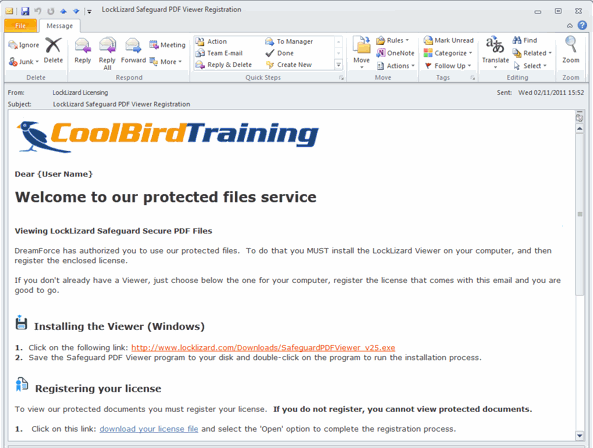
This service is especially useful if you want to reinforce your branding, wish to apply a more personal message which may include links to your protected documents, or wish to display text in another language.
Customer Testimonials















