
Prevent Printing of PDF Files & Documents: Stop or secure prints
Protect IP

Secure PDF documents without useless passwords:
- Stop unauthorized access
- Stop sharing and distribution
- Strong US Gov strength encryption, DRM and licensing controls
Restrict Use

Set Expiry

Revoke Access

Watermark

Log Use

Comply Law

Benefits

 Free Trial & Demo
Trusted by:

 Print prevention: prevent printing from your documents & files
 Print prevention: prevent printing from your documents & files
Preventing printing of PDF documents provides an extra layer of copy protection. It stops users from photocopying printed documents or scanning printed copies and re-saving them as unprotected files.
Document DRM systems go further than this, allowing you to not only prevent printing, but provide secure printing, where limited print copies are allowed and those copies are logged and watermarked with unique user information. This is an important protection for confidential and sensitive documents, which must remain traceable and accountable.
 Can Adobe Acrobat prevent printing of PDF files?
 Can Adobe Acrobat prevent printing of PDF files?
It is important to understand that solutions like Adobe Acrobat, which was never designed for security, are unable to effectively stop printing. Due to major flaws in the Adobe Security Handler, it is trivial to remove Acrobat’s editing and printing restrictions or permissions. In fact, all a user needs to do is to run the document through a PDF password removal tool or open it in a PDF viewer that does not support Adobe controls. Adobe Acrobat and similar solutions are also missing the more nuanced, granular controls that most businesses need for their printing.
Prevent Printing of a PDF or Limit Prints with Safeguard PDF Security
Using Safeguard PDF DRM software, you can simply and easily create PDF documents that cannot be printed. Safeguard PDF Security automatically prevents printing of PDF documents – PDF documents you protect will not be printable unless you specifically allow it.
How to prevent a PDF from being printed
To prevent printing, protect the PDF document and leave the ‘allow printing’ checkbox unchecked.
How to limit prints & control use
If you want to allow printing but still control print use, then Safeguard provides various secure printing control features. These include:
- limit prints – limit the number of times someone can print a PDF file.
- expiry – preventing document access after print copies have been used.
- prevent printing, enable printing, or limit prints of the same document on a per-user basis.
- enforce printing of documents in black & white or grayscale.
- dynamic print watermarks. Watermarks displaying user information on printed documents discourages users from photocopying / scanning and sharing PDFs because they identify the user responsible.
- disable print to file. Disable print to file is always enforced if printing is allowed so that users can not save your documents as unprotected PDF files with unlimited printing.
- logging print use. See who has printed your PDFs, how many prints have been made, and when and where this occurred.

Here’s how to control printing using Safeguard PDF Security
 Here’s how to control printing using Safeguard PDF Security
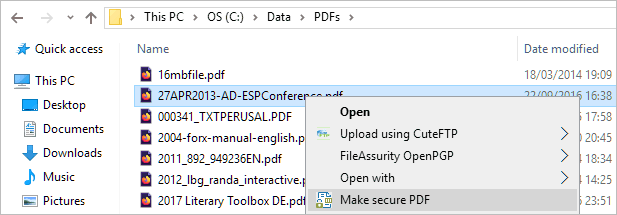
- Right-click your PDF file and choose “Make secure PDF”.
%22%20transform%3D%22translate(1.2%201.2)%20scale(2.41016)%22%20fill%3D%22%23fff%22%20fill-opacity%3D%22.5%22%3E%3Cellipse%20rx%3D%221%22%20ry%3D%221%22%20transform%3D%22matrix(-.5809%2027.73216%20-106.81608%20-2.23748%20197.3%200)%22%2F%3E%3Cellipse%20rx%3D%2246%22%20ry%3D%2230%22%2F%3E%3Cellipse%20rx%3D%221%22%20ry%3D%221%22%20transform%3D%22matrix(84.31433%2010.80091%20-3.55798%2027.77434%20176%200)%22%2F%3E%3C%2Fg%3E%3C%2Fsvg%3E)
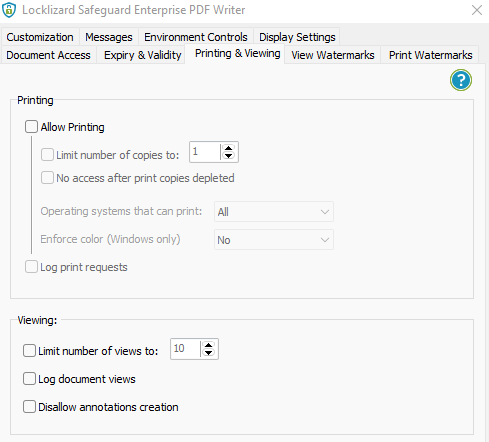
- Open the “Printing & Viewing” tab.
%27%20fill-opacity%3D%27.5%27%3E%3Cellipse%20fill%3D%22%23cdcdcd%22%20fill-opacity%3D%22.5%22%20rx%3D%221%22%20ry%3D%221%22%20transform%3D%22matrix(-227.25126%2050.62156%20-15.56276%20-69.86461%20108%2042.1)%22%2F%3E%3Cellipse%20fill%3D%22%23cbcbcb%22%20fill-opacity%3D%22.5%22%20rx%3D%221%22%20ry%3D%221%22%20transform%3D%22matrix(89.68103%2046.48623%20-37.84437%2073.0092%2056.3%20406.5)%22%2F%3E%3Cellipse%20fill%3D%22%23d3d3d3%22%20fill-opacity%3D%22.5%22%20rx%3D%221%22%20ry%3D%221%22%20transform%3D%22matrix(22.35546%20-32.49458%2073.44602%2050.52904%2064.2%20136.4)%22%2F%3E%3C%2Fg%3E%3C%2Fsvg%3E)
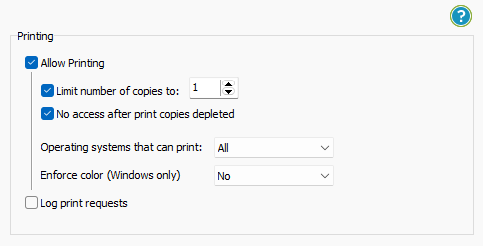
- Select the print security you’d like to apply. You can untick “Allow Printing” to stop printing entirely, or tick “Limit copies to” to allow a defined number of prints. You can also choose whether to log print requests, whether to enforce degraded printing and what operating systems they can print from.
%27%20fill-opacity%3D%27.5%27%3E%3Cellipse%20fill%3D%22%23cecece%22%20fill-opacity%3D%22.5%22%20rx%3D%221%22%20ry%3D%221%22%20transform%3D%22matrix(23.22648%20-85.21986%20126.36312%2034.43999%2066.5%20118)%22%2F%3E%3Cellipse%20fill%3D%22%23fff%22%20fill-opacity%3D%22.5%22%20rx%3D%221%22%20ry%3D%221%22%20transform%3D%22rotate(162.5%20164.1%20101.5)%20scale(148.75926%20255.51164)%22%2F%3E%3Cpath%20fill%3D%22%23cdcdcd%22%20fill-opacity%3D%22.5%22%20d%3D%22M50%20206.6h79.2v39.6H50z%22%2F%3E%3C%2Fg%3E%3C%2Fsvg%3E)
- In the “Print Watermarks” tab, tick “Add Text Watermark” and type your watermark.
%22%20transform%3D%22translate(1.2%201.2)%20scale(2.41016)%22%20fill-opacity%3D%22.5%22%3E%3Cellipse%20fill%3D%22%2352b2ec%22%20rx%3D%221%22%20ry%3D%221%22%20transform%3D%22matrix(.28468%2019.9569%20-165.52086%202.3611%20141%201.7)%22%2F%3E%3Cellipse%20fill%3D%22%23fff%22%20rx%3D%221%22%20ry%3D%221%22%20transform%3D%22matrix(73.72064%202.79978%20-.7001%2018.4342%20237.3%2047.5)%22%2F%3E%3Cellipse%20fill%3D%22%23fff%22%20cx%3D%2221%22%20cy%3D%2246%22%20rx%3D%2272%22%20ry%3D%2217%22%2F%3E%3C%2Fg%3E%3C%2Fsvg%3E)
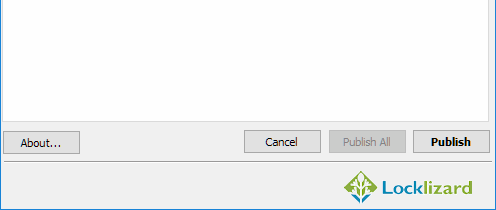
You can add an image watermark in the relevant tab if you want to add a moiré pattern to make scanning of printed documents more difficult. - Press “Publish” to apply your print controls and watermarks.
%27%20fill-opacity%3D%27.5%27%3E%3Cellipse%20fill%3D%22%23d1d1d1%22%20fill-opacity%3D%22.5%22%20rx%3D%221%22%20ry%3D%221%22%20transform%3D%22rotate(168.9%20164.5%20104.6)%20scale(494.0625%2062.51262)%22%2F%3E%3Cellipse%20fill%3D%22%23fff%22%20fill-opacity%3D%22.5%22%20rx%3D%221%22%20ry%3D%221%22%20transform%3D%22matrix(393.1765%20-23.13948%204.63058%2078.68087%20199.7%2040)%22%2F%3E%3Cellipse%20fill%3D%22%23d5d5d5%22%20fill-opacity%3D%22.5%22%20rx%3D%221%22%20ry%3D%221%22%20transform%3D%22matrix(-82.79938%20-45.81606%2023.04825%20-41.6531%2025.1%20159.3)%22%2F%3E%3C%2Fg%3E%3C%2Fsvg%3E)
Viewing Print protected PDF files in Locklizard secure PDF reader
 Viewing Print protected PDF files in Locklizard secure PDF reader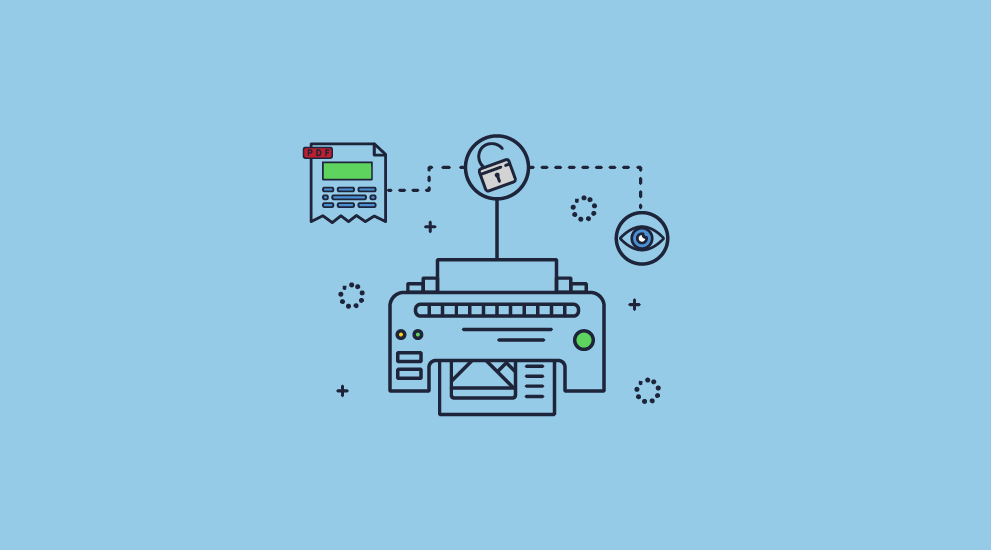
To view Locklizard print-protected PDFs, users either have to:
- Install a secure PDF reader
- Access Safeguard reader in a web browser
If printing has been prevented then the print button is greyed-out as in the screenshot below:
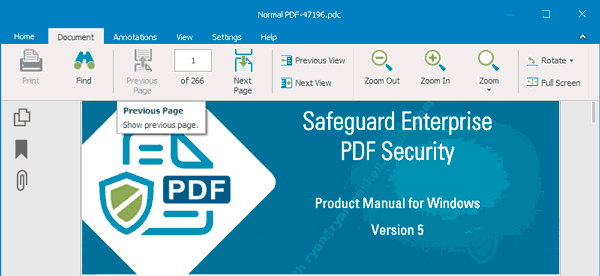
Locklizard enables sharing of secure documents online that cannot be printed, ensuring your confidential documents are protected at all times regardless of their location.
Secure print: prevent printing of a PDF or limiting prints
 Secure print: prevent printing of a PDF or limiting prints
When most people talk about preventing printing, they mean not allowing a document to be printed at all (i.e. stop printing or disable printing). If this is the only way you want to prevent printing, then the requirements aren’t too high. All you need is a document management system that can’t transfer the document to a printer (and therefore shows none in the print list), or a document DRM system that disables the use of the print command.
However, it is rarely that simple. You won’t find many businesses that want no document to be printed, ever. It is typically more useful not to prevent printing of PDFs but instead provide ‘secure printing’. That is, allow printing only under certain, controlled circumstances. This could mean limiting the number of copies that can be printed, tracking print use, and stopping printing to file drivers (which would allow the user to create any number of prints).
Ultimately, the requirement to prevent or control printing is usually qualified in some way. Sometimes, the goal is really to prevent printing that cannot be identified. This means being able to put information onto the printout that identifies the owner of the IPR of the document and perhaps the person printing. While this does not stop printing when an authorized user creates a print, it does discourage sharing of secured PDF files through deterrence. Exposing the identity of the person who has printed a confidential document can be a very effective way to prevent sharing with unauthorized users.
A common concern that causes people to prevent printing is the risk that printed PDF documents might be scanned and re-published. The requirement here is not so much to stop printing, but to prevent re-printing. The simplest way to prevent printing of PDF documents, in this case, is to add watermarks that will:
- identify clearly the source of the printed information.
- make it more difficult to try and scan the printout in order to turn it back into text that can then be made into an ordinary document.
One has to be aware that if you do not prevent printing, then you are opening up a potential security weakness, and must use one or more of the countermeasures that we have identified in order to reduce the potential for piracy or the leak of sensitive information. If you do not, then you might as well have not bothered with any document security mechanisms.
Download secure print software to prevent or limit print of PDF files & documents
 Download secure print software to prevent or limit print of PDF files & documents
Prevent printing of PDFs or enable secure printing: limit prints, track use, watermark
Download secure printing software that uses digital rights management (DRM) controls to prevent printing of PDF documents and files: reports, eLearning and online training courses, confidential documents, etc. Prevent printing, copying, and sharing of your content.
Our copy control software ensures the security and use of your highly confidential documents and sensitive information. Locklizard stops the printing of your documents and information and ensures users can not produce photocopies or duplicates for other people. With Locklizard document DRM software, you can choose to prevent prints or limit and control the number of prints allowed. If you allow prints to be made, then our document DRM software will automatically prevent printing to file, PDF, or image printers so that high-quality copies cannot be readily produced. You can additionally track print use and dynamically watermark documents to discourage photocopying of printed copies.
Safeguard uses US Government strength encryption (256-bit AES) and digital rights management controls to stop the printing of your documents, stop sharing, and control use. We do not use PDF password protection, PDF plugins, or other insecure technology.
See our customer testimonials or read our case studies to see why thousands of organizations use Locklizard PDF security to prevent printing and securely protect their documents.
FAQs
 FAQs
FAQs
How can I stop copying or printing of a PDF online?
Online PDF protection solutions come in one of two forms: a website that applies password security or a web viewer.
Using a PDF permissions password to stop printing of the document and restrict editing and copying is pointless because they are trivial to remove.
Web viewers, meanwhile, have a limited ability to stop screenshots, which can be run through an OCR (optical character recognition) tool to enable copying and printing again. The browser additionally does not have enough control over the user’s operating system to prevent printing to file drivers, and JavaScript can be manipulated to enable printing controls. In short, online tools are not secure enough to protect sensitive content.
Can a PDF reader prevent printing?
Not on its own. Preventing printing requires a combination of encryption and licensing that only a fully-fledged DRM solution can provide. Though a secure PDF reader application is part of a DRM’s toolkit, the file must be encrypted to start with, and then only decrypted by the reader in memory so that users cannot extract the information.
Applications like Adobe PDF Reader are not able to prevent printing since print controls or permissions enforced by Adobe Reader are easily bypassed due to flaws in the security handler.
How do I restrict printing in Adobe Acrobat?
You can disable printing in Adobe Acrobat Pro by pressing the “Security” icon in your Acrobat sidebar, select “Protect Using Password” and then apply an “Editing” password. However, be aware that this protection can be easily removed or bypassed and does not represent any kind of serious security.
Does Locklizard protect files in other formats?
Locklizard only protects files in PDF format. You will have to convert them to PDF before protecting them with our DRM software.
Does Locklizard prevent screenshots from being printed?
Locklizard stops screenshots from being taken of the viewer application in the first place. This applies regardless of whether first or third-party tools are used.
Does Locklizard enable you to share secure documents online & prevent print?
Yes, you can share confidential documents and prevent print online and offline. Our secure PDF reader prevents printing in both installed and browser-based versions.
Does Locklizard prevent a PDF from being downloaded?
Locklizard protected PDF files can be downloaded since they remain fully secured against printing, copying of text and images, and editing. Downloaded files are encrypted and can only be opened using our secure PDF readers which enforce the DRM (Digital Rights Management) controls.
Customer Testimonials















