
How to lock PowerPoint against editing, copying, and sharing
Protect IP

Secure PDF documents without useless passwords:
- Stop unauthorized access
- Stop sharing and distribution
- Strong US Gov strength encryption, DRM and licensing controls
Restrict Use

Set Expiry

Revoke Access

Watermark

Log Use

Comply Law

Benefits

 Free Trial & Demo
Trusted by:

Protect PowerPoint slides: Restrict access, prevent editing & copying, add expiration

 How can I protect PowerPoint presentations?
 How can I protect PowerPoint presentations?
So, you have invested hundreds of hours into creating your PowerPoint presentations, and now you realize you need to protect them. Though they are often overlooked, PowerPoint presentations carry plenty of information that could harm a business. Anything from revenue figures to acquisition prospects or client details may be presented at one point or another.
After the meeting concludes, the ppt or pptx file is often shared unprotected with the participants to recap, leading to their inevitable leak. Training companies that sell PowerPoint presentations as part of course materials also need to prevent them from being copied and shared with users that have not purchased them, or from being edited and sold on.
Below are the security options available to protect presentation slides (.pptx files) so you can prevent them from being shared, copied and edited.
Protecting CAD drawings
If you usually insert or present your CAD drawings or models in PowerPoint then see How to password protect a DWG file for additional methods to protect them.
Are PowerPoints subject to copyright protection?
 Are PowerPoints subject to copyright protection?
You have probably wondered ‘Does copyright protect PowerPoint diagrams?’. Just as with any media, you have an inherent right to control the distribution of content inside your PowerPoint presentation (provided it was created by you). This extends to images, text, video, etc. However, legally holding the rights to a work does very little to prevent it from being copied and distributed without your permission. You can add a copyright symbol and disclaimer to your PowerPoint slides, but it’s likely it’ll just be ignored and can be easily removed. If copyright notices were an effective way of preventing unauthorized distribution, piracy would be virtually non-existent.
In other words, it’s down to you to enforce your copyright by using the DMCA (Digital Millennium Copyright Act) and lawyers. You could take somebody to court every time they infringe your copyright, but that would be costly, time-consuming, and wouldn’t erase the harm they’d already done. It’s better to take measures to stop them from being able to do so in the first place.
Should I add a copyright symbol to my PowerPoint slides?
Adding a copyright symbol to your PowerPoint is unlikely to dissuade pirates. It is, however, useful for reminding genuine clients and listeners of their obligation not to share your content or claim it as their own. In the event that somebody takes a picture during your presentation and shares it on social media, for example, your copyright symbol, name, and “do not share” text will be clearly visible.
How to add a copyright symbol or notice to PowerPoint
The easiest way to add a copyright symbol in PowerPoint is to type (c) in a text box, then press Space and Enter. It will automatically correct to a copyright symbol. You can then optionally write a PowerPoint copyright disclaimer. A good start is something simple like:
© Jane Doe, 2026
Or, you may want to discourage sharing more explicitly:
© Jane Doe, 2026 | Do not copy or distribute
 | PowerPoint Password Protection & Security Issues |

Password protect PowerPoint
 Password protect PowerPoint
Applying passwords to protect PowerPoint files (PPT, PPTX, PPS, PPPX) is the cheapest solution for PowerPoint Security (it is free with PowerPoint) but also the least secure.
There are two types of passwords that can be used to password protect PowerPoint files:
- the open password which is used to restrict access
- the modify password which is used to restrict editing
Both have major weaknesses:
- The open password can be cracked (if unknown), or shared or removed (if known).
- The modify password is very easy to remove as it does not utilize encryption. It’s primarily intended to stop accidental editing rather than unauthorized editing. Once a user can edit a PowerPoint they have full control over it and can remove watermarks and copyright notices.
Here’s how easy it is to remove password protection in PowerPoint:
How to open a password-protected PowerPoint file
 How to open a password-protected PowerPoint file
Like all Microsoft Office applications, PowerPoint uses a password as the encryption key to restrict access to the file. However, this does not mean that your file is safe. Passwords can be brute forced (often with the help of a list of common passwords). Short, uncomplex passwords can be removed in seconds and longer passwords with few symbols or numbers in minutes or hours.
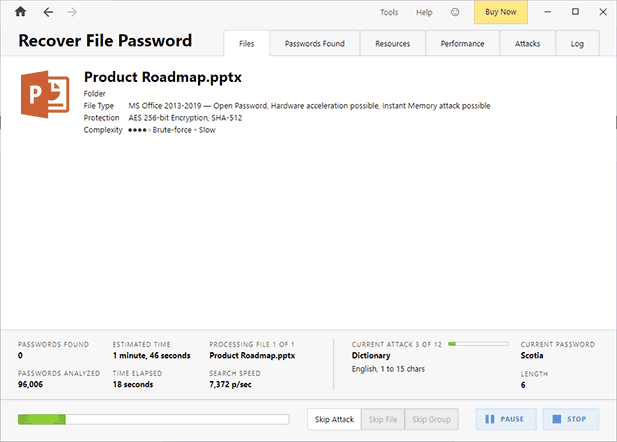
The bigger risk of protecting presentations with a password is that an authorized user can share the document and its password with somebody who is not supposed to view it. This could be intentional, in the case of an internal leak, or accidentally, due to a social engineering attack, phishing attack, or insecure password storage. However, since PowerPoint’s copy protection is useless, any user that can open the file can also share it by printing it to a PDF, copy and pasting its content, or saving a new copy without a password.
How to edit a protected PowerPoint presentation
 How to edit a protected PowerPoint presentation
It is really easy to remove edit restrictions in PowerPoint. Users can:
- copy and paste content to another presentation
- save or print to PDF and then convert back to PPTX format
- screenshot to bypass the restrictions
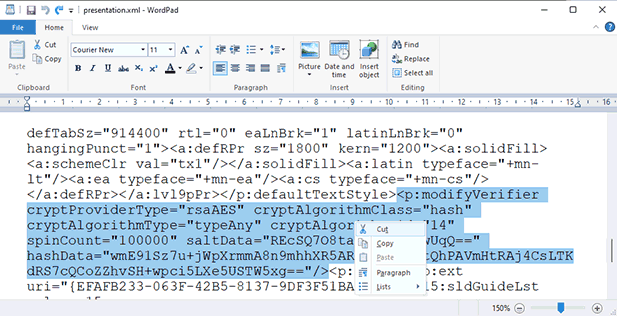
- remove the password by adding .zip to its filename, editing its presentation.xml file, and simply deleting the “modifyVerifier” code. Once saved back in pptx format, the restrictions are gone.
%22%20transform%3D%22translate(1.2%201.2)%20scale(2.41016)%22%20fill-opacity%3D%22.5%22%3E%3Cellipse%20fill%3D%22%23a2a2a2%22%20cx%3D%2275%22%20cy%3D%22107%22%20rx%3D%2248%22%20ry%3D%2233%22%2F%3E%3Cellipse%20fill%3D%22%23fff%22%20rx%3D%221%22%20ry%3D%221%22%20transform%3D%22matrix(-160.95563%20-186.46889%2030.33539%20-26.1848%20242.7%2045.1)%22%2F%3E%3Cellipse%20fill%3D%22%23fff%22%20rx%3D%221%22%20ry%3D%221%22%20transform%3D%22matrix(169.60238%20154.79526%20-23.59912%2025.85653%20245.3%2038)%22%2F%3E%3C%2Fg%3E%3C%2Fsvg%3E)
There are several online PowerPoint restriction remover tools that automate this process:
 | How to lock a PowerPoint from opening |

How to password protect a PowerPoint presentation & restrict opening
If you want to add an open/viewing password to your document despite the flaws mentioned above, this is how you do it:
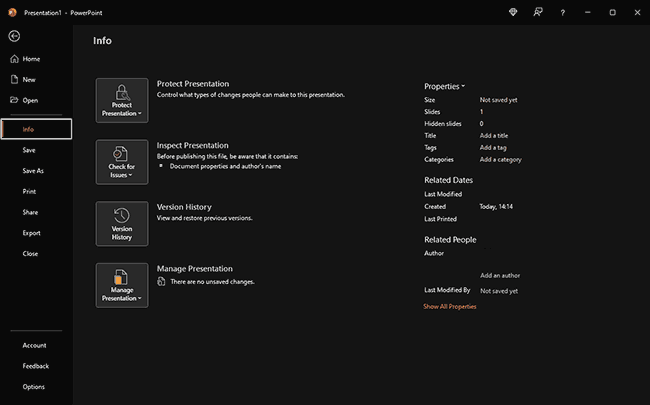
- With the document open, press “File” in your ribbon, then “Info”.
%22%20transform%3D%22translate(1.3%201.3)%20scale(2.53906)%22%20fill-opacity%3D%22.5%22%3E%3Cpath%20d%3D%22M-7.8%20108.8l17-1.4%204.6%2053.8-17%201.4z%22%2F%3E%3Cpath%20d%3D%22M-8%20110.9l17-1.5%205%2057.7-17%201.5z%22%2F%3E%3Cellipse%20fill%3D%22%23212121%22%20cx%3D%22182%22%20cy%3D%22107%22%20rx%3D%22174%22%20ry%3D%22174%22%2F%3E%3C%2Fg%3E%3C%2Fsvg%3E)
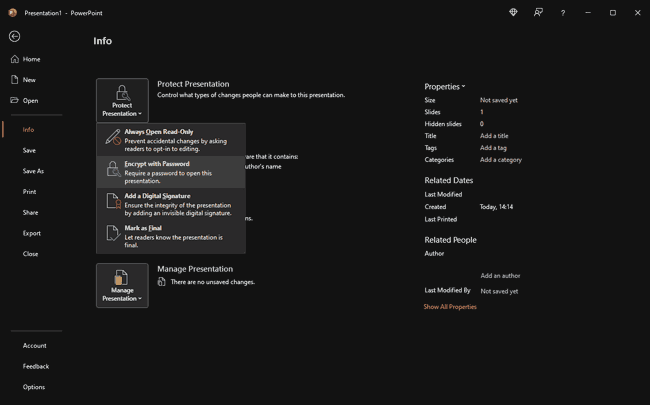
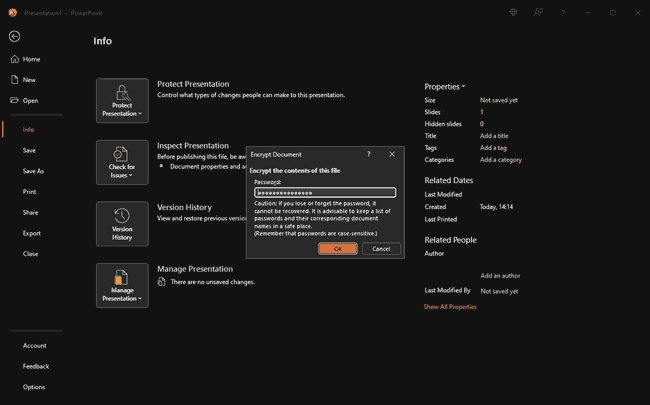
- Click on the “Protect Document” button and choose “Encrypt with Password” from the list.
%22%20transform%3D%22translate(1.3%201.3)%20scale(2.53906)%22%20fill-opacity%3D%22.5%22%3E%3Cellipse%20fill%3D%22%234f4f4f%22%20cx%3D%2259%22%20cy%3D%2263%22%20rx%3D%224%22%20ry%3D%224%22%2F%3E%3Cellipse%20fill%3D%22%23202020%22%20cx%3D%2235%22%20cy%3D%2266%22%20rx%3D%2222%22%20ry%3D%2232%22%2F%3E%3Cpath%20fill%3D%22%23202020%22%20d%3D%22M41%2066h59v24H41z%22%2F%3E%3C%2Fg%3E%3C%2Fsvg%3E)
- Enter a strong, unique password and press “OK”.
%22%20transform%3D%22translate(1.3%201.3)%20scale(2.53906)%22%3E%3Cpath%20fill%3D%22%23202020%22%20fill-opacity%3D%22.5%22%20d%3D%22M200.9%2037.6l-22.3%2017.2-6.2%204%2012.4-10.2z%22%2F%3E%3Cpath%20stroke%3D%22%23202020%22%20stroke-opacity%3D%22.5%22%20fill%3D%22none%22%20d%3D%22M202%2036.7q17.4-7.6%2032.8-52.7%22%20stroke-width%3D%22.5%22%2F%3E%3Cellipse%20fill%3D%22%23202020%22%20fill-opacity%3D%22.5%22%20cx%3D%2292%22%20cy%3D%226%22%20rx%3D%228%22%20ry%3D%228%22%2F%3E%3C%2Fg%3E%3C%2Fsvg%3E)
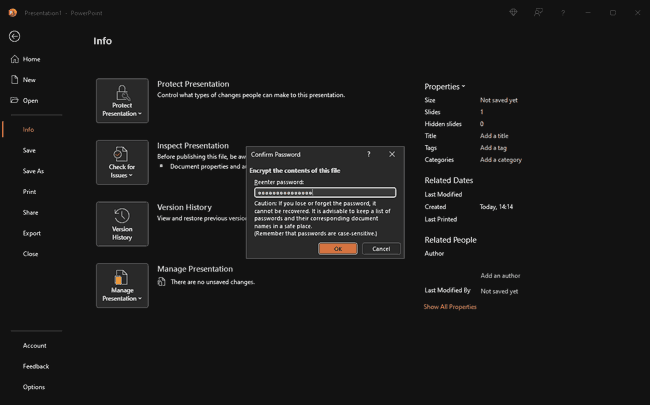
- Enter the password a second time to confirm it. Press “OK”.
%27%20fill-opacity%3D%27.5%27%3E%3Cpath%20d%3D%22M95.2%20402.4h15.2v2.6H95.2zm228.1-194.5l-13%2038-14.3-46.4%205.7%2017.2zm-164.6-133h5v68.6h-5z%22%20fill%3D%22%23202020%22%20fill-opacity%3D%22.5%22%2F%3E%3C%2Fg%3E%3C%2Fsvg%3E)
PowerPoint has now encrypted your document. Next time you open it, you will be prompted to enter the password before you can view its contents.It is worth noting that you can also add an open password to your presentation using the methods outlined in the “How to password protect a PowerPoint presentation & restrict editing” section below. This is ideal if you want to add both an editing and open password to your document, as you can do them at the same time.
| How to lock a PowerPoint from editing |

How to password protect a PowerPoint presentation & restrict editing
 How to password protect a PowerPoint presentation & restrict editing
If you’d like to lock a PowerPoint from editing with a password despite its drawbacks (perhaps you just want to stop accidental editing) here’s how:
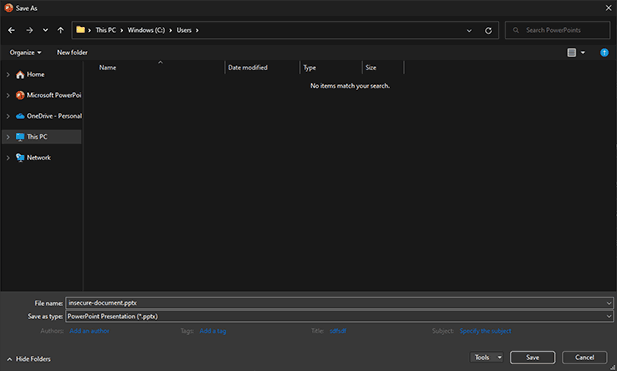
- Press File > Save as and click the “Tools” dropdown in File Explorer.
%22%20transform%3D%22translate(1.2%201.2)%20scale(2.41016)%22%20fill-opacity%3D%22.5%22%3E%3Cellipse%20fill%3D%22%23585858%22%20cx%3D%22126%22%20cy%3D%22143%22%20rx%3D%22255%22%20ry%3D%2215%22%2F%3E%3Cellipse%20fill%3D%22%231b1b1b%22%20cx%3D%22128%22%20cy%3D%2249%22%20rx%3D%2285%22%20ry%3D%2285%22%2F%3E%3Cellipse%20fill%3D%22%231c1c1c%22%20rx%3D%221%22%20ry%3D%221%22%20transform%3D%22rotate(8.6%20-294%201588.4)%20scale(55.73358%2067.30338)%22%2F%3E%3C%2Fg%3E%3C%2Fsvg%3E)
- Choose “General Options” and enter a password in the “password to modify box”. You can optionally enter a password to open the file here too. This will encrypt the file until a valid password is provided. Just bear in mind that even open passwords can be shared or brute forced if they are not long and complex.
%22%20transform%3D%22translate(.9%20.9)%20scale(1.70313)%22%20fill%3D%22%23fff%22%20fill-opacity%3D%22.5%22%3E%3Cpath%20d%3D%22M141%2037.5l18.4-16%2020.2%208.6-6.2%2022.1z%22%2F%3E%3Cellipse%20cx%3D%22161%22%20cy%3D%2238%22%20rx%3D%2217%22%20ry%3D%229%22%2F%3E%3Cpath%20d%3D%22M143%2040l25-18%2011%2019z%22%2F%3E%3C%2Fg%3E%3C%2Fsvg%3E)
- Press “OK” and enter the password again.
%22%20transform%3D%22translate(.7%20.7)%20scale(1.3125)%22%20fill%3D%22%23fff%22%20fill-opacity%3D%22.5%22%3E%3Cellipse%20cx%3D%22161%22%20cy%3D%222%22%20rx%3D%2234%22%20ry%3D%2212%22%2F%3E%3Cpath%20d%3D%22M125.8-2.2L207.5-6l-27.3%2018-45%20.6z%22%2F%3E%3Cpath%20d%3D%22M134%200h55v12h-55z%22%2F%3E%3C%2Fg%3E%3C%2Fsvg%3E)
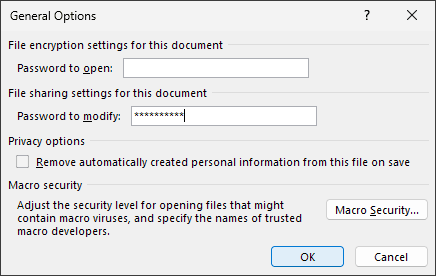
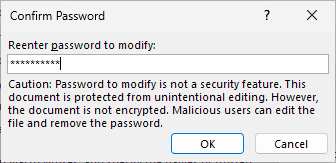
You will see that even Microsoft warns you that an editing password is not a secure feature and will not stop malicious users from editing or copying the document. Though it does restrict editing in PowerPoint, it only does so on a surface level. Users can easily remove the editing protecting using the techniques outlined above.
Lock a PowerPoint from editing by converting it to images
 Lock a PowerPoint from editing by converting it to images
Before we move on to other protection solutions, it’s worth quickly clarifying claims that saving your PowerPoint presentation as images will permanently prevent editing.
You can’t easily edit or copy text from an image, right? Well, that’s not quite true. Optical character recognition tools can take the images and turn them right back into an editable PowerPoint file again.
Here’s an example of an image file and its OCR conversion:
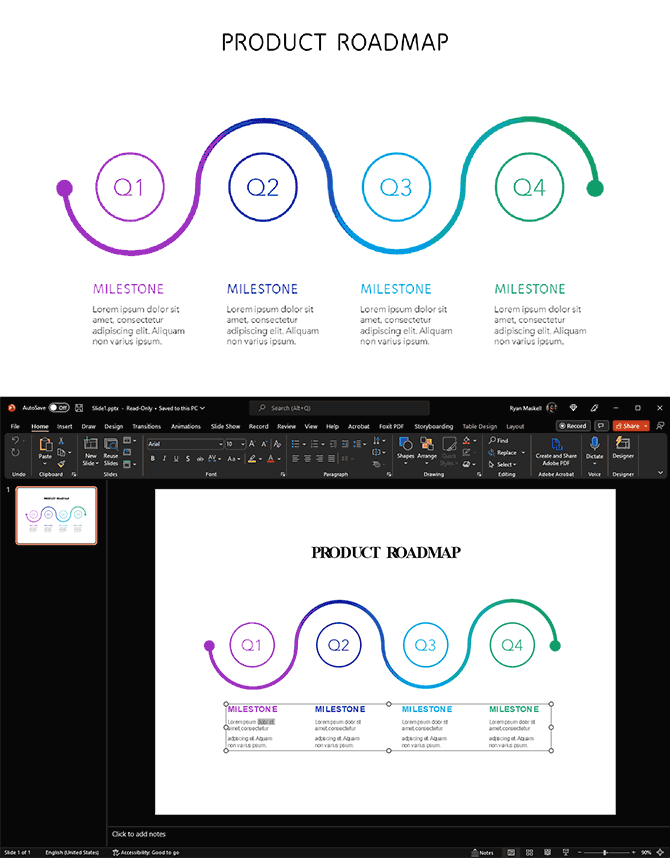
With a few seconds extra work to match the fonts, you wouldn’t be able to tell that it’s not the original PowerPoint file.
PowerPoint read only mode & preventing editing
 PowerPoint read only mode & preventing editing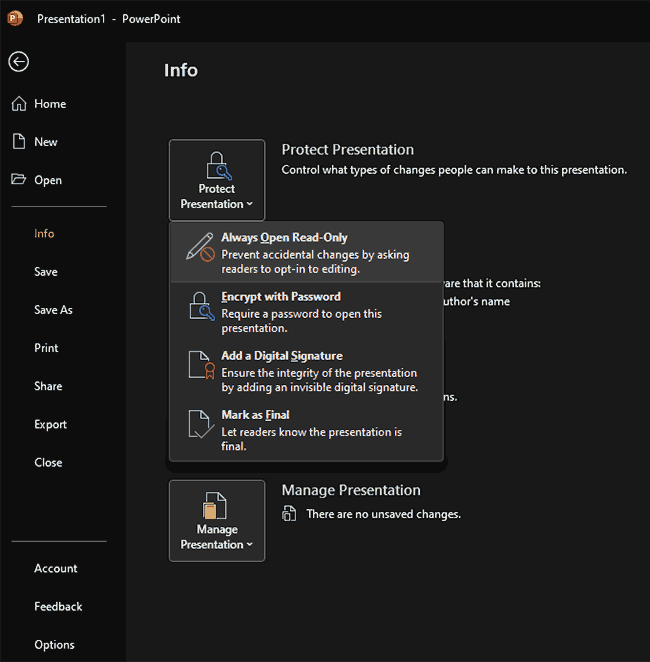
PowerPoint’s read-only mode lets you restrict editing without the use of a password. It does so by displaying a warning message when users try to edit text or images.
However, it’s important to point out that PowerPoint read only mode doesn’t stop unauthorized editing and was never designed to do so. Read-only can be toggled on and off (by pressing the ‘Enable Editing’ button on the message bar) by any user and no password is required to do so. It is only there to stop accidental changes.

The Restrict Access option to protect a PowerPoint from being copied, edited or printed, uses Microsoft Rights Management or IRM which we cover below.
If you want to save or make a PowerPoint read only or lock PowerPoint from editing, then you need to save it as a PDF and protect it with Locklizard Safeguard.
What is PowerPoint Protected mode?
 What is PowerPoint Protected mode?
Protected view, or protected mode, is a read-only mode that is automatically applied to MS Office file types when the file may have come from an unsafe location. Its purpose is to prevent users from triggering viruses or other harmful content that may be hidden in the document by preventing them from interacting with it. This includes disabling the ability to edit it.
Does Protected View prevent unauthorized editing and copying?
Protected View only triggers when a PowerPoint comes from an unknown location or fails a validation check. It’s also optional — unless otherwise configured by the admin, users can disable it with a single click in its message bar.
Even if you could control when PowerPoint triggers protected view, it wouldn’t provide additional security beyond what’s available in read-only mode. Users can copy-paste from slides or remove the protection by editing the associated XML file.
Can you lock images in a PowerPoint so they can’t be copied?
 Can you lock images in a PowerPoint so they can’t be copied?
There’s no good way to lock images in PowerPoint to protect them from copying and modification. While you can set a modify password, this does not disable the ability for users to right-click an image and select “Save as Picture”. Alternatively, they can screenshot your image and use that. PowerPoint offers zero protection against first or third-party screenshot applications.
If you plan to distribute a presentation containing your copyrighted images, you should take additional precautions or reconsider.
 | Microsoft IRM for PowerPoint Protection |
Microsoft IRM (Information Rights Management) enables you to protect PowerPoint files without passwords.
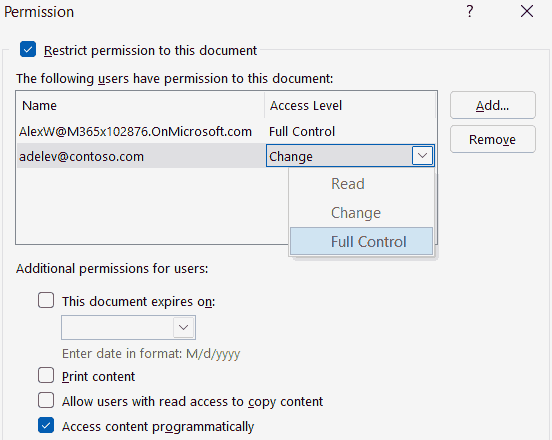
However, Microsoft IRM for PPT and PPTX files has several drawbacks:
- Recipients need to have purchased the full version of PowerPoint to view your protected presentations (the free PowerPoint Viewer does not support IRM). This is not ideal if you work with freelancers or external parties.
- You have to specify who the recipients are when you protect the PowerPoint presentation file. This makes it very inconvenient if you want other users to access this at a later date (you will have to protect it all over again). Clearly, this is a system designed purely for internal use and requires you to know from the start ALL the users that will ever want to access this presentation.
- Access controls are unhelpful. You either give users read access (no permission to modify, copy print), change access (modify, copy, but no print), or full control (same rights as the author – can modify, print, set expiry). So, if you want users to be able to print your PowerPoint Presentations you have to let them copy, edit, modify, and change expiry too. Far from ideal from a security standpoint.
- The system does not prevent third-party screen grabbers from taking screenshots of your PowerPoint slides.
- Links to external sources (MP3/MP4 files, etc.) are not protected, so your video and audio is available for everyone to copy and share.
In conclusion, using Microsoft IRM for PowerPoint Security is only helpful in limited situations, and it does not completely protect PowerPoint presentations. Even Azure information protection restrictions can be bypassed if a user has been given view access.
 | Locklizard PowerPoint Security – DRM Protection for PPT & PPTX files |

Locklizard Digital Rights Management software can protect PowerPoint presentations that have been converted to PDF format. You can do this within PowerPoint by saving your PPT or PPTX file as a PDF. The advantage of converting PowerPoints to the Adobe PDF format is that you can easily prevent the editing and copying of content. It also means users of your PowerPoint slides don’t need to use insecure technology like passwords or plugins to view them.
Once your PowerPoint presentation has been converted to a PDF file, you can secure it using Safeguard PDF Security.
Safeguard PDF Security protects PowerPoint presentations from unauthorized:
- access
- copying
- sharing
- editing
- saving
- screen grabbing
- printing
Safeguard PDF Security automatically locks PowerPoint slides to authorized devices so they cannot be shared. You restrict who can access your protected PowerPoint slides, the amount of time they can be viewed, and whether they can be printed. And if you decide that you no longer want users to be able to view them, then you can instantly revoke access.
You choose:
- when your presentations expire (if at all) – number of views, days, prints, or fixed date
- whether they can be printed – deny or allow printing or limit the number of prints
- if they should be revoked – revoke presentations anytime regardless of where they are located
- whether content should be watermarked at view/print time dynamically with personal user identifying information
And with Safeguard Enterprise PDF DRM you can:
- control the locations users can view your PowerPoint presentations (country & IP location) to ensure confidential material can only be viewed from, say, the office
- track and log when slides are viewed and printed
| How to lock a PowerPoint from editing, copying, and printing with Safeguard DRM |

The best way to lock a PowerPoint from editing, copying, printing, etc. is to not distribute it in the PowerPoint format at all. Currently, there just aren’t any good solutions to secure a PowerPoint presentation in its native format.
Though it is tempting to use something like Adobe Acrobat or Foxit PDF password protection, these have the exact same problem as PowerPoint password protection – the modify permissions are easily removed and the document open protection does not prevent unauthorized sharing.
How to save a PowerPoint presentation as a secure PDF
 How to save a PowerPoint presentation as a secure PDF
The process of locking a PowerPoint presentation file to prevent it from being copied/edited is a two-step one: save to PDF, followed by protection in Safeguard Secure PDF Writer.
How to convert a Powerpoint to PDF
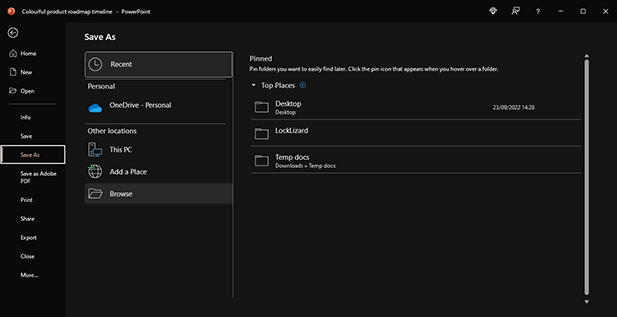
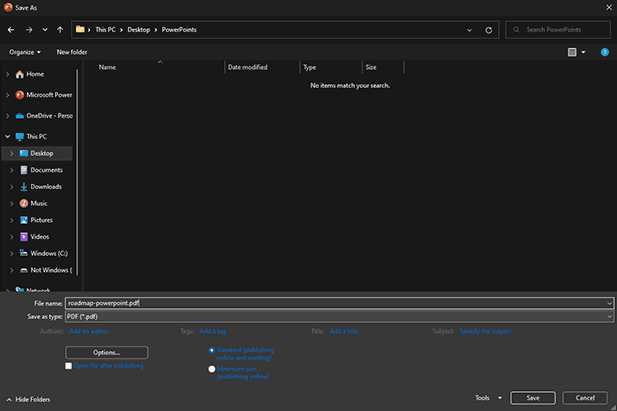
- Open the PowerPoint presentation and press “File > Save As > Browse”.
%22%20transform%3D%22translate(1.2%201.2)%20scale(2.41016)%22%20fill-opacity%3D%22.5%22%3E%3Cellipse%20rx%3D%221%22%20ry%3D%221%22%20transform%3D%22matrix(14.4392%20.63009%20-1.1829%2027.10756%206%20127.2)%22%2F%3E%3Cellipse%20cx%3D%227%22%20cy%3D%22124%22%20rx%3D%2213%22%20ry%3D%2222%22%2F%3E%3Cellipse%20fill%3D%22%23212121%22%20cx%3D%22149%22%20cy%3D%2226%22%20rx%3D%22158%22%20ry%3D%22158%22%2F%3E%3C%2Fg%3E%3C%2Fsvg%3E)
- Change “Save as type:” to “PDF” and save your presentation.
%22%20transform%3D%22translate(1.2%201.2)%20scale(2.41016)%22%20fill-opacity%3D%22.5%22%3E%3Cellipse%20fill%3D%22%23565656%22%20cx%3D%2274%22%20cy%3D%22149%22%20rx%3D%22255%22%20ry%3D%2227%22%2F%3E%3Cellipse%20fill%3D%22%23181818%22%20rx%3D%221%22%20ry%3D%221%22%20transform%3D%22matrix(-187.28771%20-6.5491%202.6404%20-75.50853%20128.2%2050.8)%22%2F%3E%3Cpath%20fill%3D%22%23545454%22%20d%3D%22M0%20119h41v4H0z%22%2F%3E%3C%2Fg%3E%3C%2Fsvg%3E) .
.
You can choose which slides to export using the “Options…” button if necessary.
 .
.Note that converting a PowerPoint to a PDF will naturally remove its functionality as an interactive presentation.
How to lock a PowerPoint from editing and copying with Locklizard Safeguard
Once you have converted your PowerPoint to PDF, protecting it with Safeguard is a simple matter:
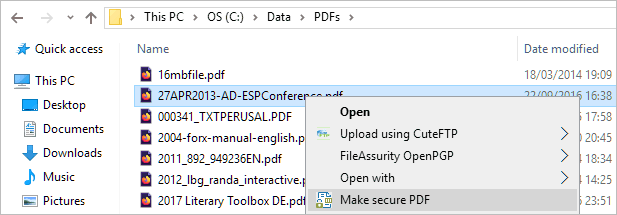
- Right-click on an ebook on your computer and select ‘Make Secure PDF’.
%27%20fill-opacity%3D%27.5%27%3E%3Cellipse%20fill%3D%22%23fff%22%20fill-opacity%3D%22.5%22%20rx%3D%221%22%20ry%3D%221%22%20transform%3D%22matrix(-202.96245%20-13.125%203.74226%20-57.86957%20386.2%20.9)%22%2F%3E%3Cellipse%20fill%3D%22%23fff%22%20fill-opacity%3D%22.5%22%20rx%3D%221%22%20ry%3D%221%22%20transform%3D%22matrix(12.13412%2055.47717%20-65.84142%2014.40102%2033.3%201)%22%2F%3E%3Cellipse%20fill%3D%22%23fff%22%20fill-opacity%3D%22.5%22%20rx%3D%221%22%20ry%3D%221%22%20transform%3D%22rotate(6.7%20152.3%203235.6)%20scale(175.223%2055.39759)%22%2F%3E%3C%2Fg%3E%3C%2Fsvg%3E)
Creating a protected presentation
- Choose the DRM controls you want to enforce. By default, editing, copy & paste, and printing are disabled.

Encrypting a PowerPoint without passwords using Safeguard PDF DRM
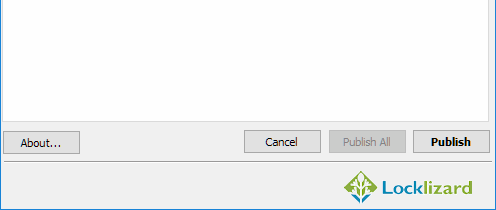
- Press the “Publish” button at the bottom of the dialog to protect the PDF file.
%27%20fill-opacity%3D%27.5%27%3E%3Cellipse%20fill%3D%22%23d1d1d1%22%20fill-opacity%3D%22.5%22%20rx%3D%221%22%20ry%3D%221%22%20transform%3D%22rotate(168.9%20164.5%20104.6)%20scale(494.0625%2062.51262)%22%2F%3E%3Cellipse%20fill%3D%22%23fff%22%20fill-opacity%3D%22.5%22%20rx%3D%221%22%20ry%3D%221%22%20transform%3D%22matrix(393.1765%20-23.13948%204.63058%2078.68087%20199.7%2040)%22%2F%3E%3Cellipse%20fill%3D%22%23d5d5d5%22%20fill-opacity%3D%22.5%22%20rx%3D%221%22%20ry%3D%221%22%20transform%3D%22matrix(-82.79938%20-45.81606%2023.04825%20-41.6531%2025.1%20159.3)%22%2F%3E%3C%2Fg%3E%3C%2Fsvg%3E)
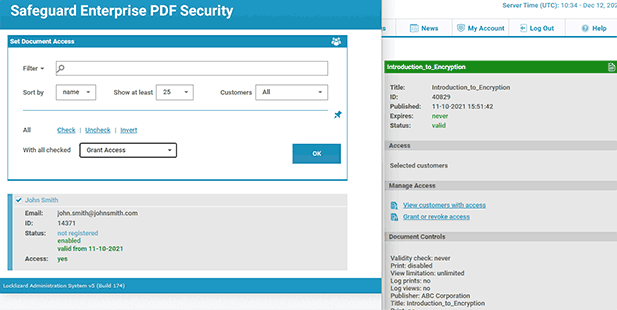
- Select the users you want to give access to your secure PDF file using the cloud-based Admin System.
%22%20transform%3D%22translate(1.2%201.2)%20scale(2.41016)%22%20fill-opacity%3D%22.5%22%3E%3Cellipse%20fill%3D%22%2357cae7%22%20rx%3D%221%22%20ry%3D%221%22%20transform%3D%22matrix(90.48772%20.46606%20-.09282%2018.0206%2065.8%207.7)%22%2F%3E%3Cellipse%20fill%3D%22%23eae2e1%22%20cx%3D%22125%22%20cy%3D%2281%22%20rx%3D%22255%22%20ry%3D%2253%22%2F%3E%3Cellipse%20fill%3D%22%239df1bc%22%20cx%3D%2252%22%20cy%3D%2221%22%20rx%3D%2292%22%20ry%3D%226%22%2F%3E%3C%2Fg%3E%3C%2Fsvg%3E)
Safeguard Admin System
- Distribute your protected PDF however you like, or see how to share a PDF document as a link for instructions on sharing via cloud storage.
For a more detailed guide see how to add security to a PDF or check our blog on how to lock a Word doc, which has many parallels to PowerPoint security.
 | PowerPoint watermarks – are they effective? |
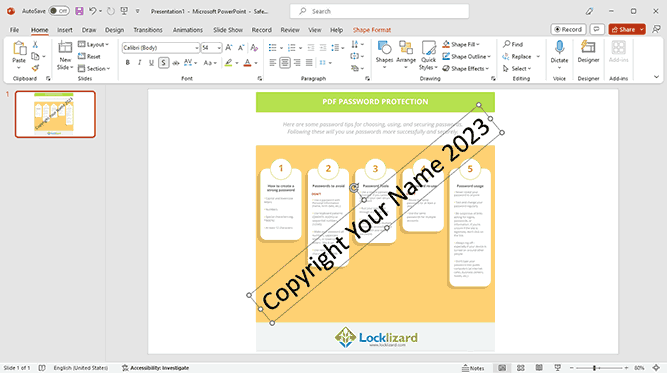
No editing controls are going to stop a user from taking a picture of their screen with their phone or (if printing is enabled) scanning a printed copy and sharing it. This is where watermarks come in. However, just like editing restrictions, all watermarks are not made equal.
The strength of your watermarks depends on the strength of your copy protection and editing restrictions. If your editing restrictions are easily removed then so is your watermark – the user can just delete the watermark in PowerPoint. As we’ve already covered, PowerPoint’s editing restrictions are useless, so PowerPoint watermarks are too.
You can see how to add or insert a watermark in PowerPoint here which also explains just how easy it is for users to remove them.
 | Expiration in PowerPoint |

How can you set expiration in PowerPoint?
 How can you set expiration in PowerPoint?
It is not possible to set a PowerPoint to expire without the help of third-party applications or IRM services. Though there is an add-in called PPTExpire, it has been in development for years and is yet to release to the public. Plugins of this sort also typically pose a security risk and do not work as advertised.
One option is to upload your PowerPoint to OneDrive and share a link with an expiration date. However, this will give you far less protection than you anticipate. Browsers are unable to effectively enforce anti-copying controls because they just do not have enough control over the operating system.
In fact, in our testing, OneDrive even offered handy “print to PDF” and “Download” buttons so that users can easily make a copy of your PowerPoint which won’t expire!
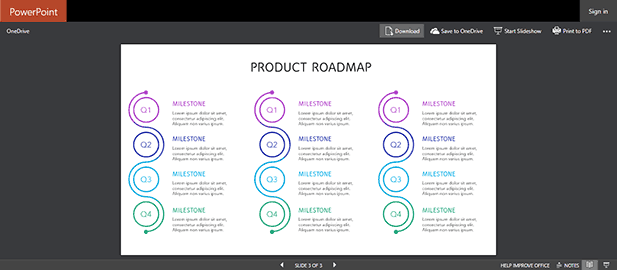
Clearly, then, you’re going to have to use something else to make a PowerPoint expire. We believe Locklizard is the best option – first by saving your PowerPoint as a PDF file and then protecting it with Safguard PDF DRM Security.
How to set a PowerPoint to expire with Safeguard Security
 How to set a PowerPoint to expire with Safeguard Security
In Safeguard Secure PDF Writer, choose the expiry options you want to apply:
- Expiration Date – expires on the date that you select here.
- After n days from first use – expires a number of days after it is first opened.
- Views – expires after it has been viewed n times.
- Prints – expires after it has been printed n times.

You can select multiple expiry options – a fixed expiration date and a number of days from first use, a number of views and/or prints. Whichever option is reached first will cause the file to expire.
Expiry days, views, and prints are allocated on a user basis – so the same file can expire at different times for individual users.
Once you have chosen your PowerPoint expiration date options, press the Publish button.
 | The best way to secure your PowerPoint presentation when sharing |

For total PowerPoint security with DRM protection, use Safeguard PDF Security to protect PowerPoint presentations. Restrict access, prevent unauthorized distribution and use, while locking the PowerPoint from editing, sharing, copying, printing, and screenshotting. Add permanent watermarks that identify users, and automatically expire presentations after a period of time or use. Revoke access anytime.
Locklizard uses US government-strength AES encryption, public key technology, Digital Rights Management, and licensing controls to ensure your presentations remain protected regardless of their location. If you want to make or save a PowerPoint as read only then only DRM protection can achieve this.
See our customer testimonials or read our case studies to see why thousands of organizations use Locklizard PDF security to protect, share and sell their documents securely.
Protecting Microsoft Office files
Looking to protect other MS-Office files to restrict access, copying, editing, printing and sharing?
See our blogs on how to restrict editing in Excel and password protect a Word document.
 FAQs
FAQs
 FAQs
FAQs
Can PowerPoints be encrypted?
Most document formats can be encrypted, including PowerPoints. If you password protect PowerPoint files it will encrypt them using AES encryption.
However, it’s important to be aware of the strength of the encryption and encryption mechanism. Password-based encryption is inherently less secure, because it takes (for example) a random, 256-bit encryption key and links it to a short, human-chosen, and often insecure string of characters. Microsoft state that “You cannot enable a strong encryption file by using password protection.”
How do I password protect PowerPoint files?
- Select File > Info.
- Select Protect Presentation > Encrypt with Password.
- In the Password field, enter the password and press OK.
- Re-enter the password to confirm it.
- Save the PPT / PPTX file so that the password takes effect.
Is there a way to encrypt PowerPoint slides?
Though you can’t encrypt individual slides within a larger PowerPoint presentation or Show, you can export those slides as a PDF and use a PDF DRM solution to encrypt them. This has the additional advantage of not relying on password security.
Does Locklizard use asymmetric or symmetric encryption to protect Powerpoint slides?
We use both. RSA asymmetric encryption for key exchange and AES 256 bit symmetric encryption for file encryption.
How do I disable PowerPoint protected view?
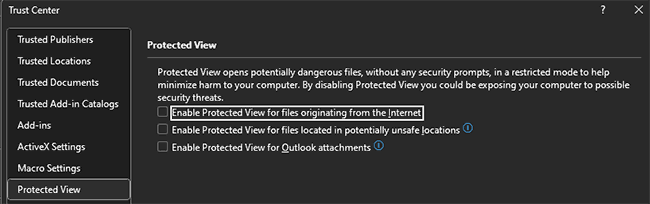
To disable Protected View for an individual PowerPoint, just press “Enable Editing” in the message bar at the top of the screen. Or, to disable it for all documents, go to “Options > Trust Center > Trust Center Settings > Protected View” and uncheck the relevant boxes.
Why can’t you bypass a password-locked PowerPoint document without brute force?
PowerPoint uses 256-bit AES to encrypt the entire pptx document or ppt files. This form of encryption would take current computers millions of years to break, and Microsoft’s implementation does not have any known shortcuts or vulnerabilities.
However, to say that you can’t bypass the document without brute force is not true. As a password is used to unlock the document, any of the traditional password attack methods can be utilized. This includes obtaining it from a party who already knows it through social engineering, phishing, etc.
How do I protect a PowerPoint from being changed or make it read only?
Convert it to a PDF, then encrypt it and apply editing controls with a PDF DRM solution to make it read only. The same applies if you want to copyright protect a pptx file to read only or make a ppt uneditable permanently.
PowerPoint’s editing protection is easily bypassed, protected view mode can be turned off, and converting to images doesn’t work either as they can be run through an OCR recognition tool.
How do I protect a PowerPoint presentation from being copied?
Unauthorized copying is all but impossible to prevent. Instead, you need to:
- Make any copied file useless (inaccessible without a requisite license file)
- Lock the presentation to a device so it cannot be shared
- Restrict editing, copy and paste, screenshots and printing
- Add watermarks that identify users should they share a printed or photographed copy
Locklizard Safeguard DRM can achieve all of these goals, stopping users from making a copy of your presentation and protecting your important files and intellectual property.
How do I remove encryption from a PowerPoint presentation?
It depends on the method of encryption. If you applied PowerPoint password encryption (used to password protect PowerPoint files), you’ll need to either obtain and enter the password or brute force it. Documents encrypted with Locklizard Safeguard do not use passwords, and therefore encryption cannot be removed. The only way to obtain an unencrypted version of the document is to ask the creator for it.
Does adding a digital signature make a PowerPoint file more secure?
A digital signature is an invisible signature used for authentication purposes. It differs from an electronic signature (a visible image of your written signature) but can be used in conjunction with it. A digital signature is an encrypted stamp of authentication and is created by using a signing certificate, which if issued by a reputable Certificate Authority, proves identity.
Adding a digital signature to a PowerPoint presentation confirms that the information originated from the signer and has not been altered. Recipients need your certificate and public key to verify the signature. So, if users remove editing restrictions from a PowerPoint presentation and alter it after it has been digitally signed then you will be alerted to this.
How do you share a PowerPoint securely?
First of all, by avoiding OneDrive and other cloud sharing services. Browser security is too easily to manipulate and bypass, not to mention the freely available download button Microsoft provides. So if it is your responsibility to protect PowerPoint presentations from being shared then you need to look at more secure alternatives.
The most secure way to share PowerPoint files is to save them as a PDF, protect them with Safeguard DRM, and then send the encrypted .pdc file to the recipient or distribute it by other means. This is also the most secure way to share PowerPoint files online. While one might be tempted to use Azure information protection (RMS) or Adobe Document Cloud security, they both have multiple security issues, are complex to setup / maintain, and costly.
If I use a password to protect PowerPoint files will it restrict access?
You can use a password to restrict access to PowerPoint files. However, bear in mind that if you want to share a PowerPoint securely, then anyone you give the password to can share it with others or just remove it. If you therefore use a password to protect PowerPoint files, you have no control over who can access your PowerPoint presentations or slides.
Does Locklizard provide Digital Rights Management for PPT and PPTX files?
PPT and PPTX files have to be saved to PDF format before they can be protected with Locklizard DRM.
How to save a PowerPoint as a secure PDF?
- Within PowerPoint, save the PowerPoint deck or presentation to a PDF (File menu > Save As > Save as type: PDF).
- While you can password protect a PDF the restrictions or permissions are so easy for users to remove they are not worth adding to begin with.
- If you want to secure the PDF and prevent sharing, stop copying, restrict editing, block printing, set expiration and enforce watermarks, then use Locklizard Safeguard to protect it.
Customer Testimonials















