revoke individual user access to single, multiple, or all documents
revoke access automatically after a number of views and/or prints
Watermark
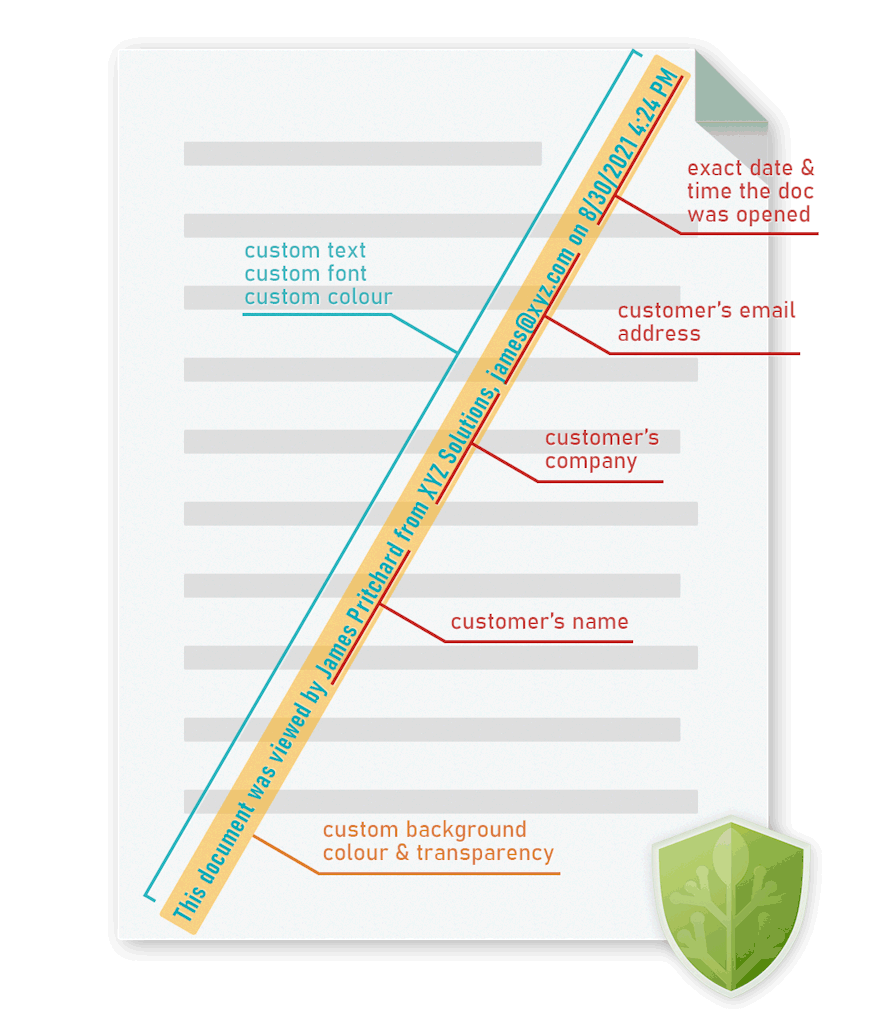
Add dynamic watermarks to viewed and or printed pages. Dynamic variables (date/time, user name, company name, email address) are replaced with actual user and system data when the protected PDF document is displayed and/or printed.
You only have to protect a document once in order to customize it for multiple users.
Safeguard enables you to add a watermark to a PDF simply and securely.
Display user info & date/time stamp dynamically
Use different PDF watermarks for views & prints
Distribute one PDF file for ALL users instead of multiple custom ones
Watermarks cannot be removed in a PDF editor
PDF watermark options
Safeguard has multiple watermark options, enabling you to choose the watermarks you want to add:
Add a PDF watermark only when printing, viewing, or both. You can select different watermarks for both viewed (View Watermarks) and printed (Print Watermarks) documents, as you may want to apply different text/images to viewed and printed content. You only need to add a print watermark if you allow printing.
Add dynamic variables to deter sharing and grant you the ability to identify a user if they unlawfully distribute your PDF. These variables will be replaced with actual data when the document is viewed/printed.
You can change the font, opacity, where the watermark is placed, and whether to display it on top of or behind the content.
If your document or ebook consists of a cover page, then you may want to check the ‘Don’t add watermark on the first page’ checkbox so a watermark overlay does not spoil the visual effect.
You can also add an image watermark to your documents. Examples of watermark images are a company logo, a draft stamp, or a confidential image background.
How to add a non-removable watermark to a PDF
Here’s how to add a watermark to a PDF and make it non-removable and dynamic:
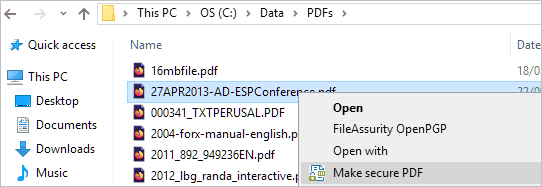
Right-click on the PDF file in Windows File Explorer and select the option ‘Make Secure PDF’.
Protecting PDF with watermarks
Add a text watermark
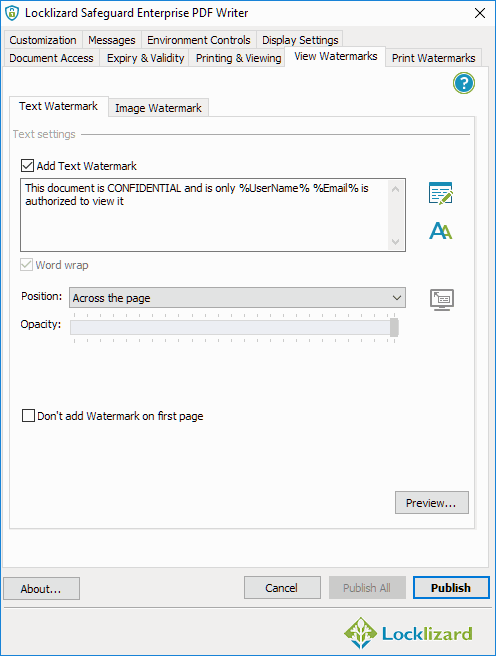
Select the “View Watermarks” tab and then check the “Add Text Watermark” option.
Adding a text watermark in Safeguard Secure PDF Writer
Type in the watermark text you want to use and customize it with dynamic variables by selecting the button. For example, you might want to add the text “This document is confidential and is only authorized to be viewed by %UserName% %Email%”. When a user views the document, their name and email address will appear where you have inserted the dynamic variables.
The “Position” and “Opacity” sliders are particularly important for customizing where you want the watermark to be displayed and how transparent it should appear. Pressing the button will allow you to adjust the precise position of the watermark on your page. You can also adjust the font type, color, size and other formatting options by pressing the button.
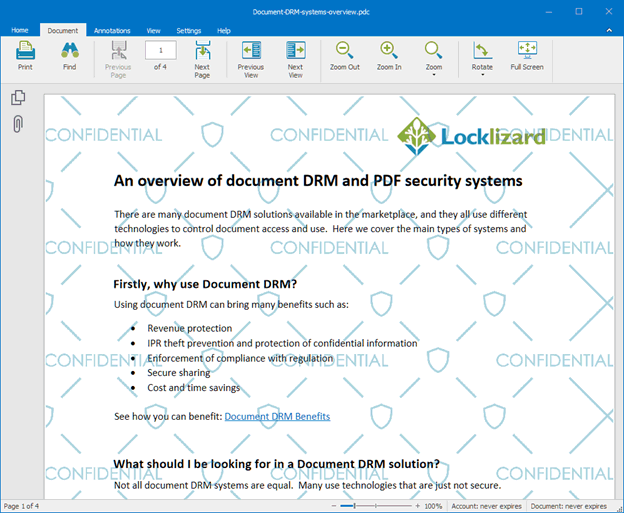
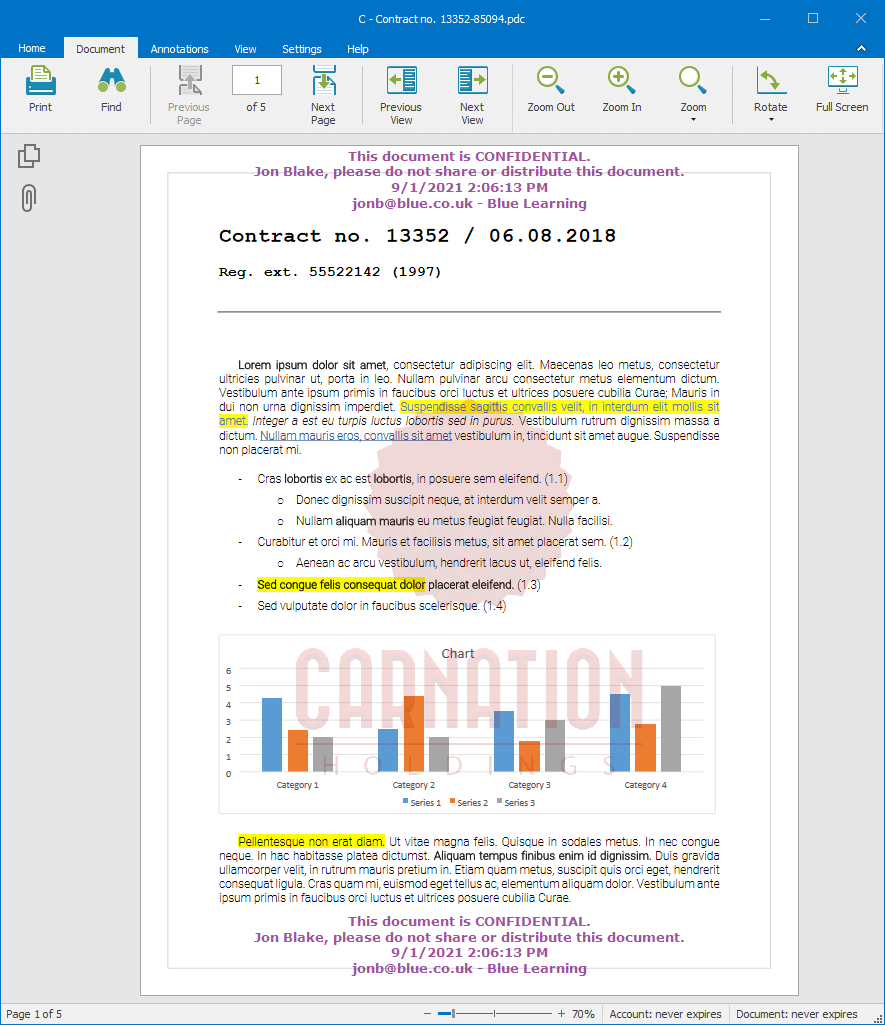
Below is an example of how the dynamic text watermark is displayed when a user views the protected PDF:
Confidential text watermark displayed in Safeguard Secure PDF Viewer
Add an image watermark
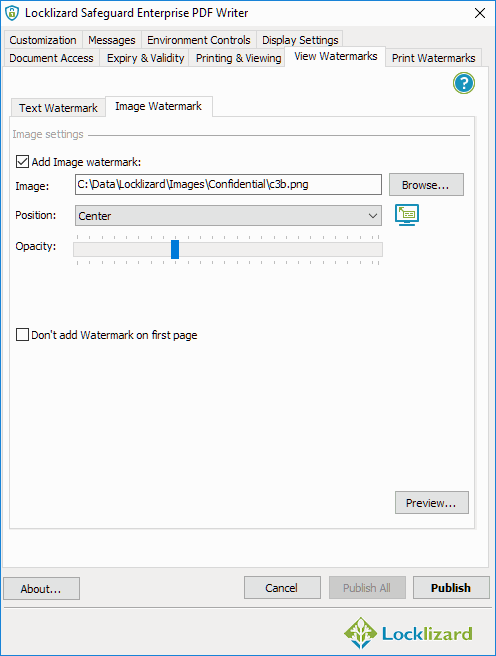
In the “View Watermarks” Image Watermark tab, check the ‘Add Image watermark’ box.
Adding a confidential image watermark in Safeguard Secure PDF Writer
Then browse for the image watermark you want to add. We recommend that you add a large background watermark so that it remains visible throughout the page, as in the example below.
Confidential watermark image
You can change the opacity slider to reduce transparency to make sure it remains unobtrusive.
Below is an example of how the image watermark is displayed when a user views the protected PDF:
Image watermark displayed in Safeguard Secure PDF Viewer
Add a print watermark
If you want to allow printing, you can add a different watermark (or the same one if you prefer) when a user prints the protected PDF document.
Customizing your print watermark independently of the digital one is generally a good idea, as it can enable you to distinguish between viewed and printed copies. You can of course apply print only watermarks if you prefer, so that a watermark is only displayed when the PDF document is printed.
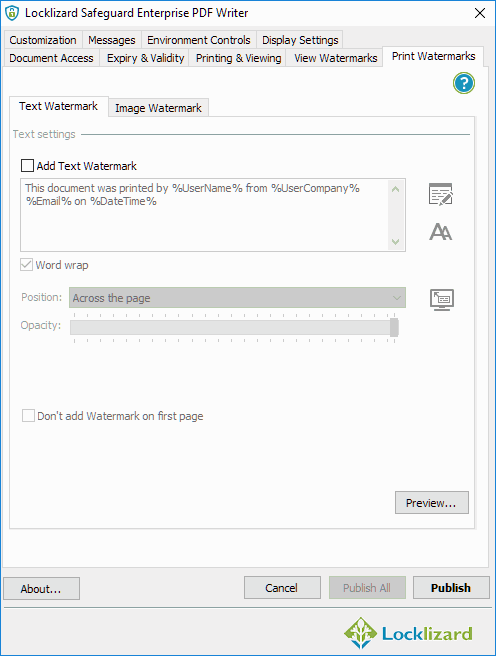
Open the “Print Watermarks” tab and adjust its options.
Adding a print watermark in Safeguard Secure PDF Writer
Follow the same process as for viewing watermarks and adding text and/or an image to your PDF content.
Save your watermarks and other PDF protection controls
Press the “Publish” at the bottom of the PDF Writer window.
Before doing so, you should ensure that any other copy protection controls you want to apply to your document are selected. By default, users cannot edit, copy or paste content, print, or take screenshots using screen capture tools.
On pressing “Publish”, the PDF file will be encrypted, and non-removable watermarks added.
Videos: How to Watermark PDF files
How to add non-removable text watermarks, image watermarks, confidential watermarks, dynamic watermarks, and print only watermarks to PDFs.
Why use Safeguard PDF DRM Security to Watermark PDF Files?
Dynamic
Inserted automatically at view/print time – identify the user and deter content redistribution
Non-removable
Cannot be removed by password recovery programs or PDF editors
Different print & view
Display different watermarks for viewed and printed content
Text & Image
Add both static & dynamic text and static image watermarks to content
Custom Positions
Display watermarks in any custom location or repeatedly on the page
Create permanent watermarks with Safeguard PDF security software
If you want to watermark PDF documents securely so that the watermarks CANNOT be easily removed, then use PDF document security software that uses digital rights management (DRM) controls to impose dynamic and static watermarks on your PDFs.
Safeguard PDF Security uses multiple methods to make watermarks permanent and prevent them from being easily removed:
protected PDFs cannot be opened in PDF editors so documents cannot be modified
protected PDFs cannot be converted to other file formats in order to remove watermarks
users are automatically prevented from taking screenshots to save PDF content as images
we don’t implement Adobe PDF permissions so are not exposed to weaknesses in third party systems or the Adobe Security Handler
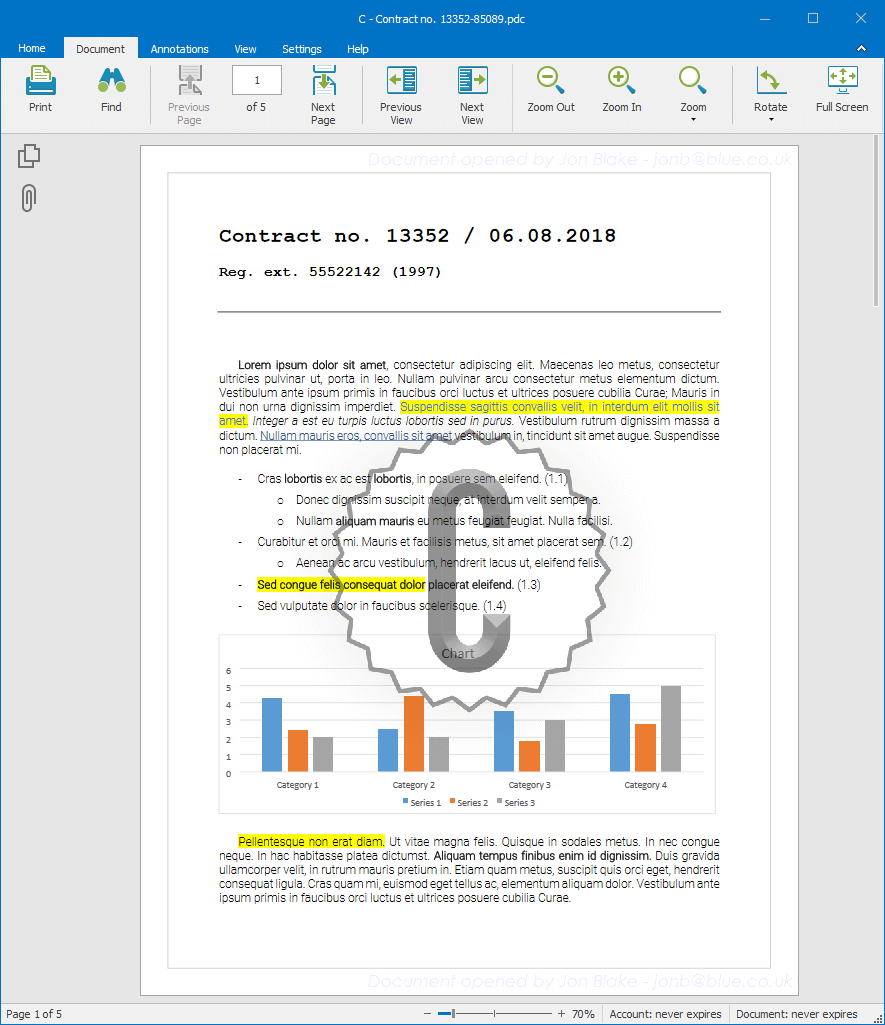
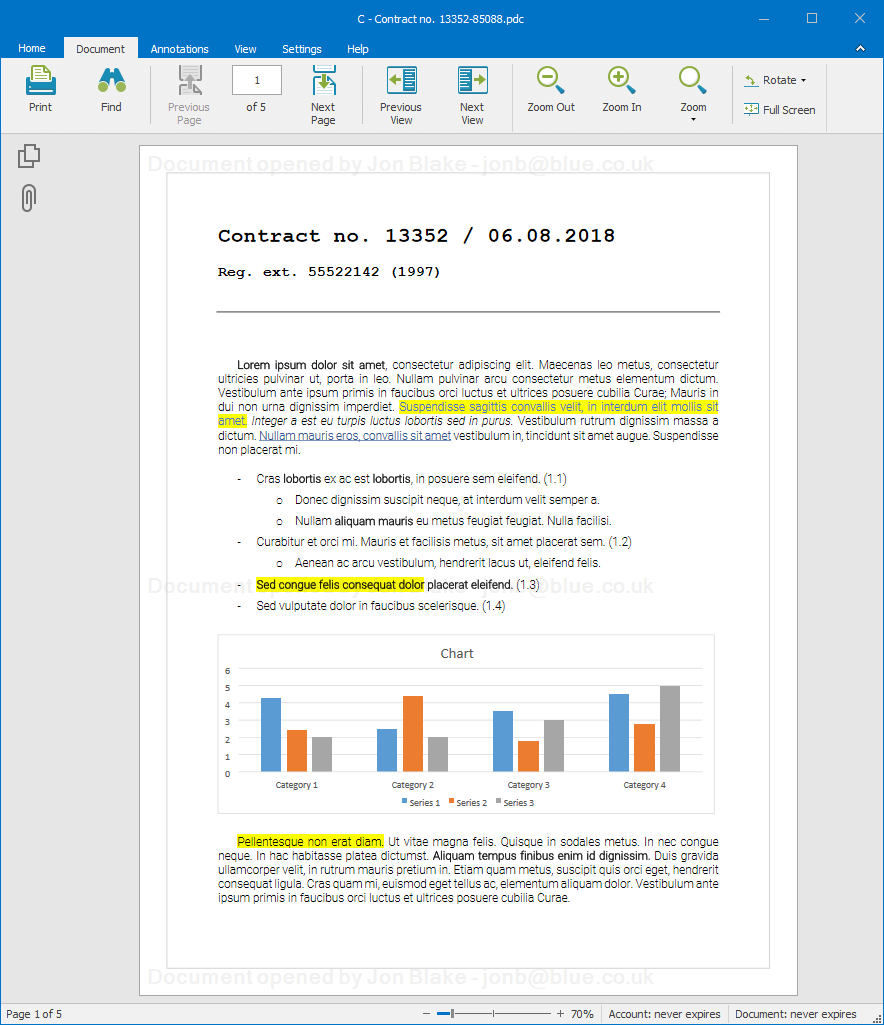
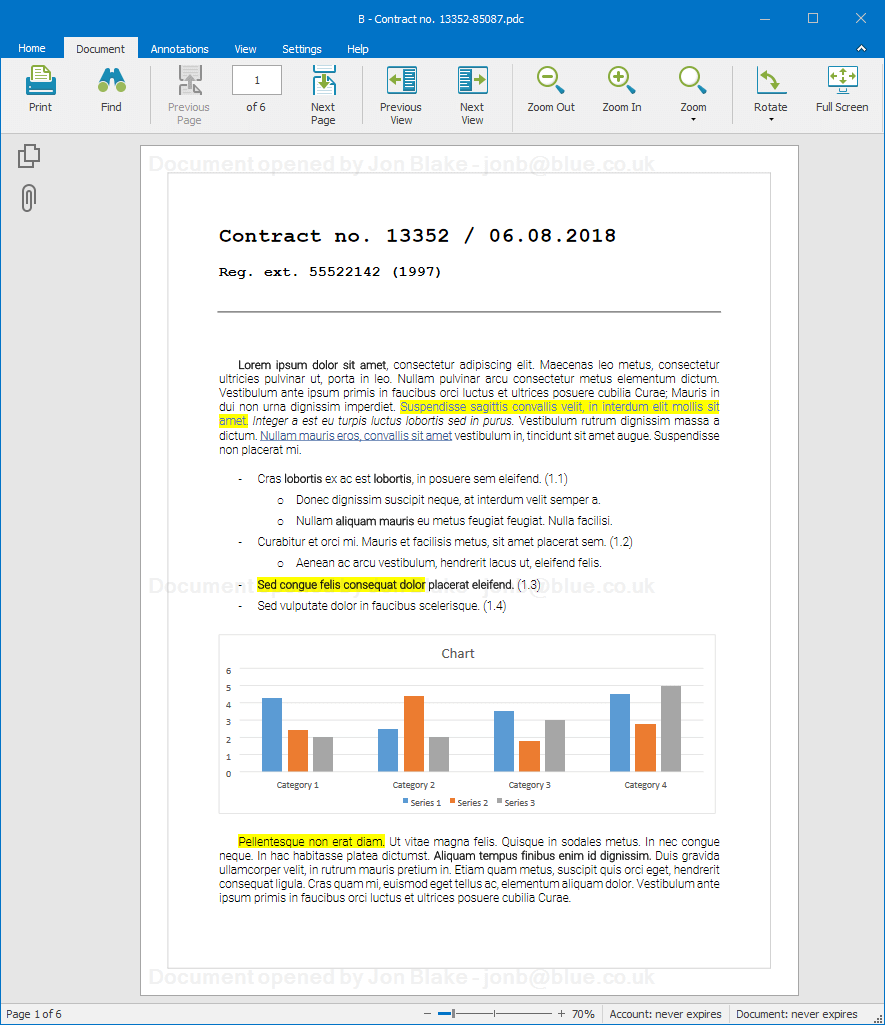
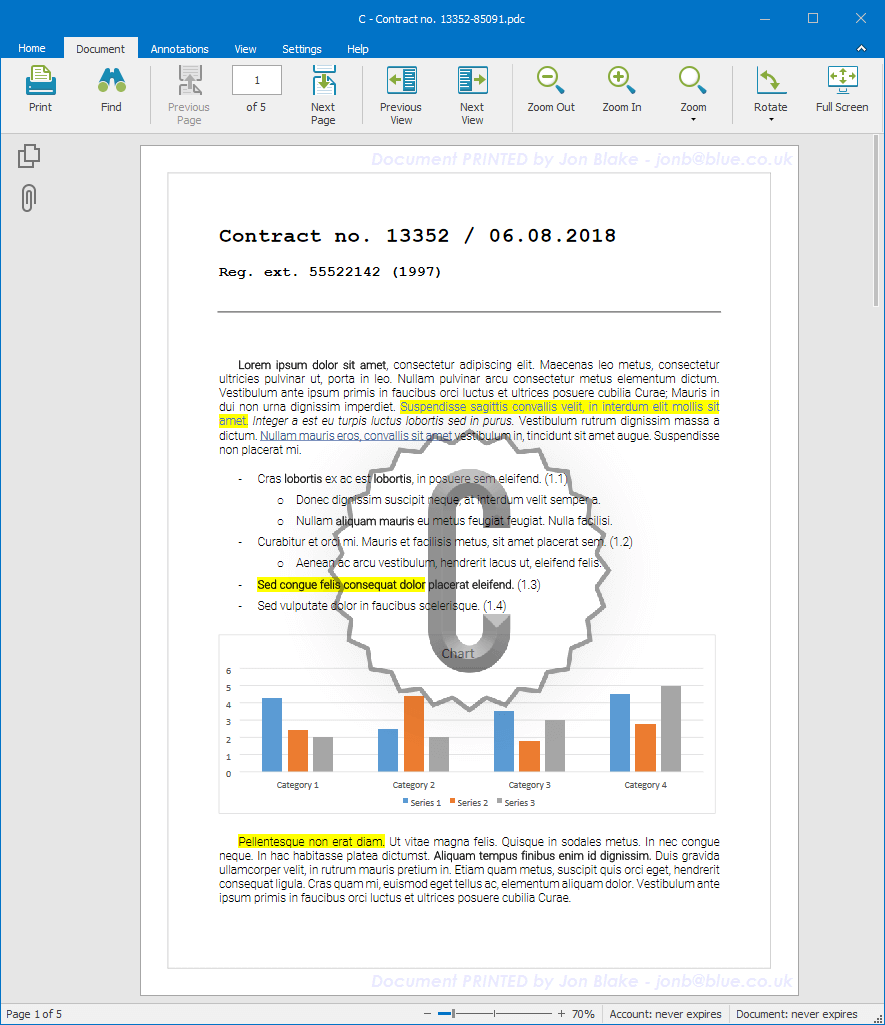
PDF Watermark examples
Examples of secure non-removable watermarks created by Safeguard PDF Security.
Why Safeguard PDF Watermarks over Adobe Acrobat Watermarks?
You can add watermarks to PDF files without Adobe Acrobat. Using Safeguard PDF security to add a PDF watermark has many advantages over Adobe Acrobat watermarks.
Safeguard PDF Watermarks are permanent
Adobe watermarks can easily be removed using simple techniques – see removing PDF watermarks.
Safeguard PDF watermarks are permanent (non-removable). There is no option to save PDFs without watermarks when viewing Safeguard-protected PDF files, and third-party PDF editing tools cannot remove Safeguard watermarks.
Safeguard PDF Watermarks are dynamic
With dynamic watermarks, user and system information is inserted at view and print time so that you only have to protect the PDF once for all users. The appropriate information (name, email, date, time, etc.) is displayed automatically. If you allow printing, a PDF print watermark with user information is essential in identifying the source of a PDF that has been printed, photocopied, and then distributed without authorization.
Adobe does not support dynamic watermarking. If you use Adobe PDF watermarks, you must protect the same PDF file each time for each user with their information. You might end up having to distribute thousands of the same PDF files in order to personalise them. Applying system information or a date/time stamp is impossible.
You can choose when PDF watermarks are displayed
PDF watermark only when printing, only when viewing, or both
You can choose whether Safeguard displays documents when they are viewed, just when they’re printed, or both. You can display a different watermark for each, as well as a different page position, colour, font, etc. You can even choose to repeat the watermark several times across the page.
With Adobe Acrobat, the watermark is inserted into the PDF and the same watermark is shown when the PDF is both viewed and printed – you cannot have different watermarks for viewed and printed pages.
Flexible & extensive pdf watermarking options
Safeguard PDF security lets you add a watermark to a PDF without Adobe Acrobat or similar PDF editing tools and provides extensive functionality:
Add a transparent watermark by changing text opacity
Add watermarks to pictures only by selecting a custom position
Watermark all pages except for a book cover
Watermark a PDF with “copy” before printing
Put a permanent confidential watermark on a PDF
Watermark a PDF based on download or purchase
Add both image and text watermarks
Display different watermarks on print and view
Add a print only watermark – watermark PDF only when printed
Add a view only watermark – watermark PDF only when viewed
Add a watermark on top of PDF content or behind it
Display watermarks across the page
Add a background watermark that is continuously repeated
Apply watermarks to all pages or don’t include the cover page
Choose from 14 different watermark positions or create your own custom ones
v Add watermarks to multiple PDF files
You can add watermarks to multiple PDF files in one go.
Just select the PDFs you want to protect, add a watermark, and press the ‘Publish All’ button.
Add watermark to PDF files for security
What is a watermarked PDF?
A watermarked PDF is a PDF that has a text and/or image watermark added to it which is displayed when the document is viewed and/or printed.
Text watermarks may be static (“This document is the property of ABC Corp.”), or dynamic (“This document was viewed by Joe Bloggs joebloggs@acme.com on 04/08/2021”). In dynamic watermarks, the text is automatically updated with the system/user information at the time of opening or printing.
Watermarks are added as a layer to the PDF (which is why they are easy to add) and can be made to appear on top of or behind existing document content.
PDF watermarking is able to emulate many of the subtleties of the physical world. If you think of a banknote, some watermarks seem inside the paper whilst others are on top. You can get a similar effect with PDF watermarks.
Think of the information being printed as if it were in layers, rather like a sandwich. The content sits in the middle, and the PDF watermarking can be over content, or under content, or both. Also, the PDF watermark can be set to be lighter or darker than the content. This lets the watermark ‘blend’ with the content so that it has a more seamless presentation and is less distracting, if that’s what you desire.
Applying PDF watermarking takes a certain amount of discipline and artistic judgement, then. It is not necessarily a mechanical process of having a ‘bog standard’ graphic and/or text and applying it to every document that goes out.
What is the point of watermarked PDF files – why add watermarks to a PDF?
to link the document with a specific authorised user
to establish who the owner is
Using watermarks to resist falsification
When using watermarks to resist falsification, PDF watermarking is used in exactly the same way as watermarks on banknotes or cheques. If you try to make a fake it can be made very difficult to exactly copy the PDF watermark, so anyone seeing the document will also see that it is a fake. This use of PDF watermarking can be very important where official documents have to be printed/printable and must be demonstrated to be authentic. (This is how you know a 20-dollar bill or a ten-pound note is genuine. It doesn’t mean documents can’t be faked. There are still fake banknotes doing the rounds and one pound coin in 36 is a fake. But PDF watermarking is significantly better than doing nothing.)
Using watermarks as a copying deterrent
This might include text such as ‘It is illegal to copy content from this document’, and/or by using dynamic watermarking to display user information so that users are discouraged from giving copies to others.
Using watermarks to display classification
This is the method of classifying documents by adding a watermark to them that displays how the document should be treated. For example, adding a confidential watermark or a ‘top secret’ watermark as a stamp or text.
Using watermarks to identify the document as an original or copy
This is achieved by adding a stamp or text to a PDF document to mark it appropriately. For example you might watermark a PDF with “copy” before printing and/or when it is viewed.
Using watermarks to link a user to a document
PDF watermarking is a useful way to link an identity to a document. The PDF watermark may be something as simple as a unique number that is associated with the authorized user of a document, or it may be their name, email address, company name and so on. The point of this PDF watermark is to make it clear who the source of the document is if it is not intended to be copied and passed around. This technique has been in use for a long time to identify the source of documents ‘leaked’ to the press or who it was obtained from by IPR pirates. The PDF watermark works because the source of the information (whether a leaked or pirated document) usually does not want to be linked to it. This does mean that when using PDF watermarking in this way you need to have a clear link between the identity on the document and the identity of the entity that it was authorized to.
Using watermarks to establish ownership
The owner of the document may be different to the document Publisher. If for example a reseller has been given permission to sell a book, report, etc. then they might want to add a PDF watermark that establishes them as the authorized reseller.
PDF print watermarks – add print only watermark to PDF files
The most common reason why people want to add watermarks only when the PDF file is printed (i.e. no watermark is displayed when the document is viewed) is to prevent printed copies from being easily re-distributed.
The best way to discourage this is for the watermark to display user identifiable information (such as the user’s name, email, etc.). This can easily be achieved by using dynamic watermarks where user information is automatically inserted when the PDF document is printed.
Locklizard supports dynamic watermarks and enables you to apply a PDF watermark only when printed, only when viewed, or both.
Watermarks for confidential documents: why add a confidential watermark to a PDF?
Many companies need to distribute confidential PDF documents to selected users or third parties but do not wish them to be distributed any further. As a security measure (and sometimes for classification) they add a confidential watermark to PDF documents (the same as a confidential watermark stamp on paper documents) on the basis that they will be honored.
However, in reality adding a confidential watermark to a PDF document provides zero protection since it is meaningless. It does not stop PDFs from being shared with others. The confidential watermark can also be easily removed in any PDF editor.
If you want PDFs to remain confidential then adding a confidential watermark will have no benefit unless you have other PDF security measures in place to make the watermark protected in the PDF and prevent document sharing.
Confidential image watermarks
Locklizard provide our Publisher customers with a range of confidential image watermarks which they can use to add a confidential watermark to PDFs. Confidential image watermark examples are below:
Does adding a watermark to a PDF make it more secure?
If the watermarked document contains the recipient name, and it cannot be removed, then yes, it does make it more secure.
If you use Adobe Acrobat or a similar PDF editor to add a watermark to a PDF document then that does not make it any more secure. The reason for this is because users can easily remove the watermark even if the file is password protected. See Removing PDF watermarks. This is true of all password protected PDFs that have a watermark applied to them and includes secure data room systems that enable users to download watermarked PDF files such as Digify and DocSend.
If you want to add a watermark that cannot be removed then you need to use PDF DRM software that adds watermarks to PDFs that cannot be removed using PDF editing software.
Invisible watermarks & social DRM: Worth using?
In a bid to stop users from removing PDF watermarks, some DRM providers had a seemingly bright idea: what if, as well as displaying the watermark on the document, they hid them in the document’s code? Unique identifiers would be applied to each document so that when they are published online the publishers can track down who shared them.
It’s not a terrible idea, but it’s not very effective at preventing document sharing in practice. Watermarks are primarily used as a deterrent, and it’s hard to deter a user with a watermark they can’t see. Sure, you can track them down afterward, but at that point, the damage is already done.
If the user does know about the hidden watermarks, they can simply remove them. Most social DRM / hidden watermark solutions don’t use any encryption or DRM, so the code is visible and editable. All the user has to do is find the “invisible” watermarks and delete them. Granted, this is more time-consuming than removing Adobe protection, but it’s still not going to stop a determined party from leaking your document.
Dynamic Watermarking: What is a PDF dynamic watermark?
A dynamic watermark is a text watermark that uses variables or placeholders that are replaced by user and/or system data when a PDF is viewed and / or printed.
Inserting a dynamic watermark in Safeguard PDF Security
The publisher adds variables to the document, for example, “%UserName%”, for the recipient name, and the software replaces the text with details of the end-user each time they open it. In the above example, %Email%, would be replaced by their email address.
With dynamic watermarking you only ever have to protect the document once – the correct user details are always displayed because they are taken dynamically from the user’s license. This is much faster than protecting a document for each user with fixed watermark data and can save potenetially thousands of hours.
PDF Watermarking & Watermark Security Tips
Here are some things to bear in mind when using PDF watermark software and adding watermarks to PDF files:
A standard PDF watermark may work very well when text documents are being sent, since their appearance is constant, but not so well if there are graphics or high-resolution pictures as well.
Another thing to keep in mind is the length of the document being protected. It is impossible to prevent someone from using a graphics or picture editor from editing out the PDF watermark if they can take a screenshot of the document. However, the longer the document, the harder the task becomes. See removing PDF watermarks.
Watermarks that are too intrusive are rarely a good idea: all you end up doing is giving the user another reason to want to remove them. You can clearly assert your expectations without ruining the reading experience.
When you add a watermark, consider using text watermarks that have a large font size, but are very ‘thin’. This means they do not upset the eye so much, but are much more difficult to remove without making the document difficult to read. This is particularly so if they go over the top of graphics.
Think about the position of the watermark. Avoid placing watermarks in blank space as it allows them to be easily cropped out or removed. Short documents may need watermarks that are graphics in order to occupy much more of the picture space. This makes it more difficult to remove the PDF watermark but can make the document more difficult to read.
Do you need to identify who viewed and/or printed a PDF (and when) if unauthorized distribution has taken place? If yes, you need to look for a PDF watermarking solution that uses dynamic watermarking – where user and system information is inserted at view/print time. Manually creating a document with a different watermark for each user will be too time-consuming.
Do you want to apply different watermarks depending on whether the user has viewed or has printed the document? If you do, the application you use to add PDF watermarks needs to support this.
Watermarks don’t work as a deterrent or identifier if the user knows they can be easily removed. The viewer application has to prevent easy watermark removal methods for you to maintain meaningful protection.
So, if you want to add PDF watermarks to your documents then there are many things to consider including whether they are dynamic, if they are protected, the position of the watermark, and how easily they can be removed.
If you want to add a PDF watermark that cannot be easily removed then you need to use PDF DRM software that enforces controls over the document (such as preventing editing, screen grabbing, printing to PDF or image printers, etc.). Safeguard PDF Security and PDF Enterprise Security software ensure your watermarks are permanent and protected at all times.
Remove Watermark from PDF files
There are many reasons why you would want to use standard Adobe watermarks in PDF documents (for PDF watermarking methods see document watermarking), but the problem is that Adobe PDF watermarks can be easily removed, even if the PDF file is password protected to prevent this.
Adobe PDF watermarks are easy to add to every page of a document in one go because they are applied as a layer on top of the original PDF content. This makes them easy to remove in one go too by just removing that layer.
Many secure data room systems say they provide secure PDF watermarks or lock a watermark in PDF files, but if you let users download PDFs, then those watermarks can be easily removed using any of the methods below.
Remove watermarks option in Nitro Pro
How to remove PDF watermarks from standard and protected PDF documents
Below are some of the many ways you can remove watermarks from Adobe PDF files.
If the PDF files are NOT password protected, open the PDF document in Adobe Acrobat and press the edit button in the sidebar. Then click “Watermark > Remove” in the toolbar and re-save the document. This method removes all the watermarks that have been added to the PDF document.
If the PDFs are password protected, then use a PDF password remover program such as A-PDF Restrictions Remover. It costs $10 for the software, and once the PDF password is removed you can use the method above to remove the watermark.
You can use a PDF to Word converter to convert the document to Word, manually remove the Watermark and then convert it back to PDF.
Use Adobe Illustrator to open the PDF, select the watermark object, delete, resave as PDF.
Use a third party PDF editor like Foxit PDF Editor or Nitro Pro to remove the watermark.
Use a screen capture application to capture a copy of the PDF and then use a paint editing program to remove the watermark. This option is the most time-consuming and not really worth doing since there are easier methods of removing the document watermark as described above.
PDF Watermark FAQs
How can I prevent watermark removal from a PDF document?
Protecting it using PDF DRM software that effectively prevents editing and saving to new files. On printed copies, the best way is to place the watermark across the page to make it more difficult to remove via editing software.
How do I tell if a PDF is watermarked?
Usually, a PDF watermark is clearly displayed on your document or print preview. Some solutions, however, apply hidden watermarks that can only be discovered by searching the document’s code.
How do I watermark a PDF with someone’s email?
You can use a tool like Adobe Acrobat to add email watermarks, but you’ll have to do it manually for each person, and they’ll be able to remove them anyway.
A better way is to use a DRM tool like Safeguard PDF security to add dynamic watermarks, which will automatically populate with the user’s email, name, etc. when they open the PDF and cannot be removed.
How do I print a PDF without a watermark?
If the PDF uses an Adobe Acrobat watermark, you can just upload it to one of the many free online tools used to strip Adobe permissions. For PDFs protected with Locklizard Safeguard, the only route is to ask the publisher or IT admin to disable watermarks on the document.
There are numerous online and offline tools that will let you add a watermark to your document for free. Before you use them, however, you should consider whether they meet your requirements, as they are easily removed. When it comes to PDF watermarking, you usually get what you pay for.
Does Safeguard provide permanent watermarks for Microsoft Office files?
No, we only watermark PDF files. If you want to insert a watermark in PowerPoint for example then you have to convert it to PDF first.
Are watermarks secure?
It depends on the software you use to create, insert, or apply them. If you use Adobe Acrobat, other PDF tools that use password protection, or similar software (Microsoft Word, etc.), they can be easily removed. Safeguard PDF is far more secure, with users’ only option to take a picture of their screen and painstakingly remove the watermark in photo editing software.
What is a security watermark?
A security watermark is a visible watermark that verifies the authenticity of a file or document. A security watermark ensures that a document cannot be readily altered without destroying the watermark in some way.
Can you create a watermarked document with the recipient’s name?
Using dynamic watermarks, you can add a dynamic variable for the recipient’s name when protecting the PDF. The recipient’s name is automatically added at view/print time so that you do not have to create a personalised PDF document for each user.
Is PDF watermarking & watermark security effective?
PDF watermarking and watermark security can be very effective at deterring unauthorized document sharing, tracking down the source of a leaked document, asserting copyright, and reminding users of their obligations. This is especially useful when dealing with sensitive information and confidential documents. However, this only holds if users cannot easily remove the watermark—if users can edit PDF files, adding a watermark for security is pointless.
What watermark options does Locklizard support?
Locklizard supports png, gif, jpg and jpeg image file formats, transparency for watermark text and images, font sizes and colors, multiple layout postions, and custom watermark text – both static and dynamic.
Download PDF Watermarker Software
Add PDF watermarks for security: dynamic & non-removable watermarking
Download PDF watermark creator software that protects PDF files with DRM controls and enables you to add watermarks to PDF documents that are dynamic and permanent.
You can dynamically insert usernames, email addresses, and date and time information into your PDF watermarks, yet you only ever have to protect the PDF once for all users. You can add print-only watermarks, view only watermarks, or both.
Safeguard PDF security does not rely on passwords for security – it uses public key technology (transparent to the user) so there are no passwords that can be easily broken or passed on to other users.
Safeguard secure PDF Viewers protect watermarks from being removed, ensuring that they are always enforced.
See our customer testimonials or read our case studies to see why thousands of organizations use Locklizard PDF security to add and copy protect PDF watermarks.
Customer Testimonials
We needed to deliver e-book versions of our handbooks while not compromising on security and digital rights. Safeguard PDF security is easy to use and intuitive.
The implementation was painless and we now have a greener, more secure way of distributing training manuals.
Locklizard’s PDF protection is exactly as described – the features are highly effective and I would give it 5 stars.
I would recommend Locklizard to others - their security is simple to use and fit for purpose. It meets common needs of businesses who have information they want to protect.
We would be happy to recommend Locklizard to any company needing a flexible way to secure PDF files.
Safeguard PDF Security has provided us with a very workable solution for sharing of information in a secure fashion. The support has been excellent and very accommodating.
We can cut accounts for a user five minutes before his class starts and he is ready to go. Happy smiling customer, while we still have security and personalized watermarking.
I have immense respect for the product and Locklizard provide great customer satisfaction and service.
We would recommend Safeguard to other companies for its security, cost and ease of use. It does what we expected it to do and more.
Ease of use is a bonus and the implementation was very easy. The product manual is excellent and Locklizard staff are very accommodating.
We sell a highly valued educational product in an open and competitive market so it was important to ensure we had effective security to protect our digital rights.
We highly recommend Locklizard - a professional company with a competitive and professional PDF Security product.
We would absolutely recommend both Locklizard as a company, and Safeguard PDF Security. It has transformed our study materials to the next level.
Not only did this increase sales, but we also believe that it has increased our customers’ ability to learn, which is even more important!
We would recommend Locklizard Safeguard to other companies that need to protect PDF reports. Customers have found the process of accessing the protected documents to be seamless.
Implementation was easy and technical support has been very responsive to requests for help.
Our company would without reservation recommend Locklizard. Their document DRM software opens up delivery of our new products in a timely fashion while knowing that the content will remain secure.
The return on investment to our company has been immediately evident.
We use Safeguard to make sure that documents cannot be opened outside our local network or from a unauthorized computer in order to copy or print the documents.
It is the most feature rich, affordable, & simple to use PDF security product on the market.
Safeguard PDF Security is simple to administer and meets our needs, consistently delivering secured manuals to our customers with ease.
Return on investment has been elimination of many man hours, printing resources and postage – it is estimated that costs decreased by 50% or more.
We would really recommend Safeguard PDF Security to every publishing company for managing ePubs or e-books securely. It is easy to secure PDF files and simple to distribute them to our authorized customers only.
Locklizard also provides a good customer support experience.
The ROI for us is incalculable. We have the security of knowing that our proprietary documents are secure. This is the entire value of our company.
I would most certainly recommend your PDF security product and already have. The ease of implementation was surprising.
We can now sell our manuals without the need to print them first, saving time, money and helping safeguard the environment.
We would recommend Safeguard PDF DRM – it is the perfect solution to sell and send e-documents securely whilst making sure someone cannot copy them.
We would recommend Locklizard to other companies without hesitation.
Their PDF DRM products provide a manageable, cost effective way to protect intellectual investment and they are always looking for ways to improve them. Moreover, their staff provide an excellent level of support.



 Free Trial & Demo
 How to watermark PDF: Add non-removable dynamic watermarks

 button. For example, you might want to add the text “This document is confidential and is only authorized to be viewed by %UserName% %Email%”. When a user views the document, their name and email address will appear where you have inserted the dynamic variables.
 button will allow you to adjust the precise position of the watermark on your page. You can also adjust the font type, color, size and other formatting options by pressing the
  button.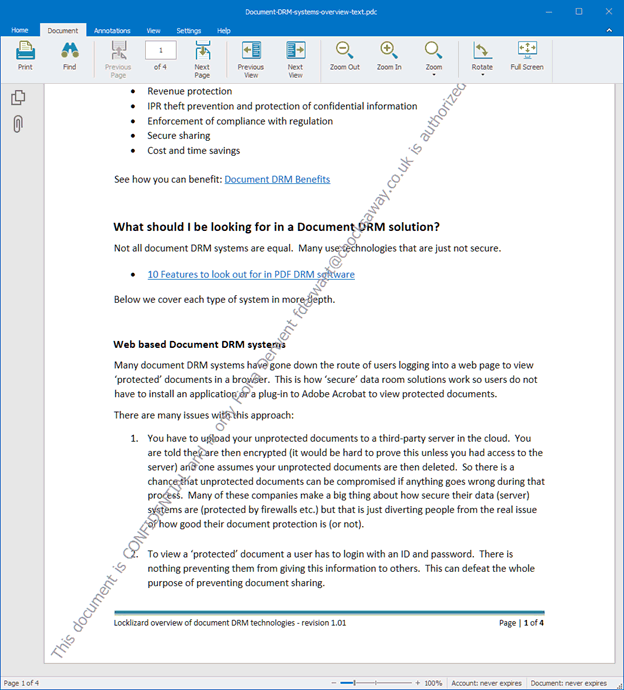




 Create non-removable PDF watermarks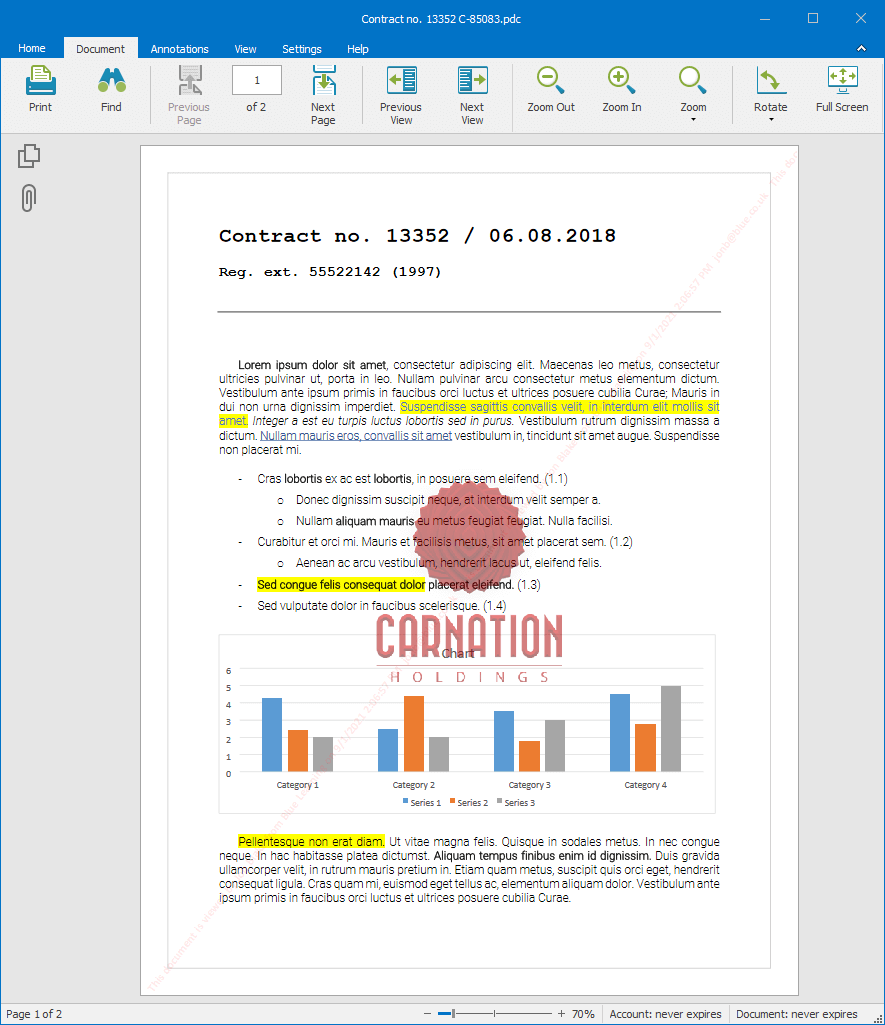
 Why Safeguard PDF Watermarks over Adobe Acrobat Watermarks?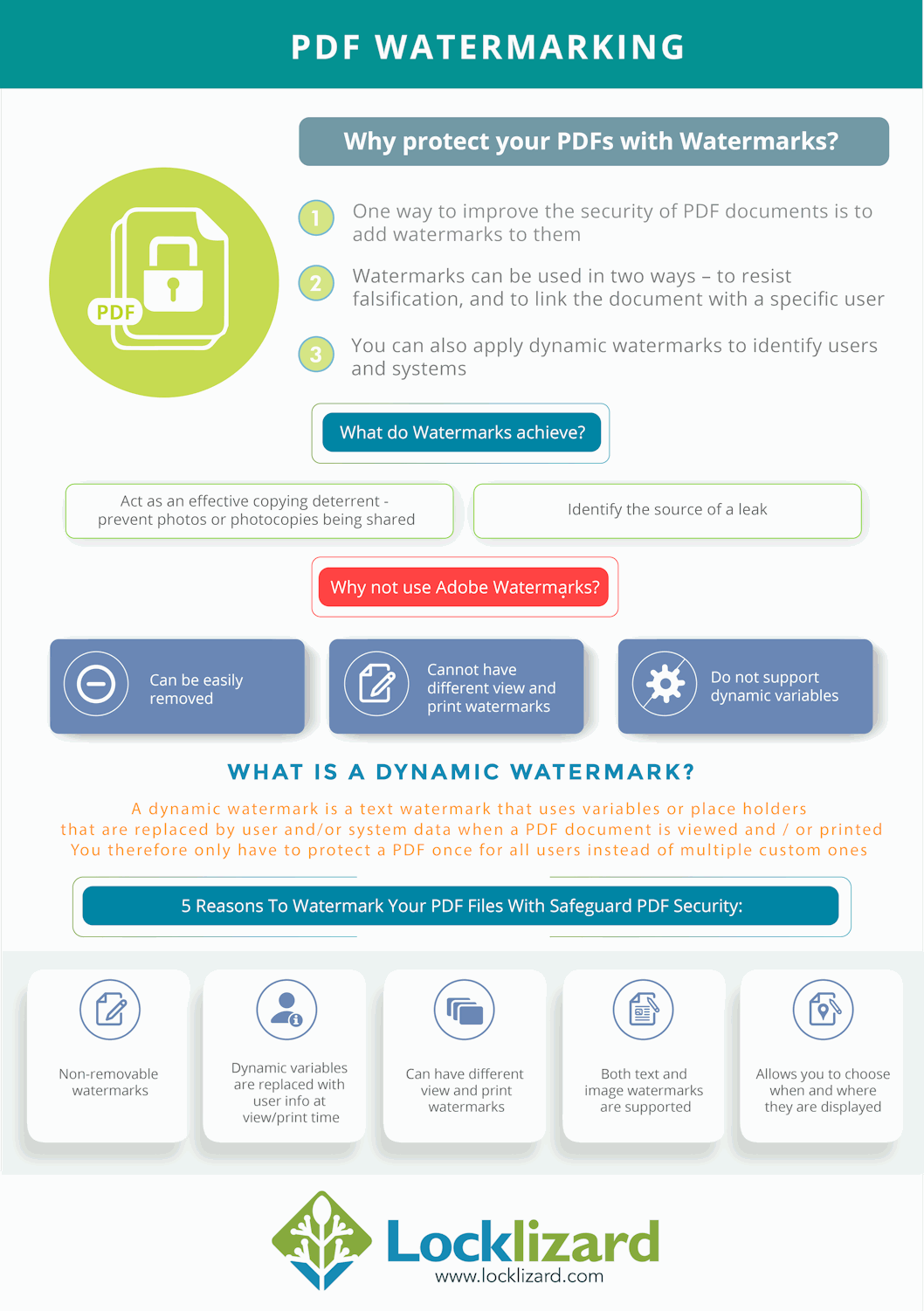
 Add watermark to PDF files for security
 What is a watermarked PDF?
 What is the point of watermarked PDF files – why add watermarks to a PDF?
 PDF print watermarks – add print only watermark to PDF files
 Watermarks for confidential documents: why add a confidential watermark to a PDF?
 Does adding a watermark to a PDF make it more secure?
 Invisible watermarks & social DRM: Worth using?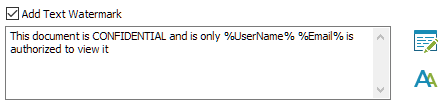
 PDF Watermarking & Watermark Security Tips
 Remove Watermark from PDF files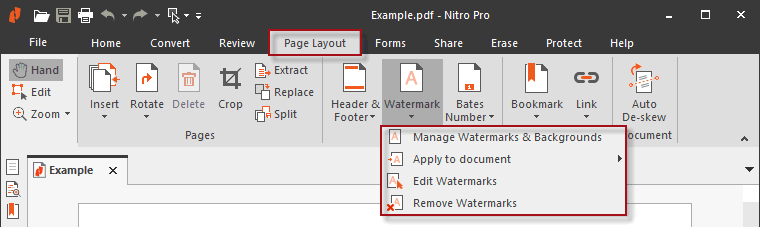
 PDF Watermark FAQs
 Download PDF Watermarker Software