
PDF DRM: Digital Rights Management for PDF Files & Documents
Protect IP

Protect PDF documents no matter where they reside:
- Stop unauthorized access
- Stop sharing and distribution
- Strong US Gov strength encryption, DRM and licensing controls
Restrict Use

Set Expiry

Revoke Access

Watermark

Log Use

Comply Law

Benefits

 Free Trial & Demo
Trusted by:

 | Adding DRM to PDFs with Safeguard PDF DRM Protection |

How to add DRM protection to a PDF file or document
Adding DRM to PDF documents with Safeguard is more secure than Adobe password security and simple.
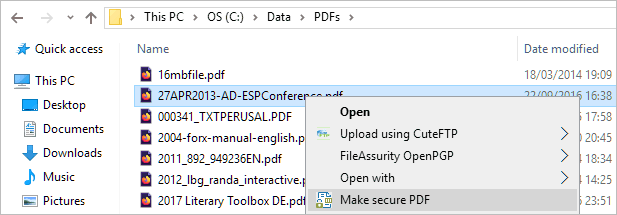
- Right-click on a PDF in Windows File Explorer and select “Make secure PDF”.
%22%20transform%3D%22translate(1.2%201.2)%20scale(2.41016)%22%20fill%3D%22%23fff%22%20fill-opacity%3D%22.5%22%3E%3Cellipse%20rx%3D%221%22%20ry%3D%221%22%20transform%3D%22matrix(-.5809%2027.73216%20-106.81608%20-2.23748%20197.3%200)%22%2F%3E%3Cellipse%20rx%3D%2246%22%20ry%3D%2230%22%2F%3E%3Cellipse%20rx%3D%221%22%20ry%3D%221%22%20transform%3D%22matrix(84.31433%2010.80091%20-3.55798%2027.77434%20176%200)%22%2F%3E%3C%2Fg%3E%3C%2Fsvg%3E)
- Protect the document from unauthorized use by selecting the relevant DRM controls. We recommend that you add a watermark to identify users. Safeguard creates permanent dynamic watermarks that cannot be removed using PDF editing software.

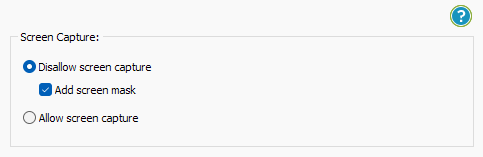
- Locklizard will automatically prevent users from copying text and images, but you may want to also protect from screen capture. Without screen capture protection, a user can screengrab your document and import it into an optical character recognition tool to make the text editable. To prevent this, in the “Environment Controls” tab, tick “Disallow screen capture” and optionally “Add screen mask” which covers the viewer window with an image if focus is moved away from it.
%22%20transform%3D%22translate(1%201)%20scale(1.88672)%22%20fill-opacity%3D%22.5%22%3E%3Cellipse%20fill%3D%22%23cacaca%22%20rx%3D%221%22%20ry%3D%221%22%20transform%3D%22rotate(76.5%20-20%2045)%20scale(59.50181%2038.8711)%22%2F%3E%3Cellipse%20fill%3D%22%23fff%22%20cx%3D%22161%22%20cy%3D%2259%22%20rx%3D%2295%22%20ry%3D%2295%22%2F%3E%3Cellipse%20fill%3D%22%23fff%22%20cx%3D%22157%22%20cy%3D%2246%22%20rx%3D%2290%22%20ry%3D%2290%22%2F%3E%3C%2Fg%3E%3C%2Fsvg%3E)
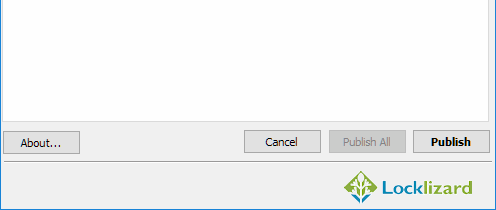
- Press the “Publish” button at the bottom of the window.
%27%20fill-opacity%3D%27.5%27%3E%3Cellipse%20fill%3D%22%23d1d1d1%22%20fill-opacity%3D%22.5%22%20rx%3D%221%22%20ry%3D%221%22%20transform%3D%22rotate(168.9%20164.5%20104.6)%20scale(494.0625%2062.51262)%22%2F%3E%3Cellipse%20fill%3D%22%23fff%22%20fill-opacity%3D%22.5%22%20rx%3D%221%22%20ry%3D%221%22%20transform%3D%22matrix(393.1765%20-23.13948%204.63058%2078.68087%20199.7%2040)%22%2F%3E%3Cellipse%20fill%3D%22%23d5d5d5%22%20fill-opacity%3D%22.5%22%20rx%3D%221%22%20ry%3D%221%22%20transform%3D%22matrix(-82.79938%20-45.81606%2023.04825%20-41.6531%2025.1%20159.3)%22%2F%3E%3C%2Fg%3E%3C%2Fsvg%3E)
Your DRM protected file will output to its source folder in the .pdc format and you can safely share it knowing that nobody can access it without a valid license. - Add a user account and send them their license via the Safeguard admin portal.
%22%20transform%3D%22translate(1.2%201.2)%20scale(2.41016)%22%20fill-opacity%3D%22.5%22%3E%3Cellipse%20fill%3D%22%2357cae7%22%20rx%3D%221%22%20ry%3D%221%22%20transform%3D%22matrix(90.48772%20.46606%20-.09282%2018.0206%2065.8%207.7)%22%2F%3E%3Cellipse%20fill%3D%22%23eae2e1%22%20cx%3D%22125%22%20cy%3D%2281%22%20rx%3D%22255%22%20ry%3D%2253%22%2F%3E%3Cellipse%20fill%3D%22%239df1bc%22%20cx%3D%2252%22%20cy%3D%2221%22%20rx%3D%2292%22%20ry%3D%226%22%2F%3E%3C%2Fg%3E%3C%2Fsvg%3E)

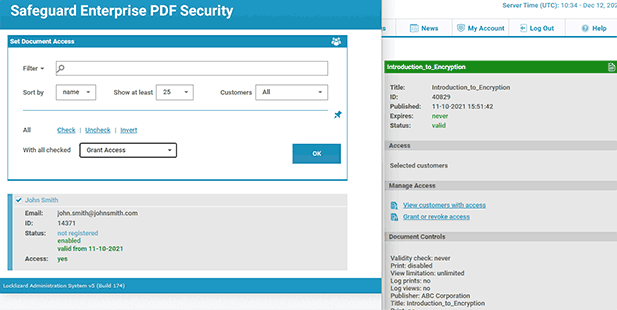
You’ll need to send your recipients the DRM protected file, alongside a download link for the secure reader application and a valid license. The simplest way of doing so is by ticking “Email license” when you add a new user. See how to add a new user and grant them document access.
PDF DRM Protection Features
Locklizard’s DRM for PDF files ensures your documents are protected regardless of their location. Choose from a wide range of granular DRM restrictions to tightly administer document access and control use.


 DID YOU KNOW?
 DID YOU KNOW?
Not all PDF DRM software is secure
- Systems that use passwords are not secure – users can share passwords and/or easily remove them with password ‘recovery’ software
- Adobe PDF permissions (stop copy, print etc.) can be removed without using any tools
- Systems using plugins can be bypassed or stop working when updates occur
- Systems that use JavaScript can put end users’ systems at risk of attack
“Truth be told, the single most compelling advantage of Locklizard to us is the mind-blowing nimbleness of your PDF DRM solution with virtual students.
We can cut accounts for a user five minutes before his class starts and voilà, he is ready to go. Happy smiling customer, while we still have security and personalized watermarking.
That is a big win over here at Qlik and has been very well received.”

What is PDF DRM or PDF Digital Rights Management?
 What is PDF DRM or PDF Digital Rights Management?
 PDF DRM Protection
 PDF DRM Protection
PDF DRM protection is the process of applying DRM restrictions to PDF files to limit access and control how authorized users can a document. For example whether they can edit, copy and paste, or print content.
PDF DRM systems use encryption, a licensing server, DRM restrictions, and other security functionality for access control and enforcing use.
Safeguard’s DRM restrictions & controls
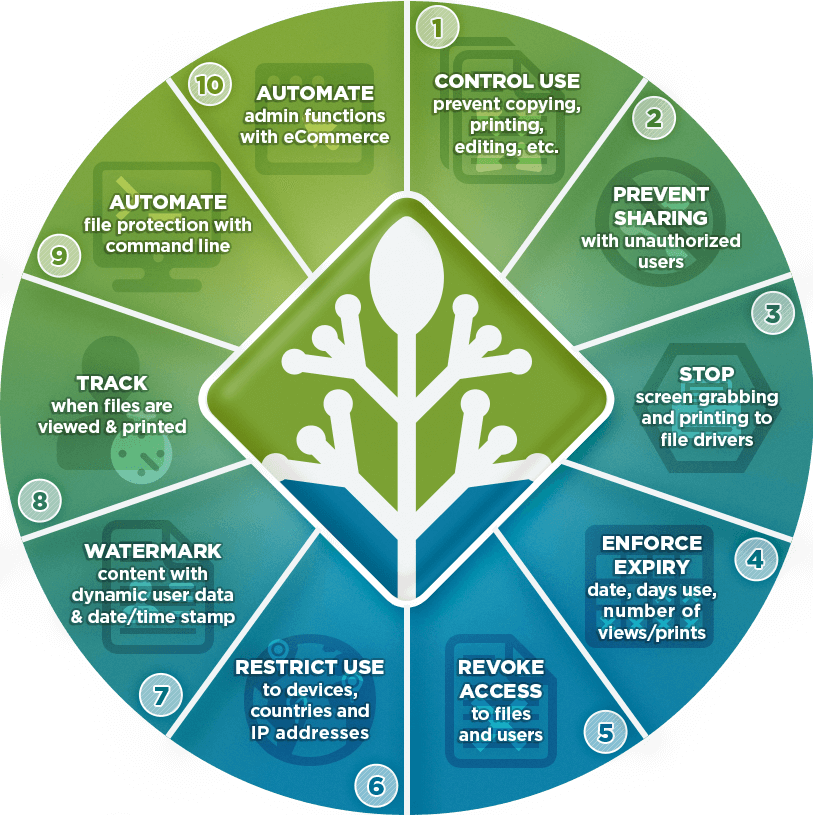
Safeguard provides multiple DRM controls to prevent copying and sharing:
- Prevent printing or limit the number of prints.
- Add dynamic watermarks to viewed and or printed pages. Dynamic variables replace actual user and system data when the document is viewed/printed so you only have to protect the document once for all users.
- Add expiry – make the PDF expire on a specific date, after a number of views, after a number of prints, or after a number of days from opening.
- Stop screen grabbing applications and prevent use of Windows print screen.
- Track document views and prints.
- Limit use to country and IP locations (e.g. use only at work).
Safeguard’s default PDF DRM protection
- Prevents users editing, copying and pasting content
- Locks PDF files to authorized devices so they cannot be shared
- There are no passwords for users to enter, manage, or remove
- Revoke PDF documents at any time regardless of location

PDF rights management & DRM restrictions
 PDF rights management & DRM restrictions
Adobe & Digital Rights Management controls
 Adobe & Digital Rights Management controls
Though there is no effective evidence to suggest it is true, Adobe is often quoted as the inventor of DRM for PDF files or digital rights management for documents.

What its password-based permissions do have, however, is popularity. The general adoption of the PDF format across multiple platforms has led to Adobe controls being widely accepted as the default situation. Adobe permissions enable you to control or restrict the following:
- printing
- changing the document
- document assembly
- content copying or extraction
- content extraction for accessibility
- commenting
- filling of form fields
- signing
- creation of template pages
And one must not forget the control of watermarking, either on-screen or on printed output, or both.
However password based permissions are not the same as those applied through a PDF DRM system. They are easy to bypass or remove. The same is true for watermarks which can be deleted in any PDF editor app.
So, a great many of what we consider to be DRM controls or restrictions may be seen as PDF digital rights management simply because they’re what Adobe decided to provide when it developed its portable document format. However these were poorly implemented by Adobe and turned out to be useless.
PDF DRM restrictions and core controls
 PDF DRM restrictions and core controls
PDF DRM software should contain the following restrictions or controls for it to be effective at controlling document access and use.
Preventing Print, Edit, Copy & Save
The core document security functions in PDF digital rights management are preventing printing, copying and pasting, editing and save. This is because without these restrictions users can easily share unprotected copies.
Locking PDFs to devices
If you don’t lock PDF files to devices then they can be shared. The only secure way to lock use to devices is by installing an application on the device.
Some browser-based systems say they lock PDFs to devices, but this ‘protection’ is implemented using cookies, which can be copied using a cookie manager and used on other devices.
Watermarks
Watermarking PDF documents is another common protection method. Many publishers want their customers to be able to make printed copies, but they also recognize that converting a good printed copy of a book into a PDF is trivial. Watermarking helps with this by identifying the purchaser, to help discourage purchased copies from being shared. This is often called “Social DRM”.
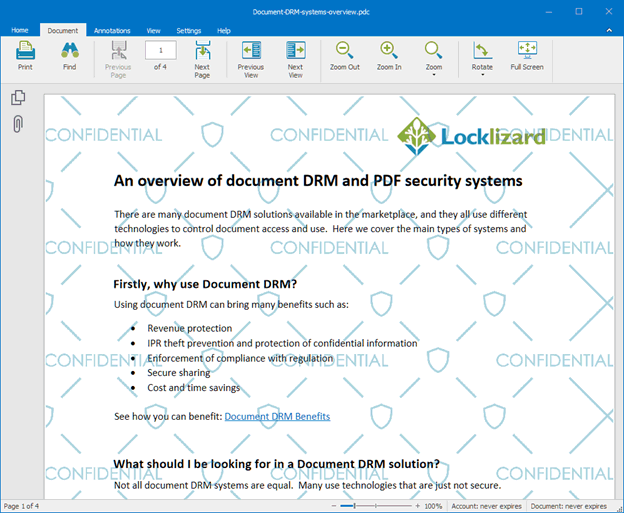
Watermarks in DRM combined with other controls to stop copying can be effective as long as they cannot be easily removed by a PDF editor application.
Expiry & revocation
Being able to expire PDFs after a certain time period or instantly revoke them, is key feature of many PDF DRM systems. Be aware however that some solutions use JavaScript to enforce expiry, and users can simply disable JavaScript to bypass the expiry controls.
Another popular way to provide expiry of PDFs is by sharing a PDF as a link. However, this provides ineffective security since only access to the link expires and not the actual document.
Blocking screenshots & printing to PDF files
An easy way for users to make high quality copies of documents is to use screen grabbing tools (Windows snipping tool, etc.), or print directly to PDF (if printing is allowed). Despite various claims, no online PDF DRM / web-browser system can prevent this because they can only enforce actions in the browser environment.
Tracking PDF use
If users can share protected PDF files (i.e. password protected PDFs) or login information to an online PDF DRM system, then you have no idea who you are actually tracking. If you can lock a PDF to a physical device then you have more certainty that you are tracking the correct person.
Preventing downloads
Cloud-based DRM systems enable you to prevent PDF downloads. This is because online PDF DRM solutions either provide no security for downloadable files or weak security in the form of password protection and/or JavaScript. An effective DRM solution for PDF files will provide full protection over access and use regardless of whether files are viewable in the browser or viewed in an app on a device.
DRM & collaboration controls
The controls surrounding assembly, filling in forms, comment authoring, signing, and templates are features that Adobe included in its products for collaboration purposes. A major issue with collaboration however is controlling content use since if a user can edit a PDF then they can also copy content. While browser based systems have proved popular for document collaboration, they are not very secure – see Adobe Cloud Security and Google Docs security as examples.
So, there you have it. PDF digital rights management controls represent a well-thought-out series of restrictions and controls to protect sensitive information and intellectual property from unauthorized access and misuse.
Who uses PDF DRM protection and what is protected by DRM?
 Who uses PDF DRM protection and what is protected by DRM?
PDF Rights Management is useful to any organization that is trying to control the distribution of its documents. An obvious use case is when you’re a publisher selling an ebook – you want to ensure that only those who have legitimately purchased a copy can read your content. However, there are a variety of other organizations and use cases that DRM can help.
Here are just a few:
- Enterprises: Every enterprise has confidential information that is not for public consumption. This could be board meeting minutes, financial reports, building plans, etc. DRM allows them to securely share documents both internally and externally without worrying about an unauthorized party being able to access and share them.
- Libraries: Most libraries lend ebooks as well as physical books. However, enforcing that lending is difficult. PDF rights management controls let them make an ebook inaccessible after a certain date while preventing other content extraction by copy/pasting, screengrabbing, printing, etc.
- Musicians: Musicians and composers often sell their sheet music as an additional revenue stream. Digital Rights Management controls help to prevent large-scale copying and sharing.
- Governments: Governments process and create a wealth of classified information. A DRM solution lets them easily manage who can access a document and implement different controls depending on the classification. They can also make documents expire after a period of time or expire them instantly if required.
- Healthcare: As well as patient info, the healthcare industry must protect patents and research data. DRM solutions prevent that information from leaking by ensuring that it can’t be accessed outside of the premises and that the encrypted document is useless to anybody without access.
- Training course providers: Piracy is common in the education market. PDF DRM lets training course providers protect elements like course materials, instruction manuals, study notes, documentation, and more. They can also use DRM to expire course materials after a certain date or number of uses, enabling free trials or subscription services.
- Engineering: Machine manuals must be delivered to customers digitally as per the EU’s new machinery regulation (2023/1230). This introduces a new demand for DRM tools that can ensure manuals remain up-to-date, compliant, and piracy-free.
- Finance & law: Legal and financial documents relating to M&A, client contracts, patent applications, regulatory filings, and financial records must be controlled to prevent leaks before they go public.
Tools to protect PDF files: Is DRM effective?
 Tools to protect PDF files: Is DRM effective?
It is important to understand the difference between providing PDF rights management controls and them being effective.
PDF DRM & password protection
In many instances, PDF rights management controls have been so poorly implemented (see PDF password protection) that they are completely useless. Many websites offer tools dedicated to the cracking of the Adobe implementation – both removal of the open password and the permissions.
Online PDF protection
Tools to protect PDF files online usually ask you to upload a PDF file to their server, where they protect it with a password and then make it available for you to download.
Unfortunately, the vast majority of online PDF protection uses Adobe Acrobat password protection, which can be easily removed using cracking tools. In fact, they’re technically even less secure, since you have to upload your unprotected PDF to a server that you have no control or visibility over.
PDF DRM plugins
Some PDF DRM companies have gone down the route of PDF plugins, but these can be overridden by other plugins and often fail to operate when Adobe Acrobat or PDF Reader is updated. See PDF Security Issues, Flaws and Cracks for articles relating to these attacks.
PDF DRM in a web browser
Secure data rooms provide PDF DRM as a service in a web browser, relying on passwords and JavaScript for protection. However both technologies provide poor security that can be easily circumvented:
- login information can be shared (even if 2FA is enabled)
- JavaScript can be edited in the browser to bypass or remove protection or users can install plugins to bypass restrictions. See Google Docs security as an example.
- screen grabbing tools can take screenshots
- users can print to PDF files (if printing is allowed)
- tracking is useless since you are only tracking login credentials – multiple users can use a VPN to login with the same IP address
In addition, these solutions require you to upload unprotected files to servers outside of your control where they could be easily compromised.
PDF DRM software apps
The most secure way to implement PDF DRM is by using installed apps since you have full control over the environment.
Locklizard have produced software for creating PDF DRM files on the desktop, along with dedicated secure PDF Viewers to open DRM protected PDF files. Our PDF DRM software ensures that your unprotected PDFs never leave your system and that DRM restrictions can be effectively enforced. Other advantages of installed viewers are:
- they are not exposed to vulnerabilities in other applications
- you can lock PDF files to devices so they cannot be shared
- you can control operating system behavior such as preventing screenshots and printing to PDF
- tracking is more accurate since you are tracking document use for an authorized device
PDF DRM FAQs
 PDF DRM FAQs
Is Adobe PDF digital rights management software effective?
No. Adobe DRM or ADEPT DRM is inherently flawed. It uses passwords, which can just be shared along with the document to grant access to anybody the user wants. Additionally, controls or permissions to stop printing, editing, etc. are easily removed or bypassed due to flaws in the Adobe Security handler.
Can PDF DRM be used for ebooks?
Yes. There are some downsides to distributing, such as a lack of reflowability based on screen size, but this is balanced out by effective DRM and the ability to preserve the content’s original layout and design.
How does PDF DRM differ from PDF permissions or restrictions?
Password based PDF permissions or restrictions provide no protection against edting, copying, and sharing of content since they can be instantly removed using free software. Some PDF Readers ignore them completely.
PDF DRM on the other hand provides persistent protection against edting, copying, and sharing of content and enforces those controls in a secure reader or viewer. DRM restrictions that don’t rely on passwords or JavaScript cannot be readily removed since there is no easy way to attack the system.
Does free PDF digital rights management software work?
It’s very unlikely to. As it stands, free digital rights management software uses one of two techniques: Adobe permissions or converting the content to images. The Adobe permissions system is flawed and easily removed by online tools, and image-based PDFs can just be run through an OCR recognition tool and copied/edited as normal. Neither stops unauthorized distribution anyway, as the user can just share the PDF or share it along with its password if it has one.
Are there any open source digital rights management tools?
There are some open-source implementations of video and audio DRMs that can be somewhat effective. Open source document DRM is very rare, however, and we have yet to find one that has any meaningful ability to prevent sharing, copying, editing, and misuse.
What is a DRM protected PDF?
A DRM protected PDF file is one that has been encrypted and has DRM restrictions added to it to control who can access it and how it can be used by authorized users.
How do you build a digital rights manager for PDF files?
You need the following:
- A software application to encrypt PDF files and add DRM restrictions.
- A licensing system or DRM server to manage users, license keys, access rights, permissions and decryption keys.
- A standalone viewer app, or a plugin to an existing PDF reader app, or a web browser, to view DRM protected PDF files.
PDF DRM solutions that use a licensing server can provide transparent key management and enable PDF security settings to be changed after distribution.
How do you open a PDF with DRM protection?
To open a DRM protected PDF file you need a license and/or decryption key. A PDF Reader app is required to process the license and/or key and decrypt the DRM protected PDF.
Does Adobe Digital Editions provide DRM for PDF files?
Yes, but the protection is ineffective since it can be easily removed using software such as Epubor. See Adobe Digital Editions security issues.
What is a DRM file?
A DRM file refers to a document, video, audio clip, or other media that has been encrypted using a DRM solution. In the case of Locklizard, the DRM file format is .PDC. Our DRM files cannot be opened or modified without a valid license file installed on the user’s device.
What is the best digital rights management software for PDFs?
The best PDF DRM software is one that does not use passwords, DRM plug-ins, or JavaScript for protection. This is because all of these protection measures can be easily bypassed or removed. PDF DRM protection systems that use a web browser for viewing protected documents use both passwords and JavaScript – so they should only be used for the sharing of non-confidential or non-sensitive PDFs.
Download the best PDF digital rights management software
 Download the best PDF digital rights management software
Download PDF DRM software that uses US Government strength encryption and does not rely on pdf password protection, JavaScript or plugins for security.
Stop copying, printing, editing, and distribution of your PDF documents. Instantly revoke and expire PDF documents. Lock use to devices and locations.
Safeguard PDF Security and Enterprise PDF Security ensure complete security with digital rights management controls. Document rights management to secure PDF documents and files without compromise.
See how our DRM Technology uses encryption, DRM controls, licensing, and proprietary security mechanisms to protect PDF documents from unauthorized use and misuse.
Customer Testimonials















