


Encryption
Used to encode content so that it is only usable if the recipient has the correct key.
Encryption is also used to lock content to specific devices.


Secure PDF documents without useless passwords:
 Free Trial & Demo
 | Using Safeguard PDF security to prevent PDF files from being copied |
Creating a copy protected PDF with Locklizard is simple but very effective. Rather than seeking to stop file copying, it locks the file’s opening to authorized devices and implements additional copy-paste, print, editing, and screenshot prevention controls. Here’s how it works:
 How to prevent a PDF from being copied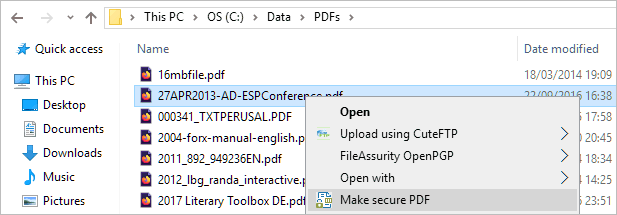

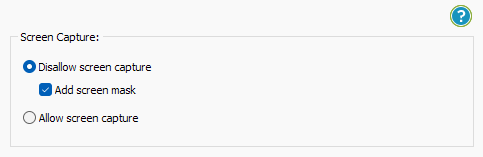
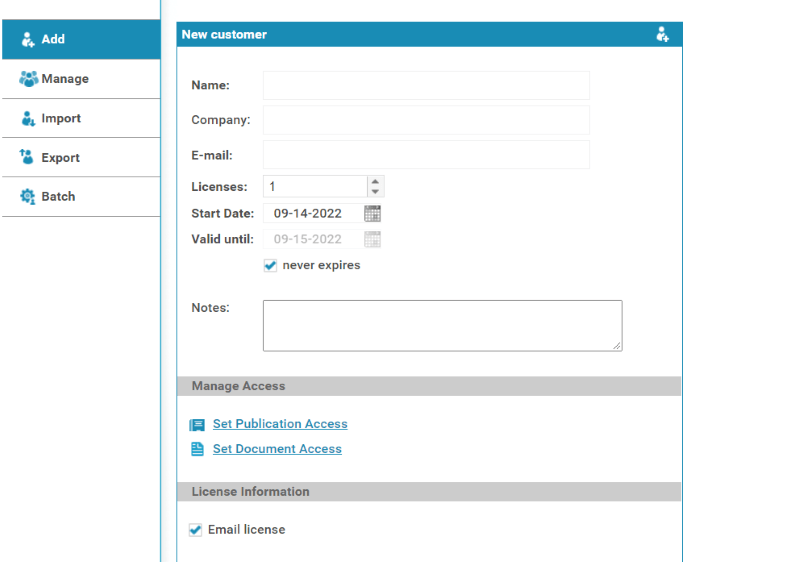
 Safeguard’s PDF copy protection
As well as preventing unauthorized users from opening a protected PDF, Locklizard provides numerous controls to prevent a PDF from being copied:
Copy protected PDF files can only be opened in the Locklizard secure PDF Viewer which enforces the above controls, which cannot be removed.
PDF isn’t the only document format that struggles to stop copying. See our blog on how to prevent your Excel being copied to learn about spreadsheet copy protection.
 | How to prevent anybody from copy and pasting from a scanned PDF |
There are of course instances where you cannot just disable printing entirely. Printed copies may be required for physical backups, distribution during meetings, and more. In this scenario, it gets harder to stop the creation of useful copies. You have to find a way to stop anybody from copy and pasting from a scanned PDF by running it through an OCR tool.
There is unfortunately no entirely foolproof way to achieve this. The simple fact is that allowing printed copies makes you more vulnerable to copying, whether it’s through scanned images or text that has been copy and pasted from them. That said, the use of so-called Moiré or fringe patterns can significantly reduce the chances that optical character recognition tools are successful by reducing the quality of the scan. This makes creating an editable copy of the document time-consuming, with lots of manual editing of the OCR output potentially required.
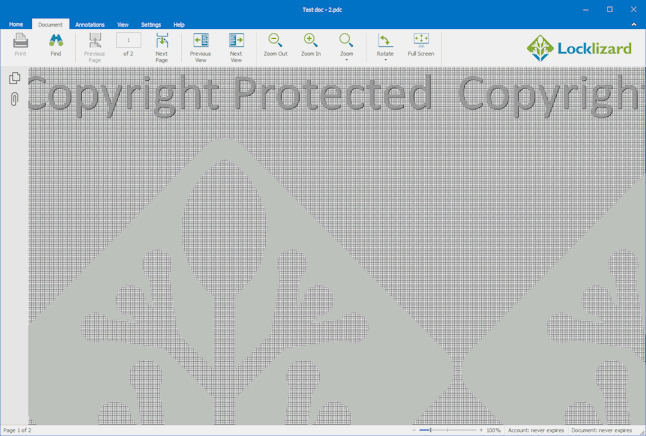
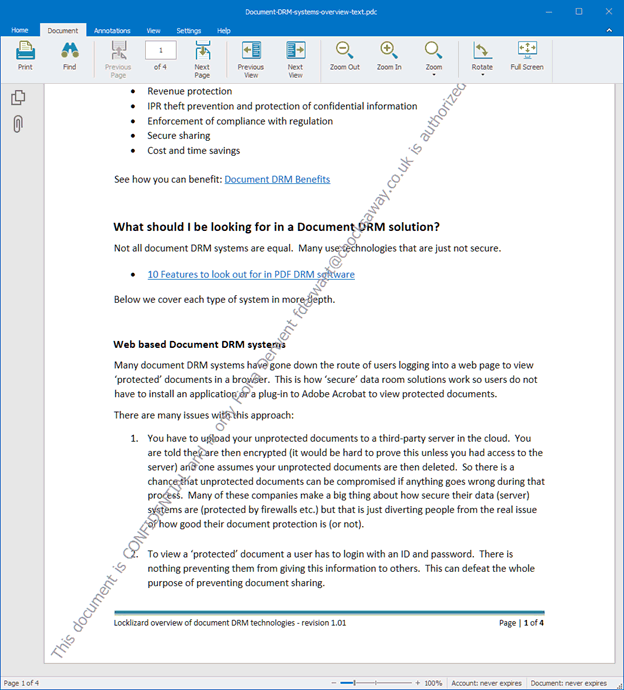
Adding dynamic watermarks can also help prevent copying. A watermarked document with the recipient’s name can deter users from sharing printed copies as it identifies them as the source.
 Preventing copying of documents & information
Copy prevention is easier said than done – computing is all about copying. It doesn’t matter when or how you enter or view (or hear) information on a computer, it is as a result of being copied.
Copy prevention, then – preventing a separate copy of information – is not an easy feat. Those providing copy prevention software or services need to be very purposeful, as it is all too easy to get wrong.
 Historical copy prevention
As one of the first targets of digital piracy, the CD and DVD industries quickly came up with ways of putting information on those formats that made it very difficult to copy them successfully. But making something difficult to copy successfully and achieving copy prevention are two different things.
In the CD/DVD industry there was an attempt to stop people from being able to play the discs if the hardware they were using did not originate in the same region that they were encoded for. This required controls to be built into hardware devices, but also into software. As a result, those industries were exposed to the willingness (or not) of many manufacturers to implement controls that met their copy prevention needs.
Digital audio tape (DAT) was the first real attempt to introduce strong controls to prevent copying. These were so strong that users were not guaranteed the ability to copy their own recordings, never mind recordings from other sources. Solely because of the copy prevention system, DAT never became a commercial success in the consumer marketplace.
So, what can we learn from this? Any limitation on consumer content, whether regional controls or copy prevention, must maintain the functions that users expect. Applying harsh restrictions reduces the value proposition of that content for the consumer – they pay the same amount and get less functionality for it. Lose the acceptance of the consumer, and you lose the market. Copy prevention must be therefore implemented in a thoughtful way that fits both the medium and consumer sentiment.
 Protect your IPR
See why thousands of companies use Locklizard to safeguard their documents and increase revenue streams.
“Safeguard PDF Security is extremely easy to use and has given us more control over our intellectual property.”

Document copy prevention
In modern document copy prevention systems, the focus is on is preventing people from making usable copies of documents rather than stopping copying entirely. Copy prevention may be achieved in a number of ways:
 Effective copy prevention controls
Copy prevention controls, if they are to be effective and accepted, must not seek to introduce restrictions that prevent legitimate users from utilizing the rights that they have purchased. One has to be careful to research the commercial and social factors and understand that these may be different for different types of IPR.
The easiest way of achieving copy prevention is to not prevent file copying at all. Instead, you can make the copy of no value if the user is not licensed. This might sound a bit esoteric, but if the person who has purchased something is able to backup freely and use these copies at any time, but other people cannot, then you have achieved unlicensed copy prevention, which might be the true objective.
 | Copy Prevention Technology |
Components you should expect a good PDF copy prevention system to consist of include:
 FAQs
FAQs
This is more difficult than you might expect. Browsers just do not have sufficient control over the operating system to prevent screenshots, removal of controls via JavaScript, editing, and printing to a PDF.
Protection beyond your standard browser PDF reader is possible, however. Safeguard’s secure browser-based viewer allows admins to enforce a single session per user and only decrypts content in memory so that content cannot be recovered from the browser’s cache.
No, a protected PDF that is printed and then scanned will have no copy protection. If you want to prevent copying and pasting of a scanned PDF then the simplest solution is to disable printing.
If you must allow printing then a watermarked document with the recipient’s name will discourage sharing.
You have to add DRM (Digital Rights Management) controls since PDF password protection is useless – users can remove the copy protection in seconds using a free online tool or password recovery software.
Locklizard enables you to prevent PDFs from being copied without using passwords. It uses US Gov strength encryption, secure and transparent key management, DRM and licensing controls to ensure your PDF files are copy protected regardless of their location.
Yes. We protect files from the copying of text or printing. We also prevent screenshots, editing, printing, and printing to PDF (if printing is allowed).
No, you cannot prevent users from making duplicate copies (i.e. backups) of a digital file. However, all copies are protected PDF files that can only be opened by an authorized user and all DRM controls are enforced.
No, while you can use JavaScript to disable copy and paste in the browser, this can be easily defeated by users removing the code in the browser console. Users can also take screenshots using screen grabbing utilities such as Windows Snipping Tool.
While you cannot prevent images from being copied from a website, you can make it more difficult by adding visible or hidden watermarks.
No, Adobe does not prevent copy paste just like all other PDF software that uses passwords for protection. All content can be copied and pasted, including images.
The problems with plugins is that they easily break – they can be circumvented by other plugins or fail to work when Acrobat Reader is updated. So while they may seem like a simple solution, they are not very effective.
Yes, we prevent copy and paste in PDF on Mac, Windows, iOS and Android operating systems.
No Google Docs does not prevent copying. At its core, Google Docs uses JavaScript to enforce its controls, which you can bypass by appending “/mobilebasic” to your URL and then disabling JavaScript in the developer console. Users can then copy and paste the contents into a new Google Doc to use as they like.
You can use Microsoft RMS to discourage copying. However a user who has been given access to the document can remove the copy prevention controls.
Only if they identify the user and cannot be easily removed. Adobe watermarks, Word, Excel and other Office watermarks, and Google Docs watermarks are useless since they can all be easily removed.
 Download PDF copy prevention software
Download PDF copy prevention software with digital rights management (DRM) controls that prevent PDFs from being copied (ebooks, reports, e-learning courses, etc.). Prevent copying of files and unauthorized sharing of your content. Stop printing, editing, copy & pasting, and screen grabbing. Lock PDFs to devices and locations to prevent sharing.
Control what users can view your documents, what they can do with them (copy, print, etc.), where they can view them, and when they can no longer be used (automatically expire and instantly revoke documents and users).
Stop PDF files from being copied, prevent copying of ebook and e-learning course content, and stop users sharing documents with others.
DRM copy prevention software that ensures the security and use of your PDF files regardless of their location.















